GPD MicroPC 2でWindows Updateを有効にする方法
このガイドで使用するファイル
変更履歴
- Source guide: How to enable Windows Updates on GPD MicroPC 2
古いバージョンはロールバック用に引き続きダウンロード可能です。各バージョンは独自の検証済みファイルを保持します。
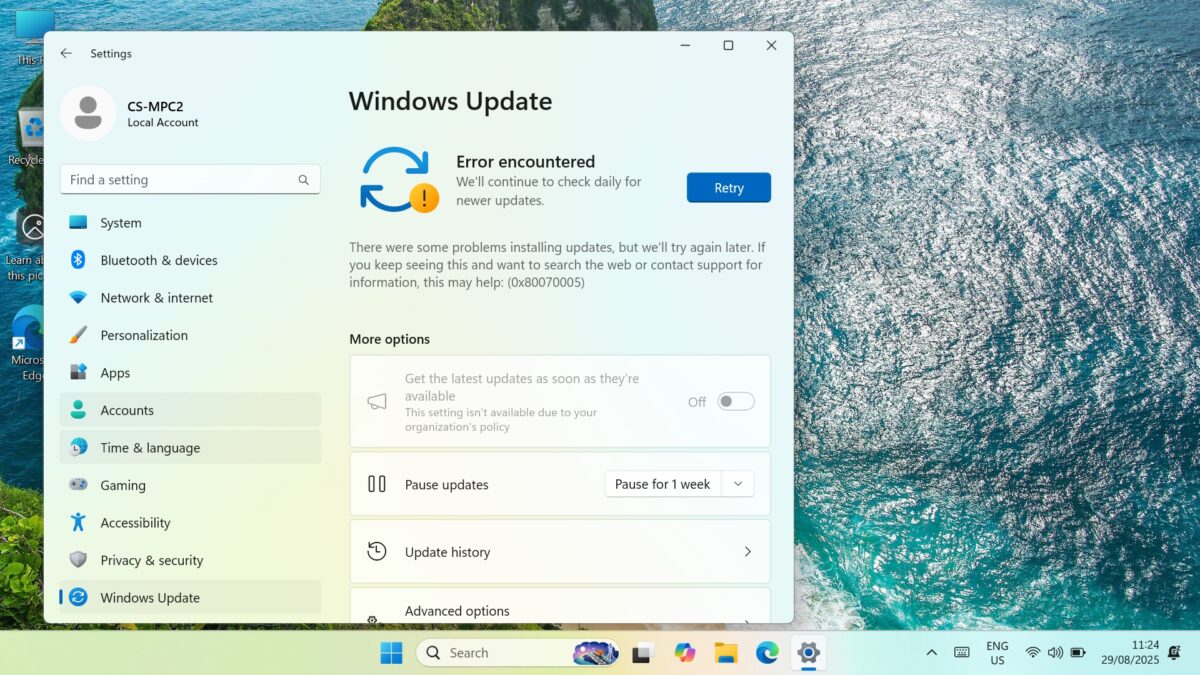
WindowsがWindows Updateを実行できません」0x8007005エラーが表示され、再試行を求められる場合、Windows Updateの設定がオフになっていることが問題かもしれません。これを解決する簡単な方法は、以下のプログラムをダウンロードして実行することです。 Windows Update Blockerを再度有効にします。以下の手順に従ってください。
まず、Windows Updateが「再試行」プロンプトとエラー0x8007005を繰り返し表示していることを確認します。
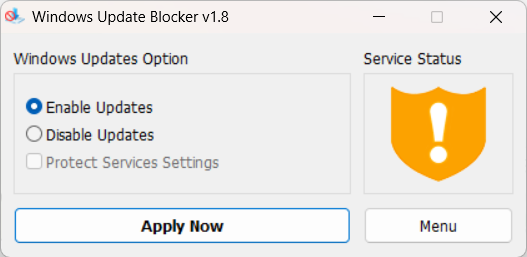
Windows Update Blocker v1.8をダウンロードし、中身をすべて解凍してWub_x64.exeファイルを実行する。
更新を有効にする]ラジオボタンをクリックし、[今すぐ適用]ボタンをクリックします。しばらくすると、サービスステータスのグラフィックが更新され、サービスが有効になったことが示されます。
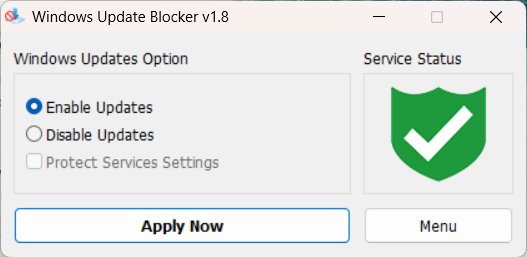
これでソフトウェアを終了し、通常通りWindows Updateを実行できる。
Questions on this guide
2 answeredSubject: Urgent Support Needed: Windows 11 Pro Activation Failure and Update Issues on new GPD MicroPC2
Dear GPD Support Team,
I purchased a brand-new GPD MicroPC2 yesterday, but I am facing critical software issues right out of the box.
1. Windows 11 Pro Activation Failure
The pre-installed Windows 11 Pro will not activate. I have already run the built-in Windows Activation Troubleshooter, but it failed.
The troubleshooter displayed the following message: “We weren’t able to activate Windows on this device.” It suggests I either “Go to Store” to purchase a new copy or state that I “changed hardware recently.”
Neither of these options applies to me. This is a brand-new device, and it should come with a genuine, pre-activated Windows 11 Pro license. I have attached a screenshot of the error message for your reference.
2. Windows Update Failure
In addition to the activation problem, Windows Update is also failing. I am unable to download or install any system updates. This is preventing the device from being secure and up-to-date.
It appears there may be an issue with the pre-installed system image or the digital license associated with this unit.
Could you please provide immediate assistance on how to resolve these two issues? I need a valid solution or a replacement product key to activate the genuine Windows 11 Pro that was supposed to come with my device.
Thank you for your prompt attention to this matter.
Sincerely,

We are sorry to hear that you are having an issue with the Windows Activation. Could you please email [email protected] with your order number and some details, including a photo of Windows showing the Activation issue. Our customer service will be able to provide a new key. Regarding the Windows Update not working, this may be due to Windows not being activated. You can re-enable the updates following our guide at https://gpdstore.net/kb/gpd-micropc-2-support-hub/kb-article/how-to-enable-windows-updates-on-gpd-micropc-2/
What is the reason for updates being blocked upon purchase? Also my MPC2 came with Windows 11 Home. Is this correct?
It was not enabled by default for whatever reason. Once you have enabled the updates you should have no issues at all. And you are correct, it comes with Windows 11 Home by default.