Accessori

Stazione docking GPD WIN 4

  • Conservare e caricare il vostro GPD WIN 4
  • Trasforma il tuo palmare in un desktop
  • Collega tutte le periferiche.
  • Dock ufficiale GPD progettato per la GPD WIN 4
  • Piccolo, leggero e adatto ai viaggi
Info sul pagamento

Utilizziamo la più recente tecnologia di elaborazione dei pagamenti, che consente di effettuare il checkout tramite carta di debito/credito o PayPal per un’esperienza rapida e sicura.

Garanzia

2 anni di garanzia da parte di DROIX Global per la vostra tranquillità

Prezzi, tasse e spedizione

Nota:
– Clienti degli Stati Uniti: Il prezzo visualizzato include tutte le tasse applicabili.
– Clienti UE: Il prezzo visualizzato include le tasse applicabili, che possono arrivare al 25% a seconda del paese.
– Clienti del Canada: Il prezzo visualizzato comprende le imposte applicabili, che possono includere il 5% di GST e ulteriori imposte provinciali sulle vendite (PST), l’imposta sulle vendite armonizzata (HST) o l’imposta sulle vendite del Quebec (QST), a seconda della provincia di appartenenza.

Spedizione e restituzione

Organizzata da DroiX, distributore ufficiale GPD, la spedizione avviene tramite DHL Express DDP (Delivered Duty Paid). Ciò significa che:

Express DDP (Delivered Duty Paid). Ciò significa che:
– Tutti i dazi doganali e le tasse sono inclusi nel prezzo visualizzato nella pagina del prodotto.
– Non sarà necessario pagare alcun costo aggiuntivo alla consegna.
– Nel raro caso di problemi doganali, il nostro team si occuperà del processo di sdoganamento per conto del cliente, per garantire una consegna senza problemi.

Informazioni importanti sui resi:
– Se decidete di restituire il vostro ordine o di richiedere un rimborso, sappiate che le tasse e i dazi pagati per vostro conto secondo i termini del DDP non possono essere rimborsati.

Per informazioni dettagliate, consultare i nostri Termini e condizioni.

Cosa È incluso
  • 1x GPD WIN 4 Dock

Disponibilità:

Esaurito

72,46  inc.TAX

12persone stanno visualizzando questo prodotto ora

Il prodotto non è attualmente in magazzino e non è disponibile.

-

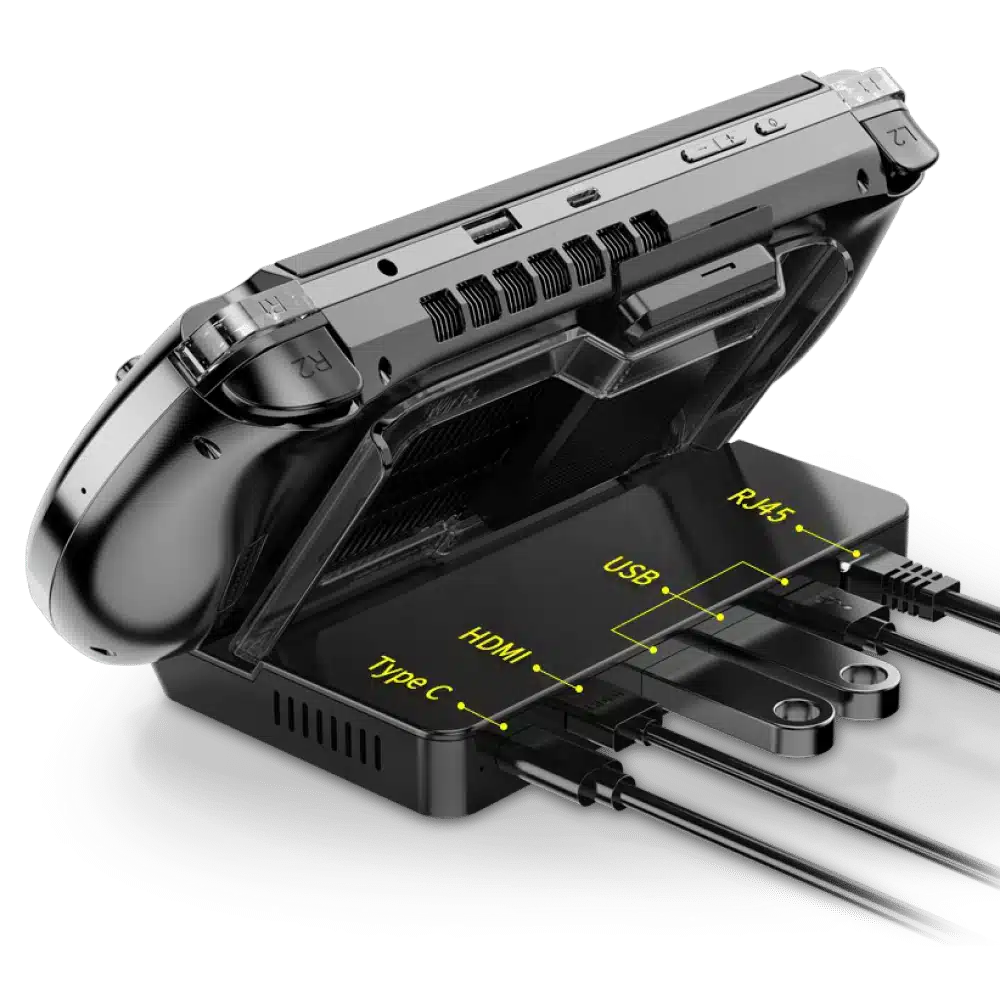
Trasformate la vostra GPD WIN 4 in un desktop con la docking station ufficiale

Elevate la vostra esperienza di gioco portatile ai livelli di una scrivania con la docking station GPD WIN 4. Questo accessorio essenziale non solo amplia le opzioni di connettività ma migliora anche le funzionalità del tuo dispositivo, trasformandolo in un PC desktop completamente equipaggiato.

Connettività USB migliorata

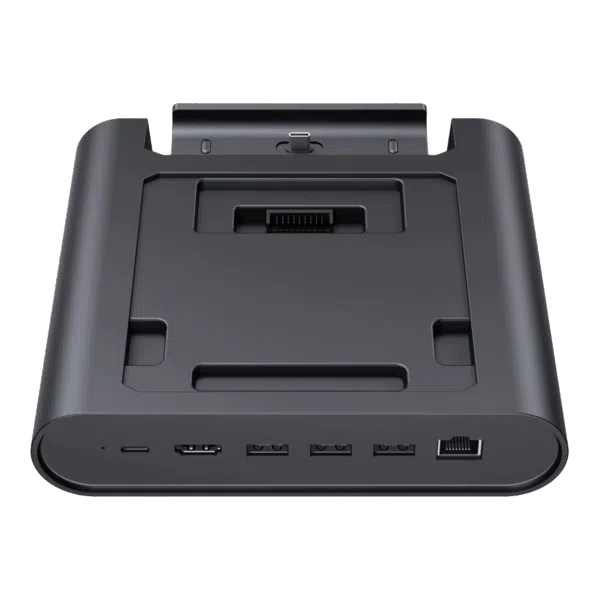
La docking station GPD WIN 4 è dotata di tre porte USB 3.2 Gen 2 Type-A, che offrono velocità fino a 10Gbps per il collegamento di una serie di periferiche come tastiere, mouse e dispositivi di archiviazione esterni ad alta velocità.

È inoltre dotato di una porta USB 3.2 Gen 2 Type-C progettata per la ricarica rapida, che supporta caricatori ad alta potenza per ricaricare rapidamente il tuo dispositivo.

Opzioni di visualizzazione superiori

Provate l’esperienza di immagini ad alta risoluzione collegando il vostro GPD WIN 4 a un monitor o a un televisore esterno tramite la porta HDMI 2.0. Questa configurazione consente di utilizzare il display di GPD WIN 4 come schermo secondario, migliorando la produttività e l’esperienza di gioco grazie alle funzionalità del doppio display.

Connettività Internet veloce e sicura

La docking station include una porta Ethernet RJ45 da 1Gbps, che offre una connessione veloce e sicura per lo streaming, i giochi e i trasferimenti di dati, superando la velocità e la sicurezza del wireless.

Design compatto per la massima portabilità

La docking station GPD WIN 4 vanta un fattore di forma compatto, con dimensioni di soli 3,4 x 5,6 x 3,2 pollici e un peso di soli 224 grammi. Ciò la rende incredibilmente portatile e facile da integrare in qualsiasi spazio di lavoro senza ingombri. Il suo design comprende un retro staccabile che consente di collegare e trasportare facilmente il dock e il dispositivo.

Inoltre, il design della docking station lascia libera la seconda porta USB Type-C del GPD WIN 4, consentendo di collegare periferiche ad alte prestazioni come una GPU esterna, migliorando ulteriormente la configurazione.

Pro e contro della docking station GPD WIN 4

Pro:

  • Porte multiple USB 3.2 Gen 2 Type-A per varie periferiche
  • Uscita HDMI 2.0 per monitor o TV esterni
  • Ethernet ad alta velocità da 1Gbps per una connettività internet affidabile
  • Porta USB Type-C per la ricarica rapida dei dispositivi

Cons:

  • Manca una porta USB Type-C aggiuntiva per le connessioni delle periferiche

Vantaggi dell’utilizzo di una Docking Station

Una docking station semplifica il tuo flusso di lavoro collegando il tuo portatile a più periferiche attraverso un unico cavo. Questo non solo ti aiuta a riordinare il tuo spazio di lavoro, ma aumenta anche la tua produttività grazie alla possibilità di configurare due display. Inoltre, riduce al minimo l’usura delle porte del dispositivo, prolungando la durata di GPD WIN 4 e riducendo la necessità di collegare e scollegare più cavi.

Investite oggi stesso nella docking station GPD WIN 4 per trasformare la vostra configurazione di gioco e ottimizzare il vostro spazio di lavoro, rendendo il vostro GPD WIN 4 non solo un gadget di gioco ma anche una workstation completa.
Informazioni aggiuntive

More

Compatibile con

GPD WIN 4, GPD WIN 4 2023, GPD WIN 4 2024

Marchio

Tipo di accessorio

Condizione

New, Refurbished (Class A)

Peso

350 g

Dimensioni

25 × 25 × 20 cm

Download

Tutte le varianti

Driver
GPD WIN 4 — Drivers v3.4 · 2024-05-07 · 1.3 GB · ospitato da DROIX
Scaricamento
Registro delle modifiche
ULTIMO v3.4 2024-05-07 · 1.3 GB ← download corrente
  • WIN 4 (8840U / 7840U / 7640U / 6800U) Drivers **(current)** | v3.4 | 2024-05-07 | Separate driver package intended for custom OS installs or when not using the official firmware bundle. After extracting, run `AutoInstallDrivers.bat`.
  • WIN Max 2 (8840U / 7840U / 7640U / 6800U) Drivers **(current)** | v3.4 | 2024-05-07 | Separate driver package for custom OS installs or when not using the official firmware bundle. After extracting, run `AutoInstallDrivers.bat`.

Le versioni precedenti rimangono scaricabili per i rollback: ogni versione mantiene il proprio file verificato.

Manual
WIN 4 User Manual 2022-09-02 · 14.3 MB · ospitato da DROIX
Scaricamento
Registro delle modifiche
ULTIMO 2022-09-02 14.3 MB ← download corrente
  • WIN 4 User Manual | 2022-09-02 | PDF with function key and port descriptions.

Le versioni precedenti rimangono scaricabili per i rollback: ogni versione mantiene il proprio file verificato.

OS Image
GPD WIN 4 / WIN Max 2 — Windows 11 24H2 Home Firmware 24H2 · 2024-12-20 · 13.7 GB · ospitato da DROIX
Scaricamento
Registro delle modifiche
ULTIMO 24H2 2024-12-20 · 13.7 GB ← download corrente
  • WIN 4 (8840U / 7840U / 7640U / 6800U) Windows 11 24H2 Home Firmware **(current)** | 2024-12-20 | `730BD7B9D989797488C1509E590085FD9941E80C`
  • GPD WIN 4 2025 (8840U / 370) Windows 11 24H2 Home Firmware **(current)** | 2024-12-20 | `730BD7B9D989797488C1509E590085FD9941E80C` | Covers both 8840U and AI 9 HX 370 variants. Includes integrated Windows 11 drivers. Reinstallation removes all data on drive C — back up first. SHA1 tool: [HashTools](https://www.binaryfortress.com/HashTools/Download/) ·
  • WIN 4 (6800U) Windows 11 24H2 Home Firmware **(current)** | 2024-12-20 | `730BD7B9D989797488C1509E590085FD9941E80C`
  • WIN Max 2 (8840U / 7840U / 7640U / 6800U) Windows 11 24H2 Home Firmware **(current)** | 2024-12-20 | `730BD7B9D989797488C1509E590085FD9941E80C`

Le versioni precedenti rimangono scaricabili per i rollback: ogni versione mantiene il proprio file verificato.

Tool
MotionAssistant (GPD Handheld Front-end Tool) v1.2.0.9 (Portable) · 2026-02-08 · 42.6 MB · ospitato da DROIX
Scaricamento
Versioni (3)
ULTIMO v1.2.0.9 (Portable) 2026-02-08 · 42.6 MB ← download corrente
  • Portable build — no installation required. Unzip password: 123.
  • MotionAssistant uses the Winring0 driver for TDP adjustment, hardware monitoring and fan control. If these features stop working, allow MotionAssistant in Windows Security Center — Microsoft may flag the driver.
  • What's new in v1.2.0.9:
  • Adapted the gyroscope in the Legion Go 2 device body (controller gyroscope and fan control not yet adapted).
  • Adapted support for various recently-released AMD rebranded models.
  • Added a "Disable Tablet Mode" option in Advanced Settings; when disabled, Tablet Mode turns off on the next launch.
  • Added an OSD toggle hotkey in the RTSS OSD settings; temperature display added to simplified mode.
  • Added a 30-second TDP reset cycle that reapplies the current TDP if an abnormal decrease is detected; added TDP ±5 hotkeys.
  • Optimized the Win5 keyboard key: press to bring up the on-screen keyboard, press again to close it.
  • Optimized the CPU frequency upper-limit control via "Optimize CPU Frequency"; maximum frequency is restored when the option is disabled.
  • Improved some controls in Dark Mode; the title bar is now a darker colour.
  • Optimized gyroscope simulation after resuming from hibernation, fixing failures on some devices after wake-up.
  • Optimized hotkey detection (shorter judgment interval); brightness hotkeys now adjust by ±10.
  • Specified ze_loader.dll as 1.11.0. Intel models unable to lock the GPU frequency should install the Intel 6647 iGPU driver first, then update to the latest.
  • Fixed the power limit being locked at 65W and not restorable when the GPD Win5 is powered via USB-C.
  • Corrected some text displays; fixed OSD monitoring showing incorrectly when hardware monitoring is off.
  • Fixed LT/RT not registering as hotkeys.
  • Fixed a freeze when setting TDP consecutively.
  • Fixed certain game-profile options (e.g. CPU frequency limits) not applying automatically.
  • Fixed frame locking failing in some game profiles; frame locking now uses an RTSS process-specific configuration instead of a global one.
  • Fixed a crash when refreshing the tray icon.
v1.2.0.9 (Installer) 2026-02-08 · 45 MB ↓ v1.2.0.9 (Installer)
  • Installer build (Setup) of the same v1.2.0.9 release — installs to Program Files rather than running portable.
v1.2.0.9 (RTSS) 2026-02-08 · 17.2 MB ↓ v1.2.0.9 (RTSS)
  • RivaTuner Statistics Server companion build (RTSS 737) for the MotionAssistant on-screen display (OSD) and frame-lock monitoring. Install alongside MotionAssistant.

Le versioni precedenti rimangono scaricabili per i rollback: ogni versione mantiene il proprio file verificato.

Driver
DTS:X Audio Driver — GPD WIN 4, GPD WIN MAX 2, GPD WIN Mini 2024-02-19 · 472.4 MB · ospitato da DROIX
Scaricamento
Registro delle modifiche
ULTIMO 2024-02-19 472.4 MB ← download corrente
  • DTS:X Audio Driver | 2024-02-19 | Right-click `DTS_install.bat` → "Run as administrator" to install; `DTS_uninstall.bat` to uninstall.

Le versioni precedenti rimangono scaricabili per i rollback: ogni versione mantiene il proprio file verificato.

Fix / Patch
WIN 4 Grip 3D Printing File 2023-04-03 · 46 MB · ospitato da DROIX
Scaricamento
Registro delle modifiche
ULTIMO 2023-04-03 46 MB ← download corrente
  • WIN 4 Grip 3D Printing File | 2023-04-03 | 3D printing file for WIN 4 handle with detailed instructions inside.
  • GPD WIN 4 Grip 3D Printing File | — | 2023-04-03 | 3D printing file for WIN 4 handle with detailed instructions inside

Le versioni precedenti rimangono scaricabili per i rollback: ogni versione mantiene il proprio file verificato.

Tool
AMD Handheld Control — GPD DUO, GPD Pocket 4, GPD WIN 4, GPD WIN 5, GPD WIN MAX 2, GPD WIN Mini v1.0.0 · 2026-02-04 · 97.9 MB · ospitato da DROIX
Scaricamento
Registro delle modifiche
ULTIMO v1.0.0 2026-02-04 · 97.9 MB ← download corrente
  • AMD Handheld Control v1.0.0 | v1.0.0 | 2026-02-04 | By Deen0X; AMD-processor systems only (relevant with AMD eGPU setups).

Le versioni precedenti rimangono scaricabili per i rollback: ogni versione mantiene il proprio file verificato.

Driver
GPD Shared Driver Package V4.1.0 · 2025-01-18 · 1.5 GB · ospitato da DROIX
Scaricamento
Registro delle modifiche
ULTIMO V4.1.0 2025-01-18 · 1.5 GB ← download corrente
  • GPD DUO (8840U / 370) Drivers **(current)** | v4.1.0 | 2025-01-18 | Both variants | Latest driver package. After extracting, double-click `AutoInstallDrivers.bat` for automatic installation.
  • WIN 4 (8840U / 7840U / 7640U / 6800U) Drivers **(current)** | v4.1.0 | 2025-01-18
  • GPD WIN 4 2025 (8840U / 370) Drivers **(current)** | V4.1.0 | 2025-01-18 | Latest driver package. After extracting, double-click `AutoInstallDrivers.bat` for automatic installation.
  • WIN Max 2 (8840U / 7840U / 7640U / 6800U) Drivers **(current)** | v4.1.0 | 2025-01-18
  • Vendor page: https://www.amd.com/en/support/download/drivers.html

Le versioni precedenti rimangono scaricabili per i rollback: ogni versione mantiene il proprio file verificato.

Tool
DTS:X Audio Technology (3D Sound Field) — GPD DUO, GPD WIN 4, GPD WIN 5, GPD WIN MAX 2, GPD WIN Mini 2024-12-24 · 2025-12-24 · 659.5 MB · ospitato da DROIX
Scaricamento
Registro delle modifiche
ULTIMO 2024-12-24 2025-12-24 · 659.5 MB ← download corrente
  • DTS:X Audio Technology, 3D Sound Field | 2024-12-24 | After downloading, decompress and execute `DTS_install.bat` to install automatically
  • DTS:X Audio Technology, 3D Sound Field | 2025-12-24 | After downloading, decompress and execute `DTS_install.bat` to install automatically

Le versioni precedenti rimangono scaricabili per i rollback: ogni versione mantiene il proprio file verificato.

OS Image
WIN 4 (8840U / 7840U / 7640U / 6800U) Windows 11 Home Firmware 2024-03-08 · 14.1 GB · ospitato da DROIX
Scaricamento
Registro delle modifiche
ULTIMO 2024-03-08 14.1 GB ← download corrente
  • WIN 4 (8840U / 7840U / 7640U / 6800U) Windows 11 Home Firmware | 2024-03-08 | —
  • WIN 4 (6800U) Windows 11 Home Firmware | 2024-03-08 | —
  • WIN Max 2 (8840U / 7840U / 7640U / 6800U) Windows 11 Home Firmware | 2024-03-08 | —
  • WIN Mini (8840U / 7840U / 7640U) Windows 11 Home Firmware | 2024-03-08 | —

Le versioni precedenti rimangono scaricabili per i rollback: ogni versione mantiene il proprio file verificato.

Firmware
WIN 4 Keyboard Firmware 2023-02-25 · 276.4 KB · ospitato da DROIX
Scaricamento
Registro delle modifiche
ULTIMO 2023-02-25 276.4 KB ← download corrente
  • WIN 4 Keyboard Firmware | 2023-02-25 | Prevents keyboard triggers caused by screen contacting keyboard during upward swipes.

Le versioni precedenti rimangono scaricabili per i rollback: ogni versione mantiene il proprio file verificato.

Manual
WIN 4 (2023) User Manual 2023-08-10 · 13.3 MB · ospitato da DROIX
Scaricamento
Registro delle modifiche
ULTIMO 2023-08-10 13.3 MB ← download corrente
  • WIN 4 (2023) User Manual | 2023-08-10 | PDF with function key and port descriptions.

Le versioni precedenti rimangono scaricabili per i rollback: ogni versione mantiene il proprio file verificato.

Manual
GPD WIN 4 (2025) User Manual 2025-01-20 · 13.1 MB · ospitato da DROIX
Scaricamento
Registro delle modifiche
ULTIMO 2025-01-20 13.1 MB ← download corrente
  • GPD WIN 4 (2025) User Manual **(current)** | 2025-01-20 | PDF — WIN 4 (2025) function keys and ports description

Le versioni precedenti rimangono scaricabili per i rollback: ogni versione mantiene il proprio file verificato.

Firmware
WinControls — GPD WIN 4 / WIN MAX 2 / WIN Mini v1.16 · 4.5 MB · ospitato da DROIX
Scaricamento
Versioni (2)
ULTIMO v1.16 4.5 MB ← download corrente
  • WinControls **(current)** | v1.16 | 2024-12-26 | WIN 4 grip customization tool. Fixed issue with grip mapping key defaulting to mouse mode. Tutorial:. Unzip Password: `123`
  • WinControls **(current)** | v1.16 | 2024-12-26 | WIN Mini/Max 2 grip customization tool. Fixed issue with grip mapping key defaulting to mouse mode. Tutorial:. Unzip Password: `123`
v1.16 (Q&A PDF) 4.1 MB ↓ v1.16 (Q&A PDF)
  • WinControls **(current)** | v1.16 | 2024-12-26 | WIN 4 grip customization tool. Fixed issue with grip mapping key defaulting to mouse mode. Tutorial:. Unzip Password: `123`
  • WinControls **(current)** | v1.16 | 2024-12-26 | WIN Mini/Max 2 grip customization tool. Fixed issue with grip mapping key defaulting to mouse mode. Tutorial:. Unzip Password: `123`

Le versioni precedenti rimangono scaricabili per i rollback: ogni versione mantiene il proprio file verificato.

Tool
MotionAssistant — Power Mod (community fork) Latest (GitHub) · 2026-02-10 · 2 download · esterno · github.com
Ricevi a github.com
Versioni (3)
ULTIMO Latest (GitHub) 2026-02-10 ← download corrente
  • Community shell-based UI modification of MotionAssistant by ThatUsernameAlreadyExist — NOT an official GPD release.
  • Always get the newest build from the GitHub releases page (latest: MotionAssistant v1.2.0.9 + Power Mod 2.2.2).
Installer (DROIX mirror) 2026-02-10 · 47.0 MB ↓ Installer (DROIX mirror)
  • DROIX-hosted mirror of the Power Mod installer (MotionAssistant Setup + Power Mod).
Portable (DROIX mirror) 2026-02-10 · 44.6 MB ↓ Portable (DROIX mirror)
  • DROIX-hosted mirror of the Power Mod portable build.

Le versioni precedenti rimangono scaricabili per i rollback: ogni versione mantiene il proprio file verificato.

Tool
GPD Tool (GPD Official Handheld Front-end Tool) v1.65 · 2026-09-18 · 29 MB · 2 download · ospitato da DROIX
Scaricamento
Versioni (7)
ULTIMO v1.65 2026-09-18 · 29 MB ← download corrente
  • Removed the UAC prompt when launching RTSS and disabled automatic updates for a smoother user experience.
  • Improved the stability of the frame-rate limiter UI.
  • Fixed a bug with the power linkage feature.
  • Fixed an issue where TDP was not automatically applied on first launch.
  • Added screen refresh-rate adjustment settings.
  • Added controller vibration adjustment options.
  • Increased the adjustable power limit to 100W on WIN 5 and 40W on other models.
  • Added 144 FPS as a new frame-rate limit option.
  • Added helpful tips for the functions at the top of the interface.
  • Added OSK and TabTip keyboard options to the on-screen keyboard settings. Right-click the button to select an option
  • On WIN 5, the physical button can be used to bring up the keyboard.
  • Fixed several bugs.
v1.62 2026-07-28 · 45 MB ↓ v1.62
  • After closing the UI, the background service will no longer execute any operations. This fixes an issue causing abnormal fan behavior on system startup.
  • Added power tuning parameters for the GPD MAX3.
  • Fixed hidden bugs.
v1.60 2026-06-01 · 45 MB ↓ v1.60
  • Updated kernel driver for improved stability; no need to add to whitelist, no antivirus warnings.
  • Fixed issue with automatic multi-language settings during installation.
  • Added Chinese, Japanese, and Korean prompts to the performance monitoring horizontal and vertical buttons.
  • Modified TDP PL2 calculation method to PL1+1 for more accurate power consumption locking.
v1.49 2026-03-19 · 42.4 MB ↓ v1.49
  • Source guide: GPD Tool Download, Setup Guide & Troubleshooting for GPD Devices
v1.48 42.4 MB ↓ v1.48
v1.45 2026-03-19 · 42.4 MB ↓ v1.45
  • Source guide: GPD Tool Download, Setup Guide & Troubleshooting for GPD Devices
v1.31 2026-03-19 · 42.6 MB ↓ v1.31
  • Source guide: GPD Tool Download, Setup Guide & Troubleshooting for GPD Devices

Le versioni precedenti rimangono scaricabili per i rollback: ogni versione mantiene il proprio file verificato.

Driver
Touchscreen Driver 2023-04-17 · 125.7 KB · ospitato da DROIX
Scaricamento
Registro delle modifiche
ULTIMO 2023-04-17 125.7 KB ← download corrente
  • Touchscreen Driver | 2023-04-17 | Solves issue of touchscreen suddenly becoming ineffective.

Le versioni precedenti rimangono scaricabili per i rollback: ogni versione mantiene il proprio file verificato.

Driver
4G LTE Module Driver — GPD DUO, GPD Pocket 4, GPD WIN 4, GPD WIN Mini 2023-09-19 · 9.6 MB · ospitato da DROIX
Scaricamento
Registro delle modifiche
ULTIMO 2023-09-19 9.6 MB ← download corrente
  • 4G LTE Module Driver | — | 2023-09-19 | Both variants | 4G LTE module driver package. After extracting, double-click to execute the installation.
  • 4G LTE Module Driver | — | 2023-09-19 | 4G LTE module driver package for Pocket 4. After extracting, double-click to execute the installation.
  • 4G LTE Module Driver | 2023-09-19 | Extract and double-click to install.

Le versioni precedenti rimangono scaricabili per i rollback: ogni versione mantiene il proprio file verificato.

Manual
WIN 4 Q & A 2022-09-02 · 2.6 MB · ospitato da DROIX
Scaricamento
Registro delle modifiche
ULTIMO 2022-09-02 2.6 MB ← download corrente
  • WIN 4 Q & A | 2022-09-02 | PDF with frequently asked questions.

Le versioni precedenti rimangono scaricabili per i rollback: ogni versione mantiene il proprio file verificato.

Manual
WIN 4 (2023) Q & A 2023-08-10 · 2.3 MB · ospitato da DROIX
Scaricamento
Registro delle modifiche
ULTIMO 2023-08-10 2.3 MB ← download corrente
  • WIN 4 (2023) Q & A | 2023-08-10 | PDF with frequently asked questions.

Le versioni precedenti rimangono scaricabili per i rollback: ogni versione mantiene il proprio file verificato.

Firmware
GPD WIN 4 — Gamepad firmware Unversioned · 2023-06-16 · esterno · droidbox.sharepoint.com
Ricevi a droidbox.sharepoint.com
Registro delle modifiche
ULTIMO Unversioned 2023-06-16 ← download corrente
  • Source guide: Troubleshooting the GPD WIN 4 (2022)

Le versioni precedenti rimangono scaricabili per i rollback: ogni versione mantiene il proprio file verificato.

Tool
AOKZOE A1 Pro / AYANEO SLIDE / GPD WIN 4 — AYASpace 2 Unversioned · 2023-06-28 · esterno · github.com
Ricevi a github.com
Registro delle modifiche
ULTIMO Unversioned 2023-06-28 ← download corrente
  • Source guide: Getting Started with the AYANEO SLIDE
  • Source guide: Getting Started with the ONEXPLAYER ONEXFLY
  • Source guide: Getting started with the GPD WIN Mini (2023 & 2024)
  • Source guide: Getting started with the GPD WIN MAX 2 2023
  • Source guide: Getting started with the GPD WIN 4 (2023 & 2024)
  • Source guide: Getting Started with Your Handheld Gaming PC
  • Source guide: Getting started with the AOKZOE A1 Pro
  • Source guide: Handheld Companion – Easy to use all in one performance metrics, TDP and motion input control

Le versioni precedenti rimangono scaricabili per i rollback: ogni versione mantiene il proprio file verificato.

Driver
GPD WIN 4 — Driver package V3.4 · 2023-08-23 · esterno · droidbox.sharepoint.com
Ricevi a droidbox.sharepoint.com
Versioni (2)
ULTIMO V3.4 2023-08-23 ← download corrente
  • Source guide: Getting started with the GPD WIN 4 (2023 & 2024)
V3.2 2023-08-23 ↓ V3.2
  • Source guide: Getting started with the GPD WIN 4 (2023 & 2024)

Le versioni precedenti rimangono scaricabili per i rollback: ogni versione mantiene il proprio file verificato.

Firmware
GPD WIN 4 — Firmware Unversioned · 2023-09-22 · esterno · droidbox.sharepoint.com
Ricevi a droidbox.sharepoint.com
Registro delle modifiche
ULTIMO Unversioned 2023-09-22 ← download corrente
  • Source guide: How to update the GPD WIN 4 2023 joystick firmware

Le versioni precedenti rimangono scaricabili per i rollback: ogni versione mantiene il proprio file verificato.

GPD WIN 4 (6800U)

BIOS
GPD WIN 4 (6800U) — BIOS V3.06 · 2023-06-07 · 6.2 MB · ospitato da DROIX
Scaricamento
Registro delle modifiche
ULTIMO V3.06 2023-06-07 · 6.2 MB ← download corrente
  • WIN 4 (6800U) BIOS **(current)** | V3.06 | 2023-06-07 | Fixes volume keys becoming unresponsive after sleep on Linux; fixes bottom C port not displaying in v3.04; fixes device crash under abnormal conditions; adds screen firmware update interface. Only upgrade if experiencing these issues.

Le versioni precedenti rimangono scaricabili per i rollback: ogni versione mantiene il proprio file verificato.

OS Image
GPD 2022–2024 handhelds — Windows recovery image Unversioned · 2023-05-31 · esterno · drive.google.com
Ricevi a drive.google.com
Registro delle modifiche
ULTIMO Unversioned 2023-05-31 ← download corrente
  • Source guide: How to Reinstall Windows on GPD WIN Devices

Le versioni precedenti rimangono scaricabili per i rollback: ogni versione mantiene il proprio file verificato.

Fix / Patch
GPD WIN 4 — LCD stuttering firmware fix 6800U v8.0 · 2023-06-01 · esterno · droidbox.sharepoint.com
Ricevi a droidbox.sharepoint.com
Versioni (3)
ULTIMO 6800U v8.0 2023-06-01 ← download corrente
  • Source guide: Troubleshooting the GPD WIN 4 (2022)
  • Source guide: GPD WIN 4 6800U LCD Firmware Update Stuttering Fix – No more 60Hz Refresh Bug
6800U model 2023-06-01 ↓ 6800U model
  • Source guide: GPD WIN 4 6800U LCD Firmware Update Stuttering Fix – No more 60Hz Refresh Bug
7840U model 2023-06-01 ↓ 7840U model
  • Source guide: GPD WIN 4 6800U LCD Firmware Update Stuttering Fix – No more 60Hz Refresh Bug

Le versioni precedenti rimangono scaricabili per i rollback: ogni versione mantiene il proprio file verificato.

GPD WIN 4 2023 (7640U / 7840U)

BIOS
GPD WIN 4 (2023/2024) — BIOS v0.62 · 2024-10-23 · 25.9 MB · 1 download · ospitato da DROIX
Scaricamento
Registro delle modifiche
ULTIMO v0.62 2024-10-23 · 25.9 MB ← download corrente
  • WIN 4 (2023 & 2024) BIOS **(current)** | v0.62 | 2024-10-23 | Applicable to WIN 4 (7640U, 7840U, 8840U). Device must be charging during upgrade.

Le versioni precedenti rimangono scaricabili per i rollback: ogni versione mantiene il proprio file verificato.

GPD WIN 4 2025 (8840U / HX 370)

BIOS
GPD WIN 4 (2025, AI 9 HX 370) — BIOS v0.14 · 2026-01-27 · 16.3 MB · ospitato da DROIX
Scaricamento
Registro delle modifiche
ULTIMO v0.14 2026-01-27 · 16.3 MB ← download corrente
  • GPD WIN 4 BIOS **(current for AI 9 HX 370)** | v0.14 | 2026-01-27 | AI 9 HX 370 only | Format USB drive to FAT32, place BIOS file on USB drive, power on and press F7 to select USB boot and flash BIOS. Keep device on charge. WinRAR decompression password: `123`

Le versioni precedenti rimangono scaricabili per i rollback: ogni versione mantiene il proprio file verificato.

BIOS
GPD WIN 4 (2025, 8840U) — BIOS v0.04 · 2025-09-28 · 15 MB · ospitato da DROIX
Scaricamento
Registro delle modifiche
ULTIMO v0.04 2025-09-28 · 15 MB ← download corrente
  • GPD WIN 4 BIOS **(current for 8840U)** | v0.04 | 2025-09-28 | 8840U only | Format USB drive to FAT32, place BIOS file on USB drive, power on and press F7 to select USB boot and flash BIOS. Keep device on charge.

Le versioni precedenti rimangono scaricabili per i rollback: ogni versione mantiene il proprio file verificato.

OS Image
GPD 2025 handhelds — Windows recovery image Unversioned · 2023-05-31 · esterno · drive.google.com
Ricevi a drive.google.com
Registro delle modifiche
ULTIMO Unversioned 2023-05-31 ← download corrente
  • Source guide: How to Reinstall Windows on GPD WIN Devices

Le versioni precedenti rimangono scaricabili per i rollback: ogni versione mantiene il proprio file verificato.

H Muller
Jun 10, 2023

Perfekt fr GPD WIN 4

Perfektes Zubehr fr das GPD WIN 4. Es ist klein, tragbar und sehr funktionell. Mehr kann man sich nicht wnschen.
DIRECT
Was this helpful?
Mercedes
Oct 15, 2023

Worth the Price

Absolutely worth the price. It does exactly what it says and more. A must-have for any GPD WIN 4 owner.
DIRECT
Was this helpful?
Morgan A
Dec 17, 2023

Excellent Purchase

Excellent purchase! The docking station works seamlessly and makes my gaming experience much better.
DIRECT
Was this helpful?
Pierre
Jul 2, 2023

Des performances solides

Des performances solides et une grande qualit de construction. Un peu cher, mais il vaut la peine pour la commodit qu'il offre.
DIRECT
Was this helpful?
Ann Morse
Oct 2, 2023

Highly Recommend

This docking station has been a game changer for me. I can connect everything I need and keep my workspace tidy.
DIRECT
Was this helpful?

Questions & Answers

Have a question about this product? Get answers from our community.

1
Domanda
✓ Answered
1
Q
Asked by Aj
Nov 14, 2025
Will this dock ever be back in stock? I bought a GPD win 4 2024 a while ago and wanted a good dock for it but this seems to be the best one yet I can't find it anywhere for a reasonable price as the only available place at the moment to get one it costs over two hundred USD.
A
Support Team
Hey, Unfortunately, we are not expecting any new stock of this item, as the manufacturer has discontinued production. We appreciate your understanding.

In the meantime, you may want to consider the eGPU GPD G1, which also offers enhanced graphics performance.
Was this helpful?