

תחילת העבודה עם תחנת העגינה GPD G1 eGPU
ברכות על רכישת תחנת העגינה GPD G1 eGPU! ה-G1 מוסיף מגוון רחב של אפשרויות קישוריות למחשב כף היד או למחשב המיני, כולל שלוש יציאות USB-3, קורא כרטיסי SD, שתי יציאות HDMI ויציאת DisplayPort. עם היכולת להתחבר באמצעות OCuLink או USB 4.0, תוכל להפוך את המכשיר התואם שלך למחשב גיימינג בעל ביצועים גבוהים. תחילת העבודה עם תחנת העגינה GPD G1 eGPU תעזור לך להגדיר, להשתמש ולפתור בעיות.
אם אתה זקוק לסיוע נוסף או אינך מוצא את המידע שאתה מחפש, אל תהסס לפנות לשירות הלקוחות שלנו. אנחנו כאן כדי לעזור!
הגדרת תחנת עגינה GPD G1 eGPU
הגדרת תחנת העגינה GPD G1 eGPU היא מהירה ופשוטה. באפשרותך לחבר ציוד היקפי כגון עכבר USB, מקלדת או התקן USB באמצעות שלוש יציאות ה- USB הזמינות. עבור צג, באפשרותך לחבר צג אחד או יותר באמצעות שתי יציאות HDMI או DisplayPort. אם הצג שלך תומך ב- DisplayPort, אנו ממליצים להשתמש בו לקבלת החוויה הטובה ביותר, אם כי HDMI יפעל באותה מידה.
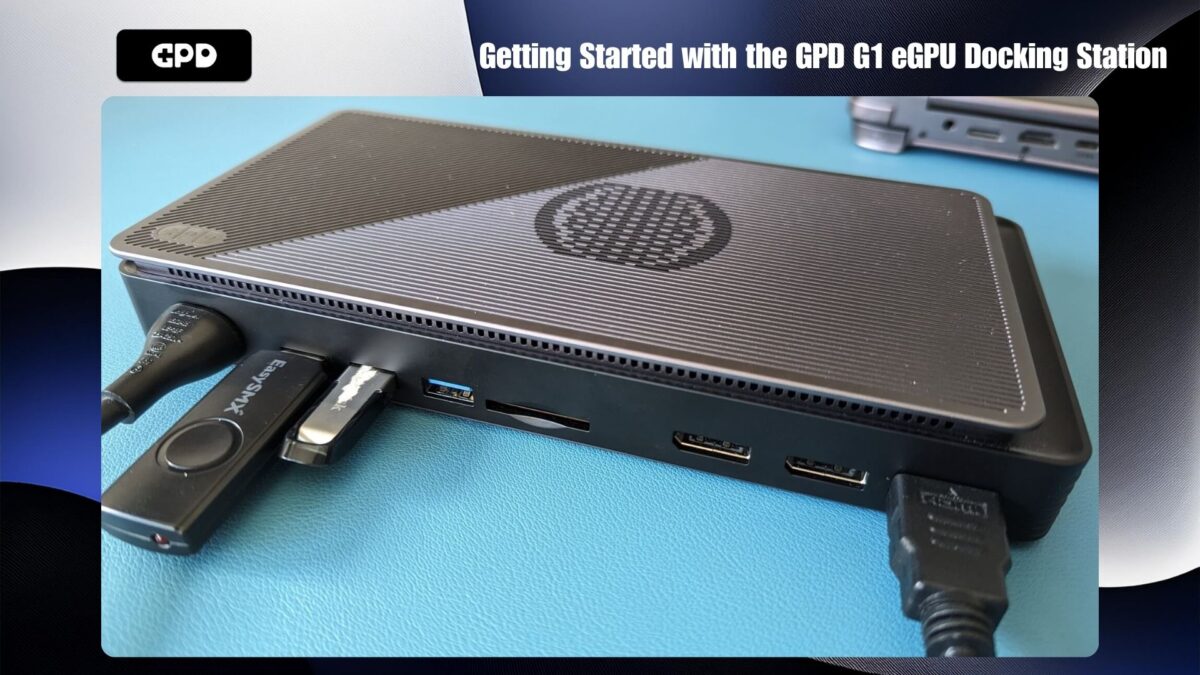
עבור מכשירים מסוימים, כמו GPD WIN MAX 2 2024 ו-GPD WIN 4 2024, יציאת OCuLink זמינה. אם יש לך אחד מהמכשירים החדשים האלה, תוכל ליהנות ממהירויות העברת נתונים גבוהות יותר. אחרת, תוכל להתחבר באמצעות USB 4.0, הנתמך על ידי מכשירים אחרים, כולל סדרת AYANEO, דגמי GPD ישנים יותר, ONEXPLAYER ומחשבי כף יד AOKZOE.
התחברות עם OCuLink
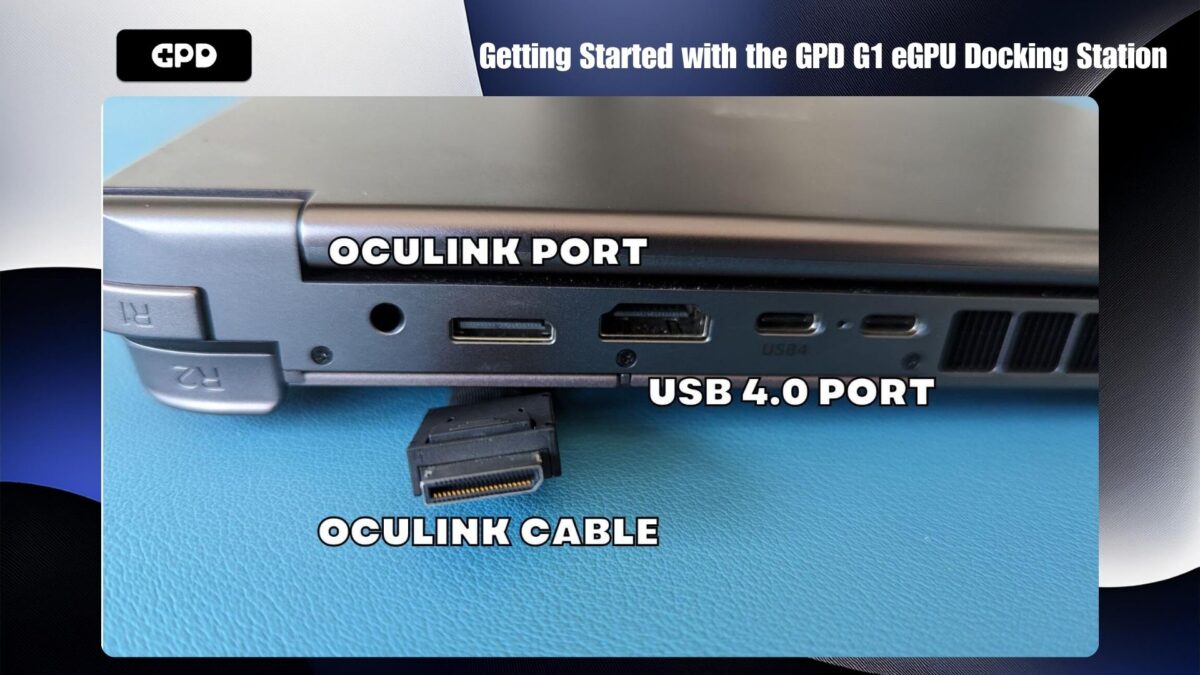
אם אתה משתמש בחיבור OCuLink, זכור לחבר הן את כבל OCuLink והן את כבל USB 4 אם ברצונך להשתמש ביציאות תחנת העגינה. חיבור ה- USB נחוץ עבור ציוד היקפי מסוג USB, קורא כרטיסי SD ויציאות וידאו. ודא שגם GPD G1 וגם ההתקן שלך כבויים לפני חיבור כבלי OCuLink ו/או USB 4.0.
התחברות ללא OCuLink
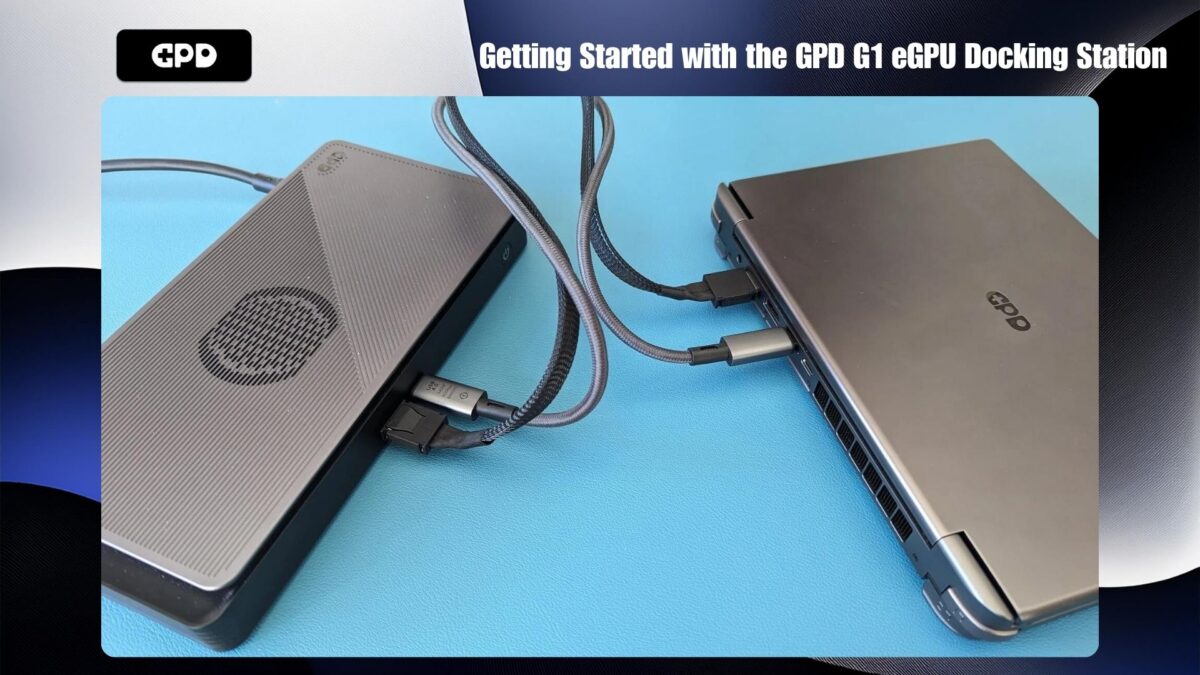
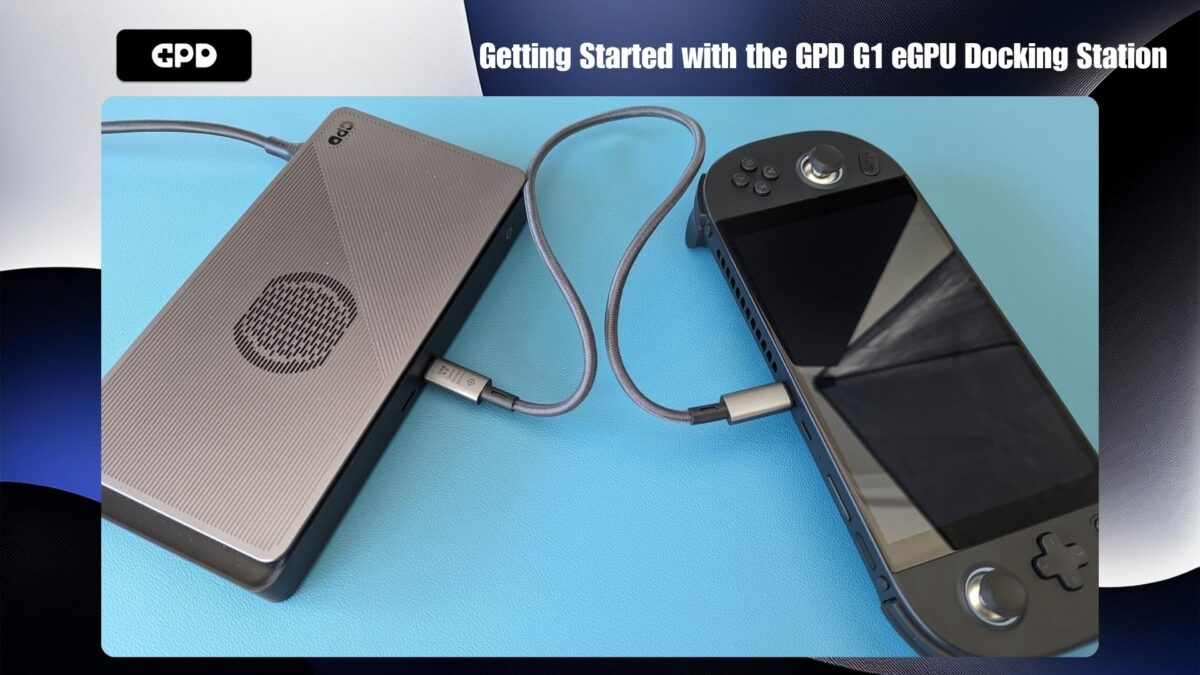
אם ההתקן שלך אינו כולל יציאת OCuLink, פשוט חבר את כבל ה- USB 4 בין GPD G1 להתקן שלך. הקפד לבדוק שוב איזו יציאה במכשיר שלך תומכת ב- USB 4.0, מכיוון שייתכן שיציאות מסוימות אינן תואמות.
הפעלה
לאחר שכל החיבורים נמצאים במקומם, הפעל תחילה את תחנת העגינה GPD G1 eGPU. המתינו מספר שניות ולאחר מכן הפעילו את המכשיר. לאחר רגע קצר, המכשיר שלך יאותחל לתוך Windows, ואתה תהיה מוכן ליהנות מביצועים משופרים עם GPD G1 שלך!
עדכון והתקנה של מנהלי התקנים גרפיים של AMD
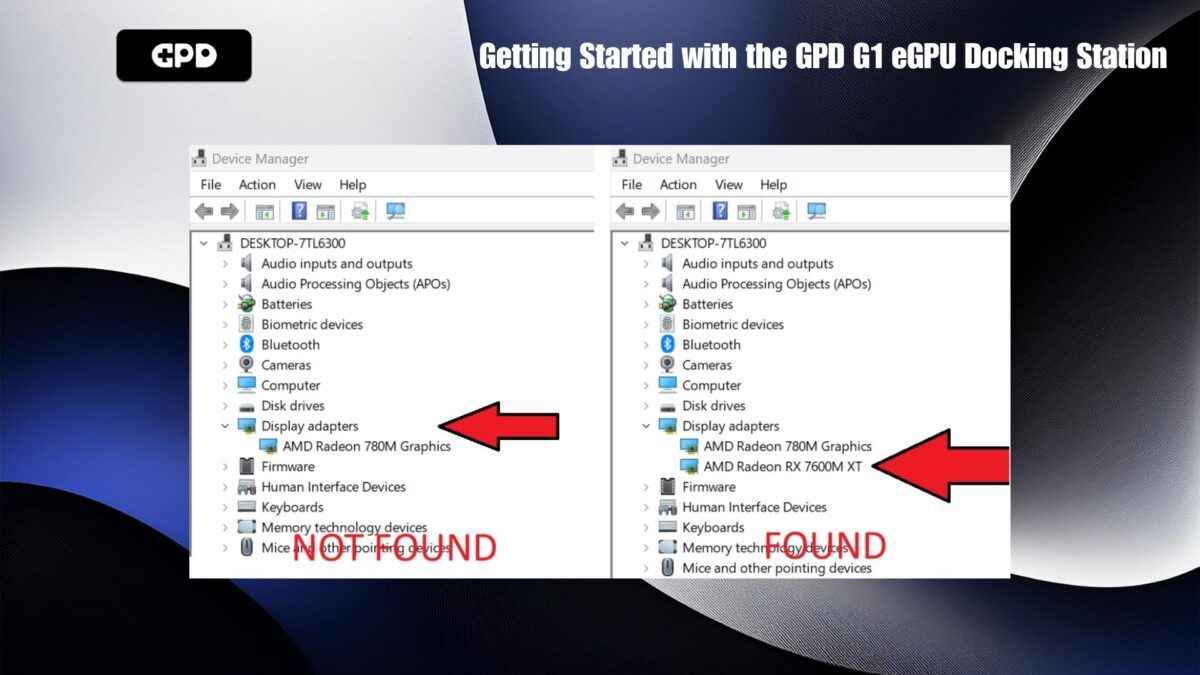
אם מנהלי ההתקן הגרפיים שלך כבר מעודכנים, GPD G1 עשוי להגדיר ולהתקין באופן אוטומטי את מנהלי ההתקנים הדרושים. כדי לאשר, עבור אל מנהל ההתקנים של Windows > התקני תצוגה. אם אתה רואה את AMD Radeon RX 7600M XT ברשימה, מנהלי ההתקנים הותקנו בהצלחה.
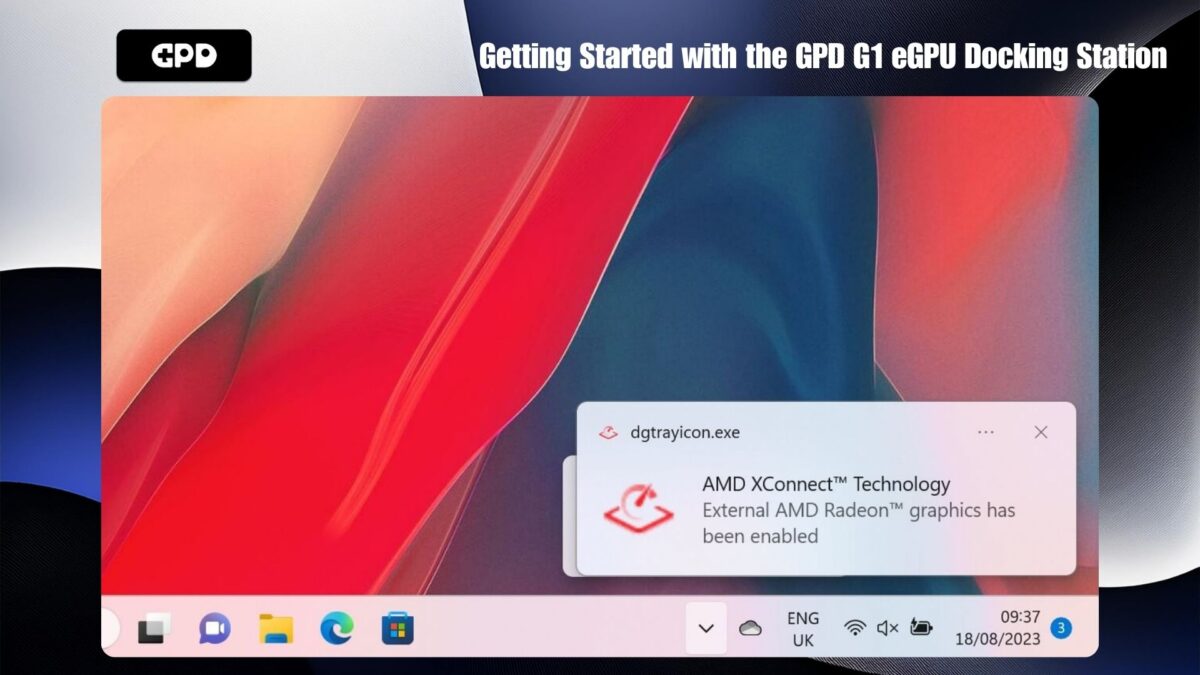
בעת חיבור באמצעות USB 4 בלבד, אתה אמור גם לקבל הודעה המציינת שטכנולוגיית AMD XConnect הופעלה. הודעה זו לא תוצג אם נעשה שימוש ב-OCuLink.
פתרון בעיות ועדכון מנהלי התקנים
אם ה-eGPU אינו מזוהה או אם ברצונך לעדכן למנהלי ההתקן העדכניים ביותר, עקוב אחר המדריך המפורט שלנו כאן: כיצד להסיר התקנה ולהתקין מנהלי התקנים גרפיים של AMD.
לאחר עדכון או התקנה של מנהלי ההתקנים, כבה את ההתקן ולאחר מכן כבה את GPD G1. המתן מספר רגעים, הפעל תחילה את GPD G1 ולאחר מכן הפעל את המכשיר.
אימות התקנה
לאחר אתחול Windows שוב, ודא ש- AMD Radeon RX 7600M XT מופיע תחת Windows Device Manager > Display Devices. אם הוא לא מופיע, כבה את GPD G1, המתן עשר שניות ולאחר מכן הפעל אותו שוב. AMD Radeon RX 7600M XT אמור להופיע כעת בהתקני תצוגה.
עדכון ה-BIOS GPD G1 (אופציונלי)
אם אתה צריך לעדכן את ה- BIOS של GPD G1 שלך, התהליך הוא פשוט ופשוט. תוכל לעקוב אחר המדריך הייעודי שלנו לעדכון BIOS G1.
פתרון בעיות ב-GPD G1 eGPU
מדוע משחקים פועלים לאט מהצפוי?
אם המשחקים שלך פועלים לאט מהצפוי, ייתכן שמספר גורמים גורמים גורמים לבעיה. להלן מספר שלבים שבאפשרותך לבצע כדי לפתור בעיות:
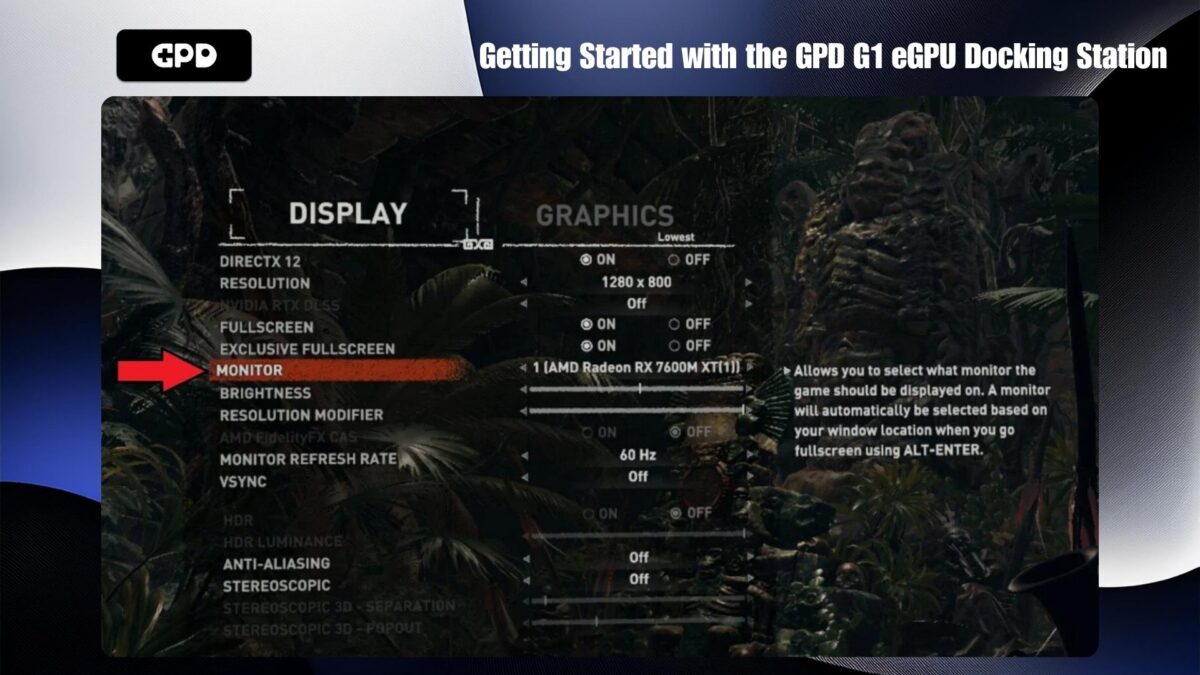
ודא שהמשחק משתמש במעבד הגרפי הנכון: ודא שהמשחק משתמש ב-AMD Radeon RX 7600M XT eGPU במקום בגרפיקה הפנימית של המכשיר שלך, כגון AMD Radeon 780M. בדקו את הגדרות הווידאו או התצוגה של המשחק כדי לראות אם יש אפשרות לבחור את המעבד הגרפי. הגדרה זו עשויה להופיע תחת שמות כגון “GPU” או “צג”.
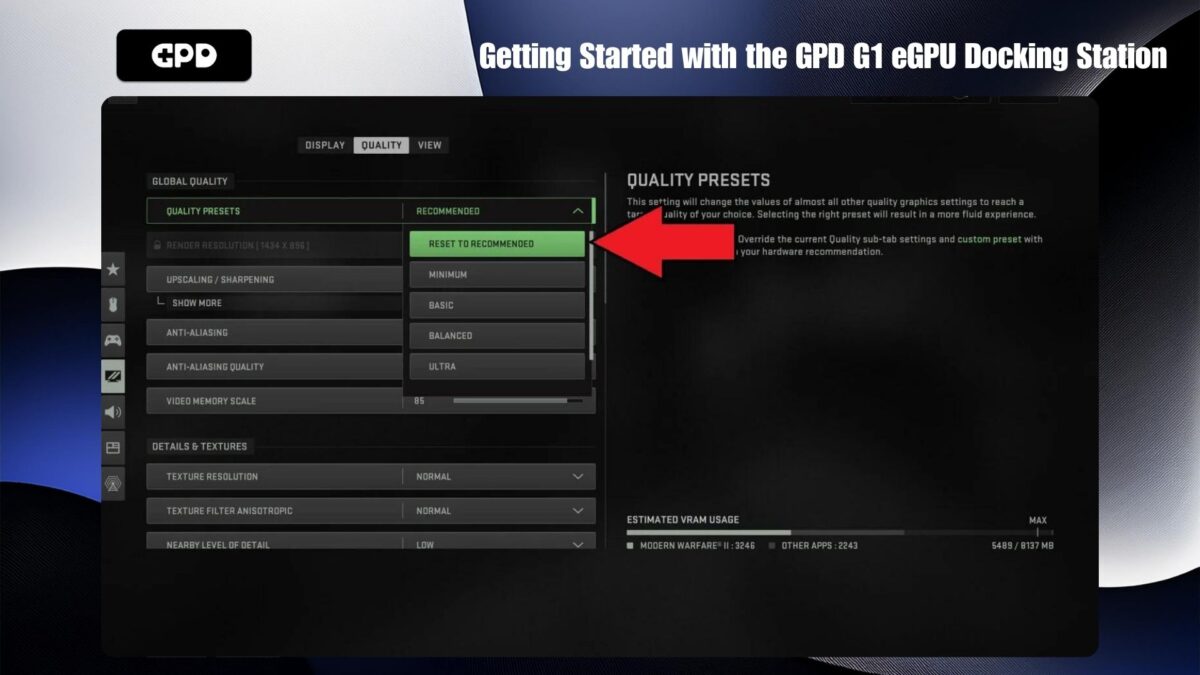
התאם את הגדרות סרטון המשחק: אם הגדרות הווידאו גבוהות מדי, ייתכן שהמשחק לא יפעל כצפוי. משחקים רבים מציעים הגדרות מומלצות שממטבות באופן אוטומטי את הגרפיקה בהתבסס על החומרה שלך. אם הבעיות נמשכות, נסה להוריד את רזולוציית המסך ל- 1440P, 1080P או אפילו 720P. לחלופין, התחל עם הגדרות גרפיקה נמוכות יותר המוגדרות כברירת מחדל והגדל אותן בהדרגה עד שהביצועים יתחילו להידרדר. לאחר מכן חזור להגדרה היציבה הקודמת.
שיקולי תצוגה פנימית: שימוש בצג הפנימי של מחשב כף היד יכול להפחית את יעילות ה-eGPU. הסיבה לכך היא שהנתונים חייבים לעבור מכף היד ל-GPD G1 ובחזרה, ולצרוך רוחב פס כפול דרך כבל USB 4. כדי לשפר את הביצועים, מומלץ להשתמש בצג חיצוני במידת האפשר, מכיוון שהדבר דורש פחות רוחב פס ומגביר את היעילות.
AMD Radeon RX 7600M XT לא זוהה
אם ההתקן שלך אינו מזהה את AMD Radeon RX 7600M XT, בצע את הפעולות הבאות:
ודא תאימות התקן: ודאו שהמכשיר תומך ב-OCuLink או ב-USB 4.0. ודא שכל הכבלים מוכנסים היטב ליציאות הנכונות בשני הקצוות.
שימוש ב-USB 4: אם ההתקן שלך חסר יציאת OCuLink, ודא שאתה מתחבר ליציאת USB 4. אם ההתקן שלך כולל יציאות Type-C מרובות, עיין במדריך כדי לזהות את יציאת USB 4.0 הנכונה.
מחזור הפעלה GPD G1: נסה לכבות את GPD G1, המתן כמה רגעים ולאחר מכן הפעל אותו שוב. Windows אמור לזהות את ההתקן וייתכן שתשמע את צליל חיבור ה- USB המוגדר כברירת מחדל. אם אתה מחובר באמצעות USB 4, אתה אמור גם לקבל הודעה על כך שטכנולוגיית AMD XConnect הופעלה.
התקן מחדש את מנהלי ההתקנים: לעתים, עלולות להתרחש התנגשויות בין גירסאות חדשות וישנים יותר של מנהלי התקנים. נסה להתקין מחדש את מנהלי ההתקנים על-ידי ביצוע השלבים במדריך לעיל כדי להסיר באופן מלא את ההתקנה ולהתקין מחדש מנהלי התקנים חדשים.
פתרון בעיות קישוריות GPD G1
כדי להשתמש ביציאות הנוספות ב-GPD G1, כבל ה-USB חייב להיות מחובר, מכיוון שכבל OCuLink מעביר נתונים עבור המעבד הגרפי בלבד. כבל USB 4.0 כלול ב-GPD G1, ומומלץ להשתמש בכבל ספציפי זה. כבלים אחרים עשויים להיות USB 3.0 או פשוט כבלי טעינה, שלא יספקו את הפונקציונליות הדרושה.
היכן ניתן לרכוש כבלי OCuLink ו- USB 4.0
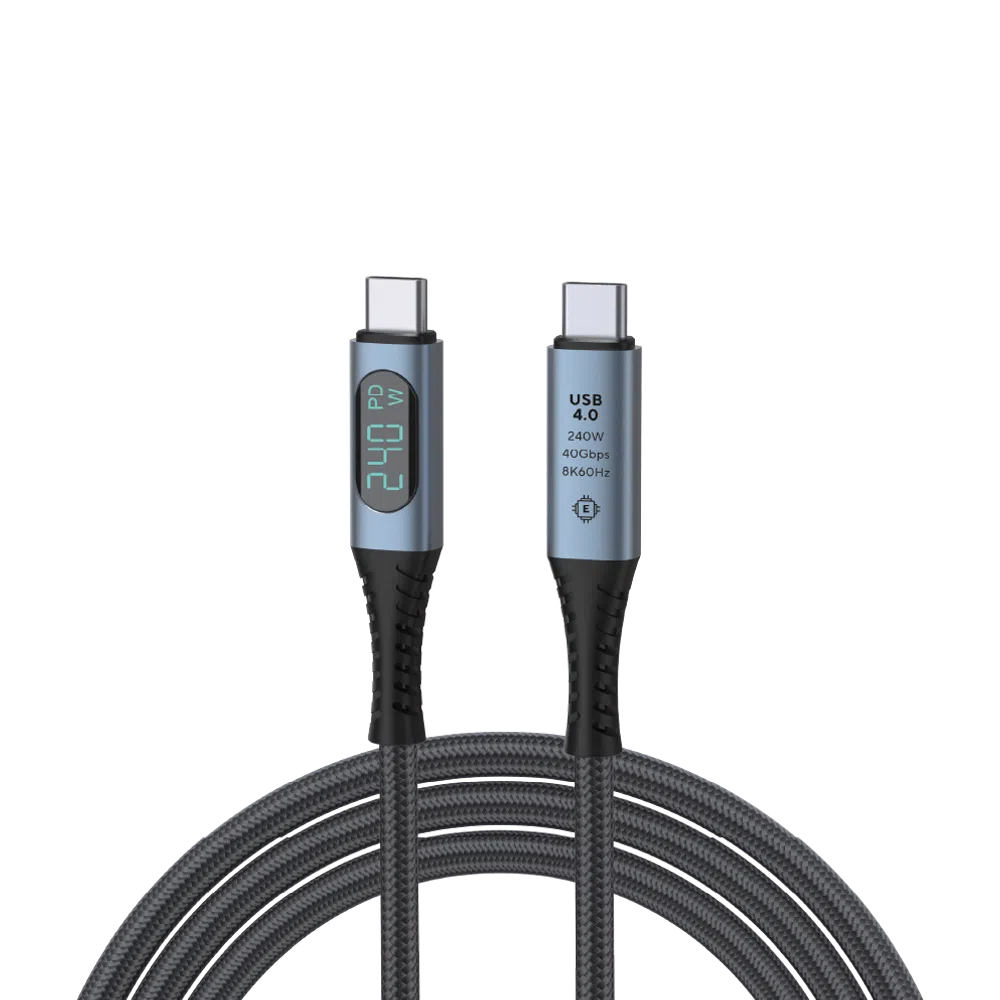
USB 4.0 Type-C Cable
- 40Gbps Data Transfer Speed
- Thunderbolt 3 & 4
- Up to 240W Power Delivery
- Supports up to 8K @ 60Hz Video Output
- Built-In Wattage Display
אפשרויות תשלום גמישות ומאובטחות
We use the latest technology in Payment Processing, which allows you to checkout via your Debit/Credit Card, or PayPal for a fast and secure experience.
אחריות 2 שנים על כל מוצרי GPD
2 Years Warranty from DROIX Global for your peace of mind
QUALITY ASSURANCE & PRE-DISPATCH TESTING
Ensuring Customer Satisfaction at the Highest Standard: Every device undergoes rigorous testing and a multi-point quality assurance check before it is shipped. Our dedicated team verifies performance, functionality, and component integrity to guarantee your GPD device is in perfect working order upon arrival, providing you with confidence and peace of mind.
תמחור, מסים ומשלוח
Note:
- United States Customers: The displayed price does NOT include TAX nor duties. Liability to clear customs and pay any associated tax/duties lies on the customer.
- EU Customers: The displayed price includes applicable TAX, which may be up to 25% depending on your country.
- Canada Customers: The displayed price includes applicable taxes, which may include 5% GST and additional Provincial Sales Taxes (PST), Harmonized Sales Tax (HST), or Quebec Sales Tax (QST), depending on your province.
For Our USA Customers: Orders are dispatched DAP (Delivered At Place). While customers are responsible for payment of any applicable tariffs, we draw on our extensive experience shipping from the UK to ensure you pay the least possible charge. Based on our records, these charges typically do not exceed 10% of the item value.
For EU Customers ONLY: Express DDP (Delivered Duty Paid). This means:
- All customs duties and taxes are included in the price displayed on the product page.
- You will not need to pay any additional charges upon delivery.
- In the rare event of customs-related issues, our team will handle the customs clearance process on your behalf to ensure a smooth delivery experience.
- If you decide to return your order or request a refund, please be aware that taxes and duties paid on your behalf under DDP terms cannot be refunded.
Important Information About Returns:
Please refer to our Terms & Conditions for detailed information.
תמיכת לקוחות
Got a question? We’re a short text away from having your issue sorted!
Please refer to our Terms & Conditions for detailed information.
מה כלול
- 1x USB 4.0 Type-C Cable
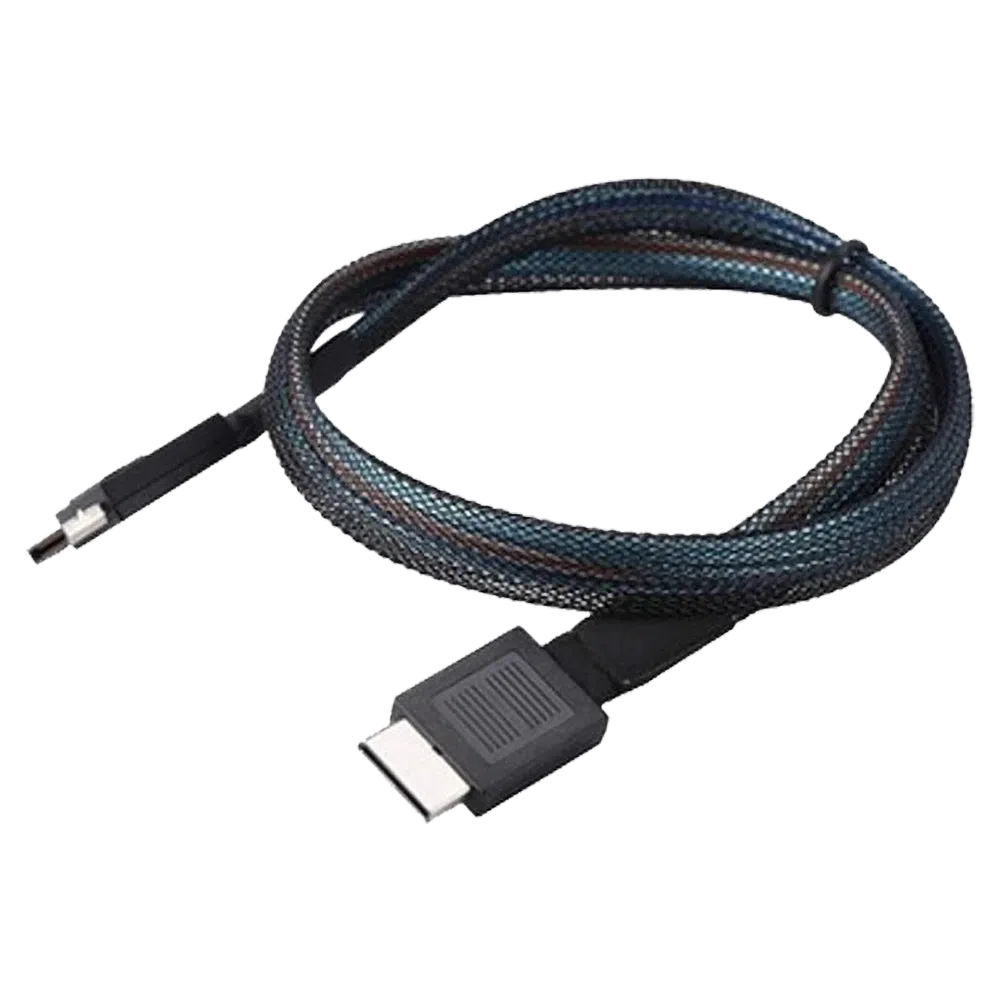
GPD OCuLink SFF8611 Cable
- Official GPD OCuLink Cable
- Compatible With GPD G1 eGPU
- Adapter For Devices Without OCuLink
- Support for PCIe Gen 4.0 & 5.0
- Speeds Up To 16GT/s & 32 GT/s Per Lane
אפשרויות תשלום גמישות ומאובטחות
We use the latest technology in Payment Processing, which allows you to checkout via your Debit/Credit Card, or PayPal for a fast and secure experience.
אחריות 2 שנים על כל מוצרי GPD
2 Years Warranty from DROIX Global for your peace of mind
QUALITY ASSURANCE & PRE-DISPATCH TESTING
Ensuring Customer Satisfaction at the Highest Standard: Every device undergoes rigorous testing and a multi-point quality assurance check before it is shipped. Our dedicated team verifies performance, functionality, and component integrity to guarantee your GPD device is in perfect working order upon arrival, providing you with confidence and peace of mind.
תמחור, מסים ומשלוח
Note:
- United States Customers: The displayed price does NOT include TAX nor duties. Liability to clear customs and pay any associated tax/duties lies on the customer.
- EU Customers: The displayed price includes applicable TAX, which may be up to 25% depending on your country.
- Canada Customers: The displayed price includes applicable taxes, which may include 5% GST and additional Provincial Sales Taxes (PST), Harmonized Sales Tax (HST), or Quebec Sales Tax (QST), depending on your province.
For Our USA Customers: Orders are dispatched DAP (Delivered At Place). While customers are responsible for payment of any applicable tariffs, we draw on our extensive experience shipping from the UK to ensure you pay the least possible charge. Based on our records, these charges typically do not exceed 10% of the item value.
For EU Customers ONLY: Express DDP (Delivered Duty Paid). This means:
- All customs duties and taxes are included in the price displayed on the product page.
- You will not need to pay any additional charges upon delivery.
- In the rare event of customs-related issues, our team will handle the customs clearance process on your behalf to ensure a smooth delivery experience.
- If you decide to return your order or request a refund, please be aware that taxes and duties paid on your behalf under DDP terms cannot be refunded.
Important Information About Returns:
Please refer to our Terms & Conditions for detailed information.
תמיכת לקוחות
Got a question? We’re a short text away from having your issue sorted!
Please refer to our Terms & Conditions for detailed information.
מה כלול
- 1x GPD OCuLink SFF8611 Cable
- 1x M.2 8612 Adapter Card
₪ 151.52
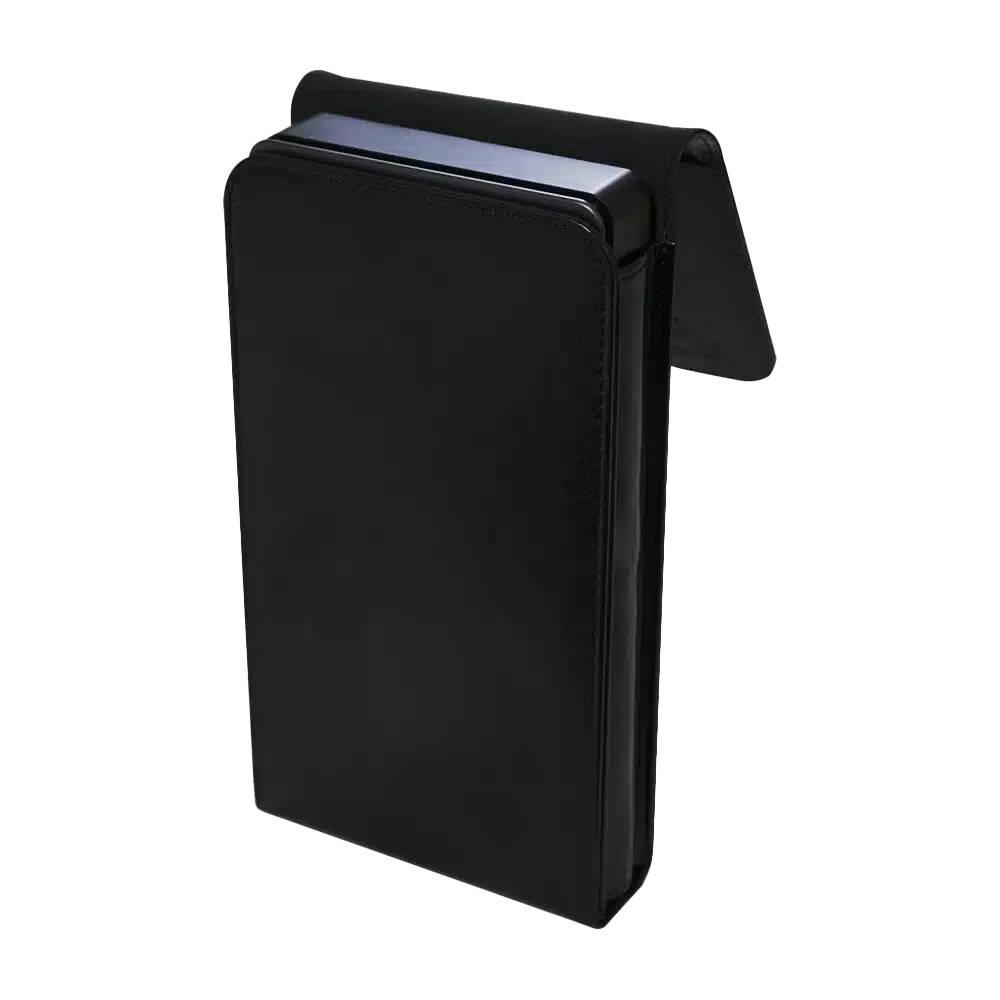
GPD G1 eGPU Docking Station – Protective Case
- Official GPD G1 eGPU Case
- Small Yet Secure
- Sleek & Stylish Design
- Soft Lined Interior
- Snug Fit For The GPD G1
אפשרויות תשלום גמישות ומאובטחות
We use the latest technology in Payment Processing, which allows you to checkout via your Debit/Credit Card, or PayPal for a fast and secure experience.
אחריות 2 שנים על כל מוצרי GPD
2 Years Warranty from DROIX Global for your peace of mind
QUALITY ASSURANCE & PRE-DISPATCH TESTING
Ensuring Customer Satisfaction at the Highest Standard: Every device undergoes rigorous testing and a multi-point quality assurance check before it is shipped. Our dedicated team verifies performance, functionality, and component integrity to guarantee your GPD device is in perfect working order upon arrival, providing you with confidence and peace of mind.
תמחור, מסים ומשלוח
Note:
- United States Customers: The displayed price does NOT include TAX nor duties. Liability to clear customs and pay any associated tax/duties lies on the customer.
- EU Customers: The displayed price includes applicable TAX, which may be up to 25% depending on your country.
- Canada Customers: The displayed price includes applicable taxes, which may include 5% GST and additional Provincial Sales Taxes (PST), Harmonized Sales Tax (HST), or Quebec Sales Tax (QST), depending on your province.
For Our USA Customers: Orders are dispatched DAP (Delivered At Place). While customers are responsible for payment of any applicable tariffs, we draw on our extensive experience shipping from the UK to ensure you pay the least possible charge. Based on our records, these charges typically do not exceed 10% of the item value.
For EU Customers ONLY: Express DDP (Delivered Duty Paid). This means:
- All customs duties and taxes are included in the price displayed on the product page.
- You will not need to pay any additional charges upon delivery.
- In the rare event of customs-related issues, our team will handle the customs clearance process on your behalf to ensure a smooth delivery experience.
- If you decide to return your order or request a refund, please be aware that taxes and duties paid on your behalf under DDP terms cannot be refunded.
Important Information About Returns:
Please refer to our Terms & Conditions for detailed information.
תמיכת לקוחות
Got a question? We’re a short text away from having your issue sorted!
Please refer to our Terms & Conditions for detailed information.
מה כלול
- 1x GPD G1 Case

שאלות במדריך זה
1 נענוRyzen Z1 Extreme搭載モデルへの対応を是非お願いします。

すでにそうなっていると思いますが、この CPU モデルでは AMD ドライバーが非常に問題になる場合があります。


