



GPD Windows Handheld Gaming PCs & Konsolen

GPD WIN MAX 2 2023 Spiele-Handheld-PC

67Wh Battery Key Feature
67Wh Battery

AMD Radeon GPU
AMD Radeon

AMD Ryzen Processor
AMD Ryzen

Bluetooth 5.2 Key Feature
Bluetooth 5.2

Wi-Fi 6 Key Feature
Wi-Fi 6

Mini PC ready for Windows 11 Update
Windows 11

  • CPU: AMD Ryzen 5 / 7 7640U / 7840U
  • GPU: AMD Radeon 760M / 780M
  • RAM: bis zu 64GB LPDDR5X @ 6400 MT/s
  • SPEICHER: bis zu 4TB Gen 3 PCI-E NVMe SSD
  • CONNECTIVITY: Wi-Fi 6 & Bluetooth 5.2 Unterstützung
Info zur bezahlung

Wir verwenden die neueste Technologie in der Zahlungsabwicklung, die es Ihnen ermöglicht, mit Ihrer Debit-/Kreditkarte oder mit PayPal schnell und sicher zu bezahlen.

Garantie

2 Jahre Garantie von DROIX Global für Ihren Seelenfrieden

QUALITÄTSSICHERUNG & TESTS VOR DER AUSLIEFERUNG

Sicherstellung der Kundenzufriedenheit auf höchstem Niveau: Jedes Gerät wird vor der Auslieferung strengen Tests und einer mehrstufigen Qualitätskontrolle unterzogen. Unser engagiertes Team prüft die Leistung, Funktionalität und Integrität der Komponenten, um zu gewährleisten, dass Ihr GPD-Gerät bei der Ankunft in einwandfreiem Zustand ist und Sie sich darauf verlassen können.

Preise, steuern und versand

Anmerkung:

  • Kunden aus den Vereinigten Staaten: Der angezeigte Preis enthält KEINE STEUERN oder Zölle. Die Verantwortung für die Zollabfertigung und die Zahlung aller damit verbundenen Steuern und Abgaben liegt beim Kunden.
  • EU-Kunden: Der angezeigte Preis enthält die gesetzliche Mehrwertsteuer, die je nach Land bis zu 25% betragen kann.
  • Kunden aus Kanada: Der angezeigte Preis enthält die anfallenden Steuern, die je nach Provinz 5% GST und zusätzliche Provincial Sales Taxes (PST), Harmonized Sales Tax (HST) oder Quebec Sales Tax (QST) umfassen können.

NUR für EU-Kunden: Express DDP (Delivered Duty Paid). Dies bedeutet:

  • Alle Zollgebühren und Steuern sind in dem auf der Produktseite angegebenen Preis enthalten.
  • Bei der Zustellung müssen Sie keine zusätzlichen Gebühren zahlen.
  • Im seltenen Fall von Zollproblemen übernimmt unser Team die Zollabfertigung in Ihrem Namen, um eine reibungslose Lieferung zu gewährleisten.
  • Wichtige Informationen über Rücksendungen:

  • Wenn Sie sich entscheiden, Ihre Bestellung zurückzusenden oder eine Rückerstattung zu beantragen, beachten Sie bitte, dass Steuern und Abgaben, die in Ihrem Namen gemäß den DDP-Bedingungen gezahlt wurden, nicht erstattet werden können.
  • Ausführliche Informationen finden Sie in unseren Allgemeinen Geschäftsbedingungen.

Kundenbetreuung

Haben Sie eine Frage? Wir sind nur einen kurzen Text davon entfernt, Ihr Problem zu lösen!

Ausführliche Informationen finden Sie in unseren Allgemeinen Geschäftsbedingungen.

Was enthalten ist
  • 1x GPD WIN MAX 2 2023
  • 1x Netzadapter
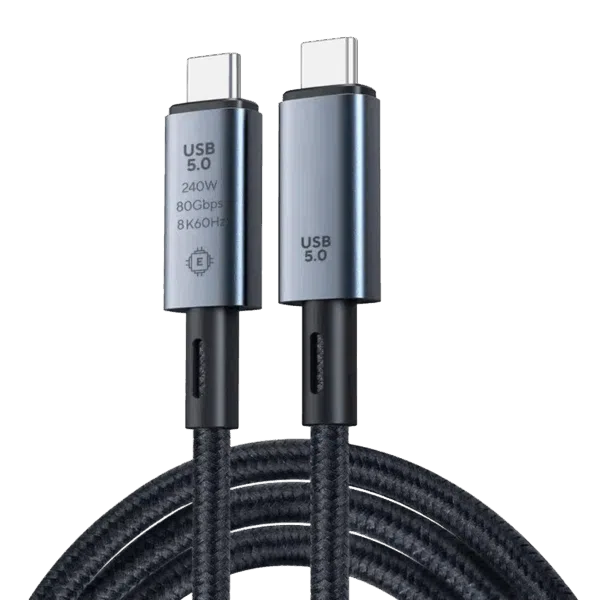
  • 1x USB Typ-C Kabel
  • 1x Benutzerhandbuch

Verfügbarkeit:

Nicht vorrätig

836,40  inc.TAX

19Personen sehen sich dies gerade an

Dieses Produkt ist derzeit ausverkauft und nicht verfügbar.

-

gpd win max 2

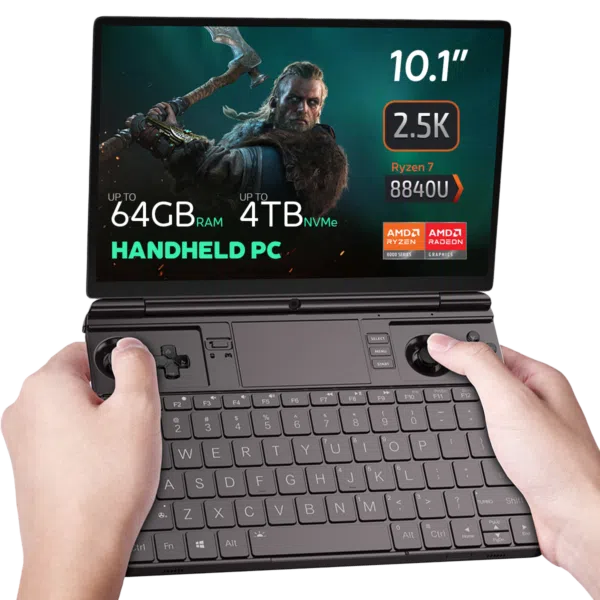
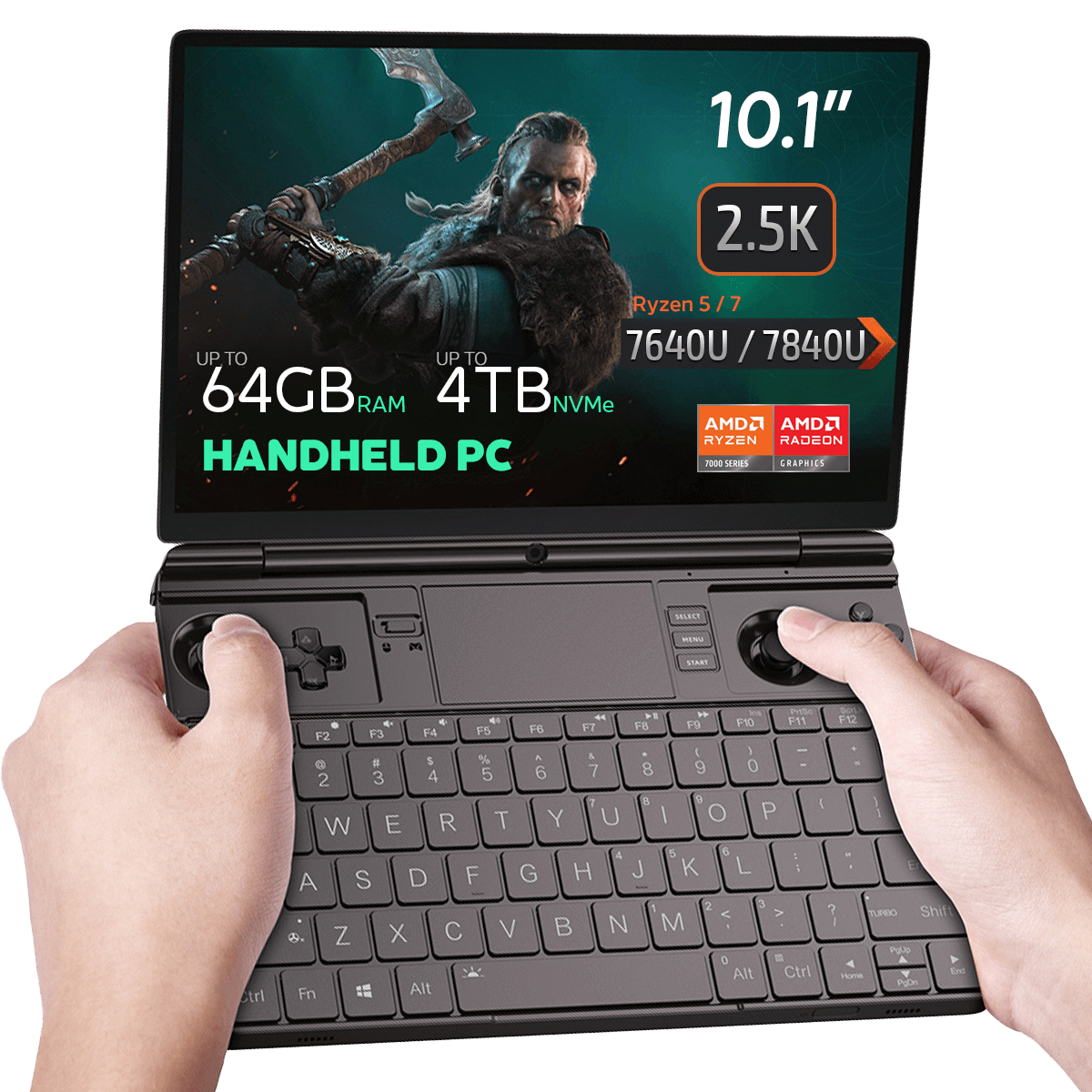
GPD WIN MAX 2 2023 Handheld Gaming PC – AMD Ryzen 7 7840U (Zen 4), 10.1″ 2.5K Display, 64GB RAM, OcuLink Support

Why pay 2025 flagship prices when the GPD WIN MAX 2 2023 remains a top-tier contender? Powered by the legendary AMD Ryzen 7 7840U, this device is the ultimate “Silicon Sweet Spot” for gamers and professionals who demand 2.5K resolution and desktop-grade multitasking without the 2025 premium.

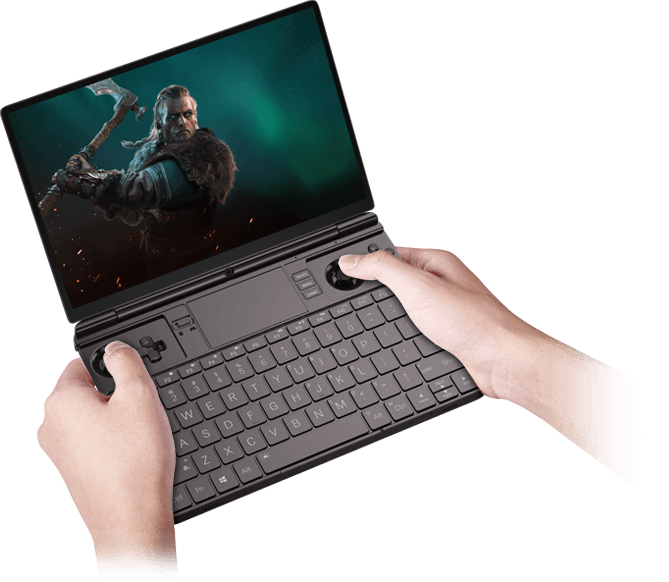
Entwickelt für Spitzenleistungen: Präzisionssteuerungen, professionelle Vielseitigkeit und intelligente Kühlung

Entfernen von Tasten für gpd win max 2

Der Hall-Sensor-Vorteil: Wie magnetische Induktion “Stick Drift” und physischen Verschleiß eliminiert.

Der herkömmliche Potentiometerknüppel, bei dem das Spannungssignal durch den Bürstenwiderstand erzeugt wird, ist anfällig für „Drift“-Probleme, die durch Abnutzung bei langfristigem Gebrauch entstehen. Mit dem WIN Max 2 2023 haben wir zum ersten Mal Hall-Sensor-Sticks mit eingebauten Induktionsspulen eingeführt. Aufgrund des Funktionsprinzips der magnetischen Induktion (bei der Drehung des Knüppels in verschiedene Positionen werden unterschiedliche magnetische Flüsse erzeugt, die wiederum unterschiedliche Spannungssignale erzeugen) gibt es bei Hall-Sensor-Knüppeln keine Abnutzung und somit auch kein Problem mit dem Knüppeldrift

Magnetische Abdeckungen für gpd

Magnetic Stealth Covers: Hide the joysticks for a clean, professional look in meetings.

Der in den Handheld-Gaming-PC integrierte Game-Controller kann ihn für den Arbeitsplatz ungeeignet machen! Um dieses Problem zu lösen, haben wir zwei Stick Cover für WIN Max 2 2023 hinzugefügt. Das magnetische Design sorgt dafür, dass die beiden Abdeckungen bei der Verwendung des Geräts nicht herunterfallen. Wenn Sie spielen, können Sie die Abdeckungen auch im hinteren Fach verstauen, damit sie nicht versehentlich verloren gehen!
Kühlung win max 2

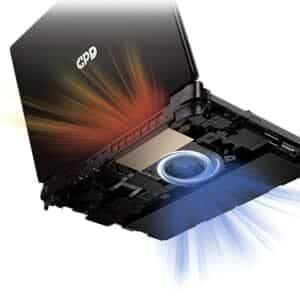
Fortschrittliche Hardware: Einsatz eines Hochleistungs-Turbolüfters und doppelter Wärmerohre für eine robuste Luftströmung.

GPD WIN MAX 2 2023 verfügt über ein verbessertes Kühlsystem in PC-Qualität mit einem großen Turbolüfter und zwei Wärmerohren, das sich durch ein hohes seitliches Luftvolumen und eine hochintelligente Geschwindigkeitssteuerung auszeichnet. Wenn die Innentemperatur unter 40 °C liegt, darf die Lüftergeschwindigkeit 20 % der maximalen Leistung nicht überschreiten. Wenn die Innentemperatur 40°C übersteigt, erhöht sich die Lüfterdrehzahl in 2%igen PWM-Schritten bis zum Erreichen des maximalen Schwellenwerts (100%).

EIN VISUELLES VERGNÜGEN: 10.1″ TOUCH CONTROL DISPLAY
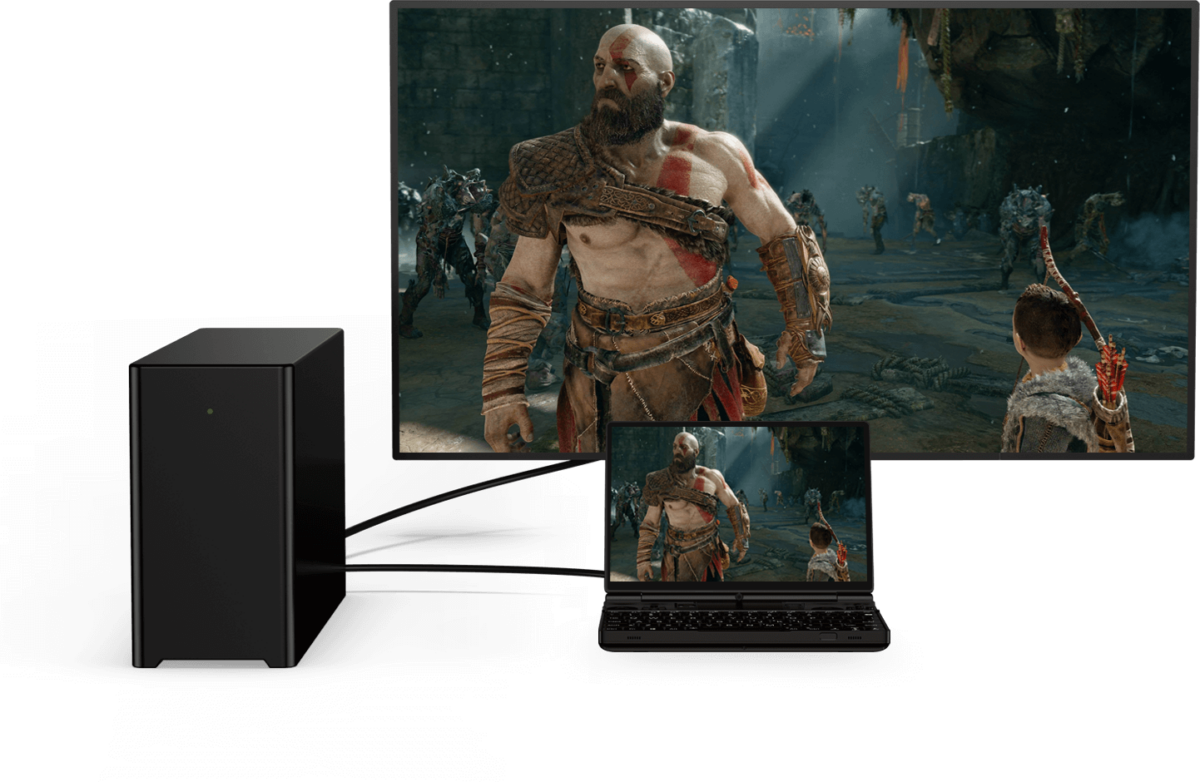
GPD win max mit PC

Lassen Sie sich vom 10,1-Zoll-Touch-Display mit 10-Punkt-Touch-Steuerung des GPD WIN MAX 2 2023 überraschen. Mit einem Seitenverhältnis von 16:10 und einer Auflösung von 1920×1200 liefert dieser lebendige Bildschirm atemberaubende Bilder. Mit einer Auflösung von bis zu 2560×1600 und einer Pixeldichte von 299 PPI ist jedes Detail klar und deutlich zu erkennen und sorgt für ein intensives Spielerlebnis.

Zen 4 Performance: The Emulation King

The 7840U Phoenix architecture remains a fan favorite in 2025 for its incredible efficiency.

Native OcuLink: Skip the USB4 bottlenecks. Connect directly to the GPD G1 eGPU for a 4K desktop experience.

Pro-Grade Emulation: Native AVX-512 support allows for superior PS3 (RPCS3) and Xbox 360 (Xenia) performance compared to many newer, more expensive handhelds.

Software Boosted: Fully compatible with AMD AFMF 2 and FSR 3.1, allowing you to play AAA titles at smooth frame rates on the 10.1″ screen.

GRAFIK, DIE VERBLÜFFT: AMD RADEON 780M GPU

Lassen Sie sich von der atemberaubenden Grafik des GPD WIN MAX 2 2023 dank seines AMD Radeon 780M Grafikprozessors überwältigen. Diese leistungsstarke Grafikkarte liefert flüssige Bildraten und atemberaubende Grafiken für ein visuell beeindruckendes Spielerlebnis.

UNÜBERTROFFENER SPEICHER: BIS ZU 64GB LPDDR5 RAM

GPD WIN MAX 2 2023 ist mit blitzschnellem 6400 MT/s LPDDR5 RAM ausgestattet, der schnelle Ladezeiten, nahtloses Multitasking und flüssiges Gameplay in anspruchsvollen Szenarien gewährleistet.

GROSSER SPEICHER: M.2 NVME 2280 SSD 4TB

Mit der geräumigen M.2 NVME 2280 SSD mit einer Kapazität von satten 4 TB geht Ihnen der Speicherplatz nicht mehr aus. Verabschieden Sie sich davon, Spiele aus Platzgründen zu löschen; mit GPD WIN MAX 2 2023 sind die Möglichkeiten endlos.

BLEIBEN SIE VERBUNDEN: WI-FI 6 UND BLUETOOTH 5.2

Konnektivität ist das A und O. WiFi 6 sorgt für blitzschnelle und stabile Internetverbindungen und damit für ein reibungsloses Online-Gaming-Erlebnis. Mit Bluetooth 5.2 können Sie kabellose Peripheriegeräte für ein wirklich beeindruckendes Spielerlebnis anschließen.

NAHTLOSE KONNEKTIVITÄT: VIELSEITIGE ANSCHLÜSSE

GPD WIN MAX 2 2023 verfügt über eine Reihe von Anschlüssen für alle Gaming- und Peripheriebedürfnisse. Mit 1x USB 4, 1x USB 3.2 Gen 2 Typ-C, 2x USB 3.2 Gen 2 Typ-A und einem OCuLink(SFF-8612)-Anschluss können Sie externe Geräte problemlos anschließen.

ERWEITERTE FUNKTIONEN FÜR UNÜBERTROFFENEN KOMFORT

GPD WIN MAX 2 2023 bietet ein nahtloses Spielerlebnis mit einem Fingerabdruck-Sensor für die schnelle und sichere Entsperrung des Geräts. Ein Microsoft Precision Touchpad (PTP) sorgt für eine flüssige und präzise Cursorsteuerung, und die beleuchtete Tastatur ermöglicht das Spielen in schwach beleuchteten Umgebungen.

ENERGIE, DIE ANHÄLT: LANGLEBIGE AKKULAUFZEIT

Der 67-Wh-Li-Polymer-Akku des GPD WIN MAX 2 2023 bietet bis zu 3 Stunden bei intensiver Nutzung, 6-8 Stunden bei moderater Nutzung und beeindruckende 14 Stunden bei leichter Nutzung und ist damit eine zuverlässige und langlebige Energiequelle für Gamer.

KOMPAKTES UND LEICHTES DESIGN

GPD WIN MAX 2 2023 bietet eine starke Leistung in einem kompakten und leichten Design. Es misst nur 8,9 x 6,2 x 0,9 Zoll und wiegt nur 1005 g. Es ist aus hochwertigen Materialien gefertigt und garantiert Langlebigkeit und Verarbeitungsqualität für das Spielen unterwegs.

WINDOWS 11 HOME VORINSTALLIERT

GPD WIN MAX 2 2023 ist mit Windows 11 Home vorinstalliert und bietet mit seiner intuitiven Benutzeroberfläche und den erweiterten Spielfunktionen ein optimiertes Spielerlebnis.

SCHLUSSFOLGERUNG

GPD WIN MAX 2 2023 ist der ultimative tragbare Gaming-PC, der High-End-Gaming-Leistung in einem kompakten Formfaktor bietet. Mit der AMD Ryzen 7 7840U oder Ryzen 5 7640U CPU, der AMD Radeon 780M GPU und bis zu 64 GB RAM sorgt er für herausragende Leistung bei anspruchsvollen Spielen. Das 10,1-Zoll-Touch-Display, die vielseitigen Anschlussmöglichkeiten und die praktischen Funktionen machen das Spielen unterwegs zum Kinderspiel. Dank der langen Akkulaufzeit und dem kompakten Design können Sie Spiele ohne Einschränkungen genießen.

Die Vorteile des GPD WIN MAX 2 2023:

  1. Powerful Performance: AMD Ryzen 7 7840U CPU and Ryzen 5 7640U with AMD Radeon 780M GPU deliver impressive performance for demanding games.
  2. Compact and Portable: The GPD WIN MAX 2 2023 offers unparalleled portability, making it easy to game on the go.
  3. Stunning Display: The 10.1″ touch control display provides vibrant visuals and a high-resolution experience.
  4. Versatile Connectivity: The GPD WIN MAX 2 2023 offers a range of ports and wireless connectivity options, ensuring seamless integration with peripherals and online gaming experiences.
  5. Ample Storage: The spacious 4TB SSD eliminates the need to constantly delete and reinstall games.

Order Your GPD WIN MAX 2 – In Stock & Ready to Ship

Get the industry’s most versatile work-and-play hybrid with a full 12-month official warranty.

  • Status: In Stock (Ships within 24 hours).
  • Shipping: Insured worldwide express delivery.
  • Support: Authorized GPD technical assistance included.

Lesen Sie hier unseren vollständigen GPD WIN MAX 2 2023 Testbericht mit detaillierten Funktionen, Benchmarks, Gameplay und Emulationsleistung.
Zusätzliche Informationen

More

Zustand

New, Refurbished (Class A), Refurbished (Class B)

Marke

Betriebssystem

Windows 11 Home

Prozessor (CPU) Marke

AMD

Prozessor (CPU) Basisfrequenz

AMD Ryzen™ 5 7640U – 3.5GHz, AMD Ryzen™ 7 7840U – 3.3GHz

Prozessor (CPU) Maximale Frequenz

AMD Ryzen™ 5 7640U – 4.9GHz, AMD Ryzen™ 7 7840U – 5.1GHz

Prozessor (CPU) Kerne / Threads

AMD Ryzen™ 5 7640U – 6 Cores / 12 Threads, AMD Ryzen™ 7 7840U – 8 Cores / 16 Threads

Prozessor (CPU) TDP

15-30W

Grafik (GPU) Marke

AMD

Grafik (GPU) Maximale Frequenz

Radeon™ 760M – 2600 MHz, Radeon™ 780M – 2700 MHz

Grafik (GPU) Kerne

Radeon™ 760M – 8, Radeon™ 780M – 12

Bildschirmauflösung / PPI

2560*1600 @ 299 PPI

Speicher (RAM) Kapazität

, ,

Speicher (RAM) Technologie

Speicher (RAM) Geschwindigkeit

6400 MT/s

Speicherkapazität

, ,

Speichererweiterung

1x Micro SD Card Slot, 1x PCI-e 22*30 NVMe Port, 1x PCI-e 22*80 NVMe Port (Used)

Speichertechnologie

E/A-Audio

3.5mm Headphone&Microphone Combo Jack, Built-In: Stereo Speakers / Microphone Setup

E/A USB

1x USB 3.2 Gen 2 Type-C, 1x USB 4.0 Type-C @ 40GB/s, 2x USB Type-A 3.2 Gen 2

Wi-Fi

Bluetooth

Gewicht

1005 g

Größe

227 × 16 × 23 cm

Downloads

Alle Varianten

Fix / Patch
3D Printing Files for M.2 to Oculink Adapter Cover — GPD G1, GPD WIN MAX 2 2023-09-13 · 412.3 KB · gehostet von DROIX
Herunterladen
Änderungsprotokoll
LETZTE 2023-09-13 412.3 KB ← aktueller Download
  • 3D Printing Files for M.2 to Oculink Adapter Cover | 2023-09-13 | Intermediate open cover for matching M.2 to Oculink on WIN Max 2 (6800U, 7640U, 7840U). Download and print yourself.
  • 3D Printing Files for M.2 to Oculink Adapter Cover | 2023-09-13 | Intermediate open cover for matching M.2 to Oculink on WIN Max 2 (6800U, 7640U, 7840U).
  • 3D Printing Files for M.2 to Oculink Adapter Cover | 2023-09-13 | Intermediate open cover for M.2 to Oculink adapter on WIN Max 2 (6800U, 7640U, 7840U). Download and print yourself.

Ältere Versionen bleiben für Rollbacks herunterladbar – jede Version behält ihre eigene verifizierte Datei.

Firmware
Fix the WIN Max 2 Battery Icon 2025-12-10 · 864 B · 1 Downloads · gehostet von DROIX
Herunterladen
Änderungsprotokoll
LETZTE 2025-12-10 864 B ← aktueller Download
  • Fix the WIN Max 2 Battery Icon | — | 2025-12-10 | After downloading, unzip the file. Double-click to execute, or right-click and select "Run as administrator"

Ältere Versionen bleiben für Rollbacks herunterladbar – jede Version behält ihre eigene verifizierte Datei.

Manual
WIN MAX 2 (2025) User Manual 2024-12-06 · 15.5 MB · gehostet von DROIX
Herunterladen
Änderungsprotokoll
LETZTE 2024-12-06 15.5 MB ← aktueller Download
  • WIN MAX 2 (2025) User Manual **(current)** | 2024-12-06 | PDF — functional key descriptions for the GPD WIN Max 2 (2025)

Ältere Versionen bleiben für Rollbacks herunterladbar – jede Version behält ihre eigene verifizierte Datei.

OS Image
GPD WIN 4 / WIN Max 2 — Windows 11 24H2 Home Firmware 24H2 · 2024-12-20 · 13.7 GB · gehostet von DROIX
Herunterladen
Änderungsprotokoll
LETZTE 24H2 2024-12-20 · 13.7 GB ← aktueller Download
  • WIN 4 (8840U / 7840U / 7640U / 6800U) Windows 11 24H2 Home Firmware **(current)** | 2024-12-20 | `730BD7B9D989797488C1509E590085FD9941E80C`
  • GPD WIN 4 2025 (8840U / 370) Windows 11 24H2 Home Firmware **(current)** | 2024-12-20 | `730BD7B9D989797488C1509E590085FD9941E80C` | Covers both 8840U and AI 9 HX 370 variants. Includes integrated Windows 11 drivers. Reinstallation removes all data on drive C — back up first. SHA1 tool: [HashTools](https://www.binaryfortress.com/HashTools/Download/) ·
  • WIN 4 (6800U) Windows 11 24H2 Home Firmware **(current)** | 2024-12-20 | `730BD7B9D989797488C1509E590085FD9941E80C`
  • WIN Max 2 (8840U / 7840U / 7640U / 6800U) Windows 11 24H2 Home Firmware **(current)** | 2024-12-20 | `730BD7B9D989797488C1509E590085FD9941E80C`

Ältere Versionen bleiben für Rollbacks herunterladbar – jede Version behält ihre eigene verifizierte Datei.

Tool
GPD GamePad Test Calibration Tool V1.03 · 2024-09-02 · 1.6 MB · gehostet von DROIX
Herunterladen
Versionen (2)
LETZTE V1.03 2024-09-02 · 1.6 MB ← aktueller Download
  • GamePad Test Calibration Tool | V1.03 | 2024-09-02 | Tool for WIN Max 2 grip back button mapping, programming, and vibration adjustment
  • GamePad Test Calibration Tool | V1.03 | 2024-09-02 | Tool for WIN Mini grip back button mapping, programming, and vibration adjustment
V1.02 2022-09-02 · 1.6 MB ↓ V1.02

Ältere Versionen bleiben für Rollbacks herunterladbar – jede Version behält ihre eigene verifizierte Datei.

Tool
MotionAssistant (GPD Handheld Front-end Tool) v1.2.0.9 (Portable) · 2026-02-08 · 42.6 MB · 9 Downloads · gehostet von DROIX
Herunterladen
Versionen (3)
LETZTE v1.2.0.9 (Portable) 2026-02-08 · 42.6 MB ← aktueller Download
  • Portable build — no installation required. Unzip password: 123.
  • MotionAssistant uses the Winring0 driver for TDP adjustment, hardware monitoring and fan control. If these features stop working, allow MotionAssistant in Windows Security Center — Microsoft may flag the driver.
  • What's new in v1.2.0.9:
  • Adapted the gyroscope in the Legion Go 2 device body (controller gyroscope and fan control not yet adapted).
  • Adapted support for various recently-released AMD rebranded models.
  • Added a "Disable Tablet Mode" option in Advanced Settings; when disabled, Tablet Mode turns off on the next launch.
  • Added an OSD toggle hotkey in the RTSS OSD settings; temperature display added to simplified mode.
  • Added a 30-second TDP reset cycle that reapplies the current TDP if an abnormal decrease is detected; added TDP ±5 hotkeys.
  • Optimized the Win5 keyboard key: press to bring up the on-screen keyboard, press again to close it.
  • Optimized the CPU frequency upper-limit control via "Optimize CPU Frequency"; maximum frequency is restored when the option is disabled.
  • Improved some controls in Dark Mode; the title bar is now a darker colour.
  • Optimized gyroscope simulation after resuming from hibernation, fixing failures on some devices after wake-up.
  • Optimized hotkey detection (shorter judgment interval); brightness hotkeys now adjust by ±10.
  • Specified ze_loader.dll as 1.11.0. Intel models unable to lock the GPU frequency should install the Intel 6647 iGPU driver first, then update to the latest.
  • Fixed the power limit being locked at 65W and not restorable when the GPD Win5 is powered via USB-C.
  • Corrected some text displays; fixed OSD monitoring showing incorrectly when hardware monitoring is off.
  • Fixed LT/RT not registering as hotkeys.
  • Fixed a freeze when setting TDP consecutively.
  • Fixed certain game-profile options (e.g. CPU frequency limits) not applying automatically.
  • Fixed frame locking failing in some game profiles; frame locking now uses an RTSS process-specific configuration instead of a global one.
  • Fixed a crash when refreshing the tray icon.
v1.2.0.9 (Installer) 2026-02-08 · 45 MB ↓ v1.2.0.9 (Installer)
  • Installer build (Setup) of the same v1.2.0.9 release — installs to Program Files rather than running portable.
v1.2.0.9 (RTSS) 2026-02-08 · 17.2 MB ↓ v1.2.0.9 (RTSS)
  • RivaTuner Statistics Server companion build (RTSS 737) for the MotionAssistant on-screen display (OSD) and frame-lock monitoring. Install alongside MotionAssistant.

Ältere Versionen bleiben für Rollbacks herunterladbar – jede Version behält ihre eigene verifizierte Datei.

Driver
DTS:X Audio Driver — GPD WIN 4, GPD WIN MAX 2, GPD WIN Mini 2024-02-19 · 472.4 MB · 3 Downloads · gehostet von DROIX
Herunterladen
Änderungsprotokoll
LETZTE 2024-02-19 472.4 MB ← aktueller Download
  • DTS:X Audio Driver | 2024-02-19 | Right-click `DTS_install.bat` → "Run as administrator" to install; `DTS_uninstall.bat` to uninstall.

Ältere Versionen bleiben für Rollbacks herunterladbar – jede Version behält ihre eigene verifizierte Datei.

Tool
AMD Handheld Control — GPD DUO, GPD Pocket 4, GPD WIN 4, GPD WIN 5, GPD WIN MAX 2, GPD WIN Mini v1.0.0 · 2026-02-04 · 97.9 MB · 5 Downloads · gehostet von DROIX
Herunterladen
Änderungsprotokoll
LETZTE v1.0.0 2026-02-04 · 97.9 MB ← aktueller Download
  • AMD Handheld Control v1.0.0 | v1.0.0 | 2026-02-04 | By Deen0X; AMD-processor systems only (relevant with AMD eGPU setups).

Ältere Versionen bleiben für Rollbacks herunterladbar – jede Version behält ihre eigene verifizierte Datei.

Driver
GPD Shared Driver Package V4.1.0 · 2025-01-18 · 1.5 GB · 4 Downloads · gehostet von DROIX
Herunterladen
Änderungsprotokoll
LETZTE V4.1.0 2025-01-18 · 1.5 GB ← aktueller Download
  • GPD DUO (8840U / 370) Drivers **(current)** | v4.1.0 | 2025-01-18 | Both variants | Latest driver package. After extracting, double-click `AutoInstallDrivers.bat` for automatic installation.
  • WIN 4 (8840U / 7840U / 7640U / 6800U) Drivers **(current)** | v4.1.0 | 2025-01-18
  • GPD WIN 4 2025 (8840U / 370) Drivers **(current)** | V4.1.0 | 2025-01-18 | Latest driver package. After extracting, double-click `AutoInstallDrivers.bat` for automatic installation.
  • WIN Max 2 (8840U / 7840U / 7640U / 6800U) Drivers **(current)** | v4.1.0 | 2025-01-18
  • Vendor page: https://www.amd.com/en/support/download/drivers.html

Ältere Versionen bleiben für Rollbacks herunterladbar – jede Version behält ihre eigene verifizierte Datei.

Tool
DTS:X Audio Technology (3D Sound Field) — GPD DUO, GPD WIN 4, GPD WIN 5, GPD WIN MAX 2, GPD WIN Mini 2024-12-24 · 2025-12-24 · 659.5 MB · 3 Downloads · gehostet von DROIX
Herunterladen
Änderungsprotokoll
LETZTE 2024-12-24 2025-12-24 · 659.5 MB ← aktueller Download
  • DTS:X Audio Technology, 3D Sound Field | 2024-12-24 | After downloading, decompress and execute `DTS_install.bat` to install automatically
  • DTS:X Audio Technology, 3D Sound Field | 2025-12-24 | After downloading, decompress and execute `DTS_install.bat` to install automatically

Ältere Versionen bleiben für Rollbacks herunterladbar – jede Version behält ihre eigene verifizierte Datei.

Manual
WIN Max 2 Q & A 2022-09-02 · 2.3 MB · gehostet von DROIX
Herunterladen
Änderungsprotokoll
LETZTE 2022-09-02 2.3 MB ← aktueller Download
  • WIN Max 2 Q & A | 2022-09-02 | PDF with frequently asked questions.

Ältere Versionen bleiben für Rollbacks herunterladbar – jede Version behält ihre eigene verifizierte Datei.

Manual
WIN MAX 2 (2023) User Manual 2023-09-06 · 16 MB · gehostet von DROIX
Herunterladen
Änderungsprotokoll
LETZTE 2023-09-06 16 MB ← aktueller Download
  • WIN MAX 2 (2023) User Manual | 2023-09-06 | PDF with functional key descriptions.

Ältere Versionen bleiben für Rollbacks herunterladbar – jede Version behält ihre eigene verifizierte Datei.

Fix / Patch
WIN Max 2 Screen Color Calibration File 2025-05-15 · 627.9 KB · gehostet von DROIX
Herunterladen
Änderungsprotokoll
LETZTE 2025-05-15 627.9 KB ← aktueller Download
  • WIN Max 2 Screen Color Calibration File | 2025-05-15 | ICM profiles in D65 and D70 color temperatures. See installation steps below.
  • WIN Max 2 Screen Color Calibration File | 2025-05-15 | .icm format files for Windows only. Two variants: D65 (6500K, average daylight) and D70 (7000K, cooler white point calibration). Installation: copy .icm to `C:WindowsSystem32spooldriverscolor`, open Color Management, select device, check "Use my settings for this device", click Add and select the profile. In Advanced tab, click "Change system defaults", check "Use Windows display calibration", click "Reload current calibration".

Ältere Versionen bleiben für Rollbacks herunterladbar – jede Version behält ihre eigene verifizierte Datei.

Firmware
WIN Max 2 Touchpad Firmware v1.0.3 · 125.9 KB · gehostet von DROIX
Herunterladen
Änderungsprotokoll
LETZTE v1.0.3 125.9 KB ← aktueller Download
  • WIN Max 2 Touchpad Firmware | v1.0.3 | 2023-12-19 | For WIN Max 2 (6800U). Brand new optimizations.

Ältere Versionen bleiben für Rollbacks herunterladbar – jede Version behält ihre eigene verifizierte Datei.

Firmware
WinControls — GPD WIN 4 / WIN MAX 2 / WIN Mini v1.16 · 4.5 MB · 1 Downloads · gehostet von DROIX
Herunterladen
Versionen (2)
LETZTE v1.16 4.5 MB ← aktueller Download
  • WinControls **(current)** | v1.16 | 2024-12-26 | WIN 4 grip customization tool. Fixed issue with grip mapping key defaulting to mouse mode. Tutorial:. Unzip Password: `123`
  • WinControls **(current)** | v1.16 | 2024-12-26 | WIN Mini/Max 2 grip customization tool. Fixed issue with grip mapping key defaulting to mouse mode. Tutorial:. Unzip Password: `123`
v1.16 (Q&A PDF) 4.1 MB ↓ v1.16 (Q&A PDF)
  • WinControls **(current)** | v1.16 | 2024-12-26 | WIN 4 grip customization tool. Fixed issue with grip mapping key defaulting to mouse mode. Tutorial:. Unzip Password: `123`
  • WinControls **(current)** | v1.16 | 2024-12-26 | WIN Mini/Max 2 grip customization tool. Fixed issue with grip mapping key defaulting to mouse mode. Tutorial:. Unzip Password: `123`

Ältere Versionen bleiben für Rollbacks herunterladbar – jede Version behält ihre eigene verifizierte Datei.

Manual
WIN Max 2 (2023) Q & A 2023-09-06 · 2.3 MB · gehostet von DROIX
Herunterladen
Änderungsprotokoll
LETZTE 2023-09-06 2.3 MB ← aktueller Download
  • WIN Max 2 (2023) Q & A | 2023-09-06 | PDF with frequently asked questions.

Ältere Versionen bleiben für Rollbacks herunterladbar – jede Version behält ihre eigene verifizierte Datei.

Tool
AOKZOE A1 Pro / AYANEO SLIDE / GPD WIN 4 — AYASpace 2 Unversioned · 2023-06-28 · extern · github.com
Erhalten Sie bei github.com
Änderungsprotokoll
LETZTE Unversioned 2023-06-28 ← aktueller Download
  • Source guide: Getting Started with the AYANEO SLIDE
  • Source guide: Getting Started with the ONEXPLAYER ONEXFLY
  • Source guide: Getting started with the GPD WIN Mini (2023 & 2024)
  • Source guide: Getting started with the GPD WIN MAX 2 2023
  • Source guide: Getting started with the GPD WIN 4 (2023 & 2024)
  • Source guide: Getting Started with Your Handheld Gaming PC
  • Source guide: Getting started with the AOKZOE A1 Pro
  • Source guide: Handheld Companion – Easy to use all in one performance metrics, TDP and motion input control

Ältere Versionen bleiben für Rollbacks herunterladbar – jede Version behält ihre eigene verifizierte Datei.

BIOS
GPD Win Max / GPD WIN MAX 2 — BIOS V0.35 · 2023-08-23 · extern · droidbox.sharepoint.com
Erhalten Sie bei droidbox.sharepoint.com
Versionen (3)
LETZTE V0.35 2023-08-23 ← aktueller Download
  • Source guide: Getting started with the GPD WIN MAX 2 2023
V0.30 2023-08-23 ↓ V0.30
  • Source guide: Getting started with the GPD WIN MAX 2 2023
V0.29 2023-08-23 ↓ V0.29
  • Source guide: Getting started with the GPD WIN MAX 2 2023

Ältere Versionen bleiben für Rollbacks herunterladbar – jede Version behält ihre eigene verifizierte Datei.

Tool
MotionAssistant — Power Mod (community fork) Latest (GitHub) · 2026-02-10 · 5 Downloads · extern · github.com
Erhalten Sie bei github.com
Versionen (3)
LETZTE Latest (GitHub) 2026-02-10 ← aktueller Download
  • Community shell-based UI modification of MotionAssistant by ThatUsernameAlreadyExist — NOT an official GPD release.
  • Always get the newest build from the GitHub releases page (latest: MotionAssistant v1.2.0.9 + Power Mod 2.2.2).
Installer (DROIX mirror) 2026-02-10 · 47.0 MB ↓ Installer (DROIX mirror)
  • DROIX-hosted mirror of the Power Mod installer (MotionAssistant Setup + Power Mod).
Portable (DROIX mirror) 2026-02-10 · 44.6 MB ↓ Portable (DROIX mirror)
  • DROIX-hosted mirror of the Power Mod portable build.

Ältere Versionen bleiben für Rollbacks herunterladbar – jede Version behält ihre eigene verifizierte Datei.

Tool
GPD Tool (GPD Official Handheld Front-end Tool) v1.65 · 2026-09-18 · 29 MB · 9 Downloads · gehostet von DROIX
Herunterladen
Versionen (7)
LETZTE v1.65 2026-09-18 · 29 MB ← aktueller Download
  • Removed the UAC prompt when launching RTSS and disabled automatic updates for a smoother user experience.
  • Improved the stability of the frame-rate limiter UI.
  • Fixed a bug with the power linkage feature.
  • Fixed an issue where TDP was not automatically applied on first launch.
  • Added screen refresh-rate adjustment settings.
  • Added controller vibration adjustment options.
  • Increased the adjustable power limit to 100W on WIN 5 and 40W on other models.
  • Added 144 FPS as a new frame-rate limit option.
  • Added helpful tips for the functions at the top of the interface.
  • Added OSK and TabTip keyboard options to the on-screen keyboard settings. Right-click the button to select an option
  • On WIN 5, the physical button can be used to bring up the keyboard.
  • Fixed several bugs.
v1.62 2026-07-28 · 45 MB ↓ v1.62
  • After closing the UI, the background service will no longer execute any operations. This fixes an issue causing abnormal fan behavior on system startup.
  • Added power tuning parameters for the GPD MAX3.
  • Fixed hidden bugs.
v1.60 2026-06-01 · 45 MB ↓ v1.60
  • Updated kernel driver for improved stability; no need to add to whitelist, no antivirus warnings.
  • Fixed issue with automatic multi-language settings during installation.
  • Added Chinese, Japanese, and Korean prompts to the performance monitoring horizontal and vertical buttons.
  • Modified TDP PL2 calculation method to PL1+1 for more accurate power consumption locking.
v1.49 2026-03-19 · 42.4 MB ↓ v1.49
  • Source guide: GPD Tool Download, Setup Guide & Troubleshooting for GPD Devices
v1.48 42.4 MB ↓ v1.48
v1.45 2026-03-19 · 42.4 MB ↓ v1.45
  • Source guide: GPD Tool Download, Setup Guide & Troubleshooting for GPD Devices
v1.31 2026-03-19 · 42.6 MB ↓ v1.31
  • Source guide: GPD Tool Download, Setup Guide & Troubleshooting for GPD Devices

Ältere Versionen bleiben für Rollbacks herunterladbar – jede Version behält ihre eigene verifizierte Datei.

Firmware
GPD Keyboard Assistant Tool v1.06 · 369.7 KB · gehostet von DROIX
Herunterladen
Änderungsprotokoll
LETZTE v1.06 369.7 KB ← aktueller Download
  • GPD Keyboard Assistant Tool | v1.06 | 2021-12-16 | Download and unzip, then double-click to run the installation

Ältere Versionen bleiben für Rollbacks herunterladbar – jede Version behält ihre eigene verifizierte Datei.

Firmware
GPD WIN MAX 2 — Touchpad firmware Unversioned · 2022-11-25 · 125 KB · extern · drive.google.com
Erhalten Sie bei drive.google.com
Änderungsprotokoll
LETZTE Unversioned 2022-11-25 · 125 KB ← aktueller Download
  • Source guide: How to update the GPD WIN MAX 2 Touchpad Firmware

Ältere Versionen bleiben für Rollbacks herunterladbar – jede Version behält ihre eigene verifizierte Datei.

GPD WIN MAX 2 2022 (6800U)

BIOS
GPD WIN Max 2 (6800U) — BIOS V1.05 · 2022-12-22 · 5.8 MB · gehostet von DROIX
Herunterladen
Änderungsprotokoll
LETZTE V1.05 2022-12-22 · 5.8 MB ← aktueller Download
  • WIN Max 2 (6800U) BIOS **(current for 6800U)** | V1.05 | 2022-12-22 | Fixes: (1) wireless screen projection failure with yellow exclamation in Device Manager; (2) eGPU not auto-connecting after 10-second unplug; (3) Power mode option added to BIOS Setup → Advanced; (4) cursor removed from boot logo.

Ältere Versionen bleiben für Rollbacks herunterladbar – jede Version behält ihre eigene verifizierte Datei.

OS Image
GPD OS (WIN Max 2 6800U) — Manjaro/SteamOS 2022-12-13 · 5.8 MB · gehostet von DROIX
Herunterladen
Änderungsprotokoll
LETZTE 2022-12-13 5.8 MB ← aktueller Download
  • GPD OS (WIN Max 2 6800U) — Manjaro/SteamOS | 2022-12-13 | Linux Kernel 6.0, Manjaro desktop + Steam OS game mode. **Install BIOS v1.03 before flashing** (otherwise USB may not be recognized). Use balenaEtcher. First boot: connect Wi-Fi, launch Steam before switching to Deck GamePad UI. [Setup video](https://youtu.be/aekVivINoOQ) — BIOS v1.03: | [Mirror](https://mirror.fkardame.com/Linux/Images/GPD/)
  • GPD OS (WIN Max 2 6800U) Firmware | 2022-12-13 | Manjaro/SteamOS-like Linux by Furkan Kardame. Linux Kernel 6.0. Before installing, update to BIOS v1.03 (required or USB devices may fail to recognise). Use balenaEtcher to install. | [Download](https://mirror.fkardame.com/Linux/Images/GPD/) ·

Ältere Versionen bleiben für Rollbacks herunterladbar – jede Version behält ihre eigene verifizierte Datei.

Firmware
WIN Max 2 (6800U) Camera Firmware 2022-12-05 · 1.3 MB · gehostet von DROIX
Herunterladen
Änderungsprotokoll
LETZTE 2022-12-05 1.3 MB ← aktueller Download
  • WIN Max 2 (6800U) Camera Firmware | — | 2022-12-05 | Fixes WeChat camera not opening and microphone not picking up voice in Skype/Teams.

Ältere Versionen bleiben für Rollbacks herunterladbar – jede Version behält ihre eigene verifizierte Datei.

OS Image
GPD 2022–2024 handhelds — Windows recovery image Unversioned · 2023-05-31 · extern · drive.google.com
Erhalten Sie bei drive.google.com
Änderungsprotokoll
LETZTE Unversioned 2023-05-31 ← aktueller Download
  • Source guide: How to Reinstall Windows on GPD WIN Devices

Ältere Versionen bleiben für Rollbacks herunterladbar – jede Version behält ihre eigene verifizierte Datei.

GPD WIN MAX 2 2023 (7640U / 7840U)

BIOS
GPD WIN Max 2 (2023/2024) — BIOS v0.42 · 2024-10-23 · 6.6 MB · 1 Downloads · gehostet von DROIX
Herunterladen
Änderungsprotokoll
LETZTE v0.42 2024-10-23 · 6.6 MB ← aktueller Download
  • WIN Max 2 (2023 & 2024) BIOS **(current)** | v0.42 | 2024-10-23 | Applicable to WIN Max 2 (7640U, 7840U, 8840U). Device must be charging during upgrade. Resolves flickering screen issue on some displays.

Ältere Versionen bleiben für Rollbacks herunterladbar – jede Version behält ihre eigene verifizierte Datei.

Firmware
WIN Max 2 2023 Gamepad/Keyboard-Mouse Firmware v3.14 · 6.9 MB · gehostet von DROIX
Herunterladen
Änderungsprotokoll
LETZTE v3.14 6.9 MB ← aktueller Download
  • WIN Max 2 2023 Gamepad/Keyboard-Mouse Firmware **(current)** | v3.14 / v1.23 | 2023-12-15 | Applicable to WIN Max 2 (6800U, 7640U, 7840U). After upgrade, adjust dead zones through WinControls V1.15. Upgrade instructions included.
  • WIN Max 2 Gamepad/Keyboard-Mouse Firmware | v3.14 / v1.23 | 2023-12-15 | Applicable to WIN Max 2 (6800U, 7640U, 7840U). After upgrade, adjust dead zones through WinControls V1.15. Upgrade instructions included.

Ältere Versionen bleiben für Rollbacks herunterladbar – jede Version behält ihre eigene verifizierte Datei.

GPD WIN MAX 2 2025 (8840U / HX 370)

BIOS
GPD WIN MAX 2 2025 — BIOS Unversioned · 2025-08-12 · 28.3 MB · 1 Downloads · gehostet von DROIX
Herunterladen
Änderungsprotokoll
LETZTE Unversioned 2025-08-12 · 28.3 MB ← aktueller Download
  • Source guide: How to update the GPD WIN MAX 2 2025 BIOS

Ältere Versionen bleiben für Rollbacks herunterladbar – jede Version behält ihre eigene verifizierte Datei.

Fix / Patch
GPD WIN MAX 2 2025 — Battery icon fix Unversioned · 2025-10-10 · 2 Downloads · extern · gofile.me
Erhalten Sie bei gofile.me
Änderungsprotokoll
LETZTE Unversioned 2025-10-10 ← aktueller Download
  • Source guide: How to fix battery icon disappearing on the GPD WIN MAX 2 2025

Ältere Versionen bleiben für Rollbacks herunterladbar – jede Version behält ihre eigene verifizierte Datei.

OS Image
GPD 2025 handhelds — Windows recovery image Unversioned · 2023-05-31 · 1 Downloads · extern · drive.google.com
Erhalten Sie bei drive.google.com
Änderungsprotokoll
LETZTE Unversioned 2023-05-31 ← aktueller Download
  • Source guide: How to Reinstall Windows on GPD WIN Devices

Ältere Versionen bleiben für Rollbacks herunterladbar – jede Version behält ihre eigene verifizierte Datei.

Chris bright ✓ Verified Purchase
Sep 27, 2024

GPd win max 2 2024 64 GB ram 2 tb storage

Received my device a few days ago , all in all a good capable machine , if your looking for a in-between laptop and gaming console then this is what you have been looking for
DIRECT
Was this helpful?
Mark Brown ✓ Verified Purchase
Mar 23, 2024

Changed my life!

I have previously spent ages looking for small yet powerful devices, and even made my own laptop with a desktop 1080 inside! I had been considering doing another build like this when I found the GPD Win Max 2 2023.i wanted something to replace my desktop and laptop, that could hook up to a gpu for high performance VR. This ticked all the boxes, and my only concern was using it for work with the game pad showing, until I saw it has covers! CPU performance is about the same for gaming as my desktop CPU was (10600k),but with faster ram, a faster SSD and the option to be portable or connect to my GPU this has become my everything device. There are a few tools to get used to on it/figure out, however this has been great in the office with additional monitors, great for gaming and all in such a tiny device. The keyboard is excellent to type on, the track pad is usable when really needed but I only really ever use/used a mouse so it's a nice to have backup. The gaming pad isn't as good as a normal controller, but is another nice to have. Cooling and performance is good, although using Ptm is seen as a good mod to do so I plan to do that at some point. This is expensive, but when you add up the cost of a motherboard, cpu, ram, cooler, screen, ssd, etc in a desktop this is not too bad for such a small device. If you use the vr app immersed then this is even better for a day in the office! Highly recommend to others, it has its quirks, but so far I have sorted or got around most of them, one I haven't though is that the keyboard reflects light too much, so if you have a light above you, you might not be able to see the letters on the keyboard too well. Otherwise very happy, thanks GPD/Droix
DIRECT
Was this helpful?
Krzysztof Polowczyk ✓ Verified Purchase
Oct 17, 2024

A great laptop in a very small package.

This little laptop is amazing, it can do everything like a desktop computer. I bought it as a very powerful handheld tablet and after a week of use it became my only and main device. In my opinion it is a computer for everything on which you can play in a very comfortable way, of course for photo editing, video etc. I connect an external monitor and you can connect up to three of them without any adapters.
I love it
DIRECT
Was this helpful?
Sonny Visawadia ✓ Verified Purchase
Jan 15, 2024

Great mini laptop

Really good unit . Great form
Factor. Just be aware you can’t use both sd card slots at the same time on the 2023 model.
DIRECT
Was this helpful?
Dario Bertagna ✓ Verified Purchase
Sep 30, 2023

Amazing

I am truly impressed by the performance of this tiny machine. It can run act 3 in Baldurs Gate 3, which is knows to stress GPUs, with no issues. Also running Lies of P with maxed out graphics and resolution! Wow. Some people complain about the comfort but works very well for me, especially when laying down. I think my steam deck will retire soon…Thanks Droix!
DIRECT
Was this helpful?

Questions & Answers

Have a question about this product? Get answers from our community.

5
Fragen
✓ Answered
5
Q
Asked by What is price 🤔
Nov 14, 2025
What is price
A
Support Team
Hi, Unfortunetly, the product is not in stock and we are not expecting new stock as no longer under production with manufacturer.
Was this helpful?
Q
Asked by Cameron Sexton
Nov 14, 2025
Is it possible to upgrade the RAM on the unit?
A
Support Team
Hey, The RAM on the GPD Win Max 2 (2024) is not upgradeable because it is soldered directly to the motherboard.
Was this helpful?
Q
Asked by miguel
Nov 14, 2025
what monitor type and refresh rate?
A
Support Team
Hi, The GPD Win Max 2 (2024) features a 10.1-inch IPS touchscreen display with a default resolution of 1920×1200 and a maximum resolution of 2560×1600. The display has a pixel density of 299 PPI and supports a 16:10 aspect ratio. Additionally, it boasts a brightness of 400 nits and covers 80.2% of the DCI-P3 color gamut, making it suitable for vibrant visuals and gaming experiences. In terms of refresh rate, the GPD Win Max 2 operates at 60Hz.
Was this helpful?
Q
Asked by Customer
Nov 14, 2025
Does the Max 2 support Linux, such as Mint Linux?
A
Support Team
Hi, Yes, The GPD Win Max 2 does support Linux, including distributions like Mint Linux. Users have reported successful installations of various Linux distributions on the device.
Was this helpful?
Q
Asked by Customer
Nov 14, 2025
Will you be getting any 64GB versions of the 2024 GPD Win Max 2 back in stock? I noticed it wasn’t even listed as a “sold out” option in the configuration selector so I wondered if that variation is no longer even an option going forward.
A
Support Team
Hey, Unfortunately, the manufacturer has discontinued production of the 64GB RAM variant of this model. As a result, we are unable to restock that configuration.

At this time, the 32GB RAM variant is the only available option. We apologize for any inconvenience this may cause and hope it still meets your requirements.

If you have any additional questions or need assistance in choosing the right configuration, please don’t hesitate to contact us.
Was this helpful?