


GPD G1 eGPUドッキングステーションを使い始める
GPD G1 eGPU ドッキングステーションをお買い上げいただき、誠にありがとうございます!G1は、3つのUSB-3ポート、SDカードリーダー、2つのHDMIポート、およびDisplayPortを含む、幅広い接続オプションをハンドヘルドまたはミニPCに追加します。OCuLinkまたはUSB 4.0経由で接続できるため、互換性のあるデバイスを高性能ゲーミングPCに変身させることができます。この「GPD G1 eGPU ドッキングステーション入門」は、セットアップ、使用方法、トラブルシューティングに役立ちます。
さらにサポートが必要な場合、またはお探しの情報が見つからない場合は、遠慮なくカスタマーサービスまでご連絡ください。私たちがお手伝いいたします!
GPD G1 eGPUドッキングステーションのセットアップ
GPD G1 eGPUドッキングステーションのセットアップは素早く簡単です。3つのUSBポートを使って、USBマウス、キーボード、USBスティックなどの周辺機器を接続できます。ディスプレイには、2 つの HDMI ポートまたは DisplayPort を使用して、1 台または複数のモニタを接続できます。お使いのディスプレイがDisplayPortに対応している場合は、最高のエクスペリエンスのためにDisplayPortを使用することをお勧めします。
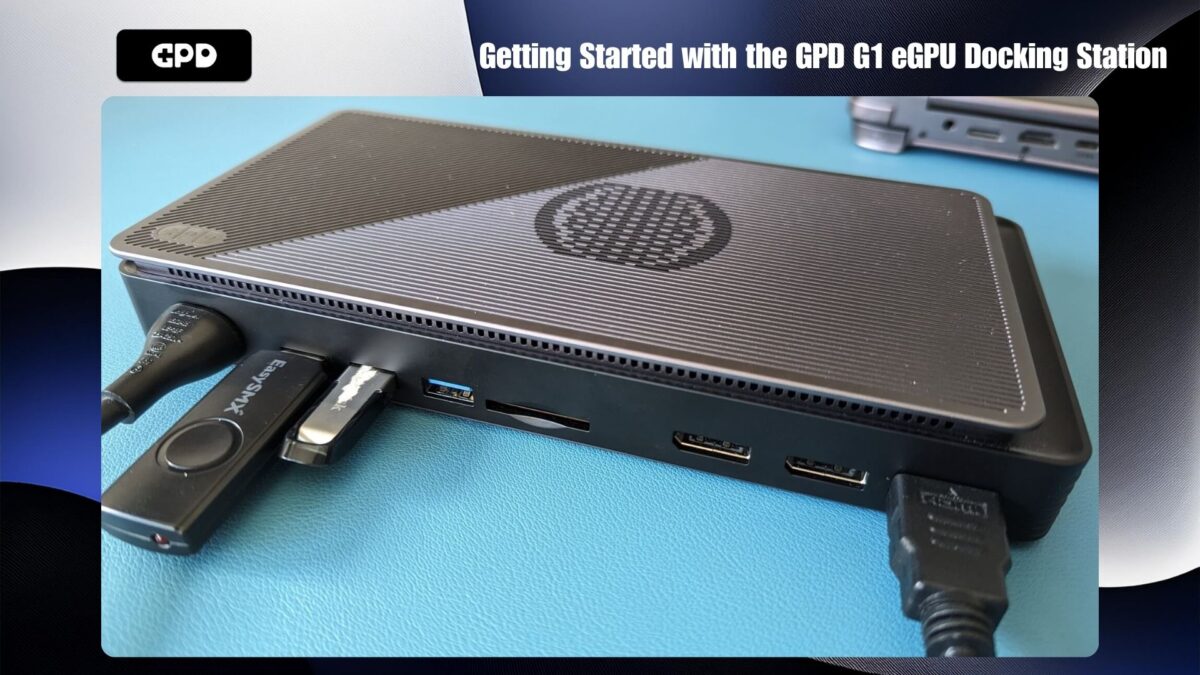
GPD WIN MAX 2 2024や GPD WIN 4 2024のような特定のデバイスでは、OCuLinkポートが利用可能です。これらの新しいデバイスをお持ちの場合、より速いデータ転送速度の恩恵を受けることができます。それ以外の場合は、AYANEOシリーズ、GPDの旧モデル、ONEXPLAYER、AOKZOEハンドヘルドなど、他のデバイスでサポートされているUSB 4.0経由で接続することができます。
OCuLinkとの接続
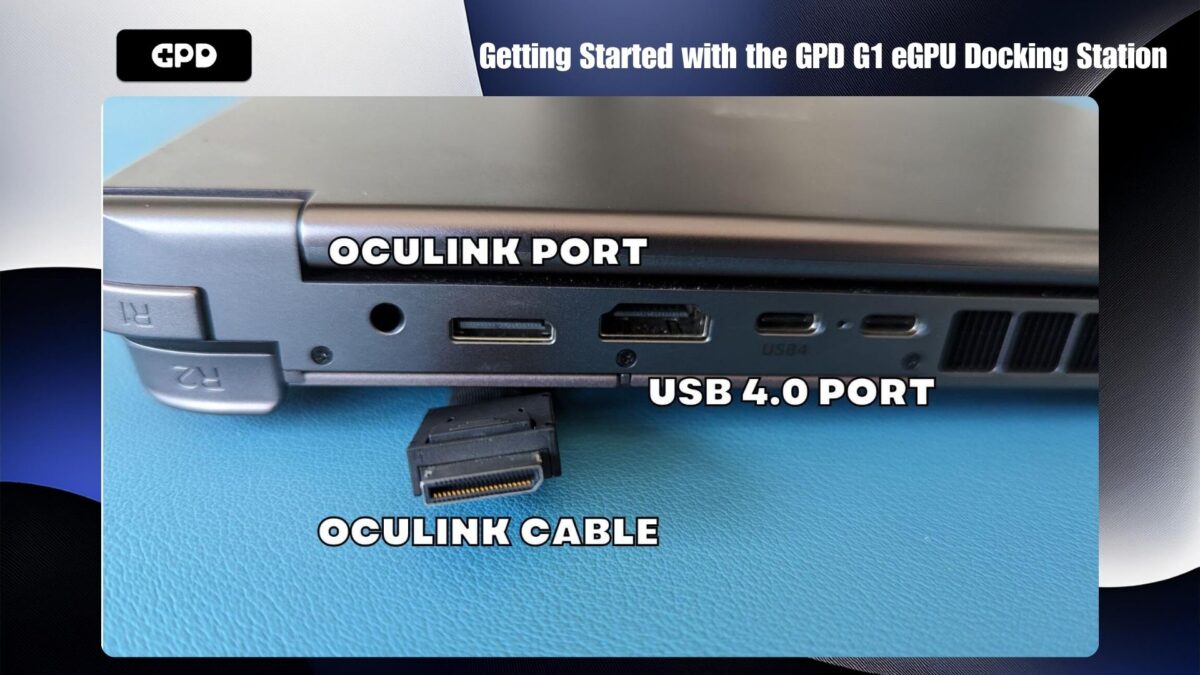
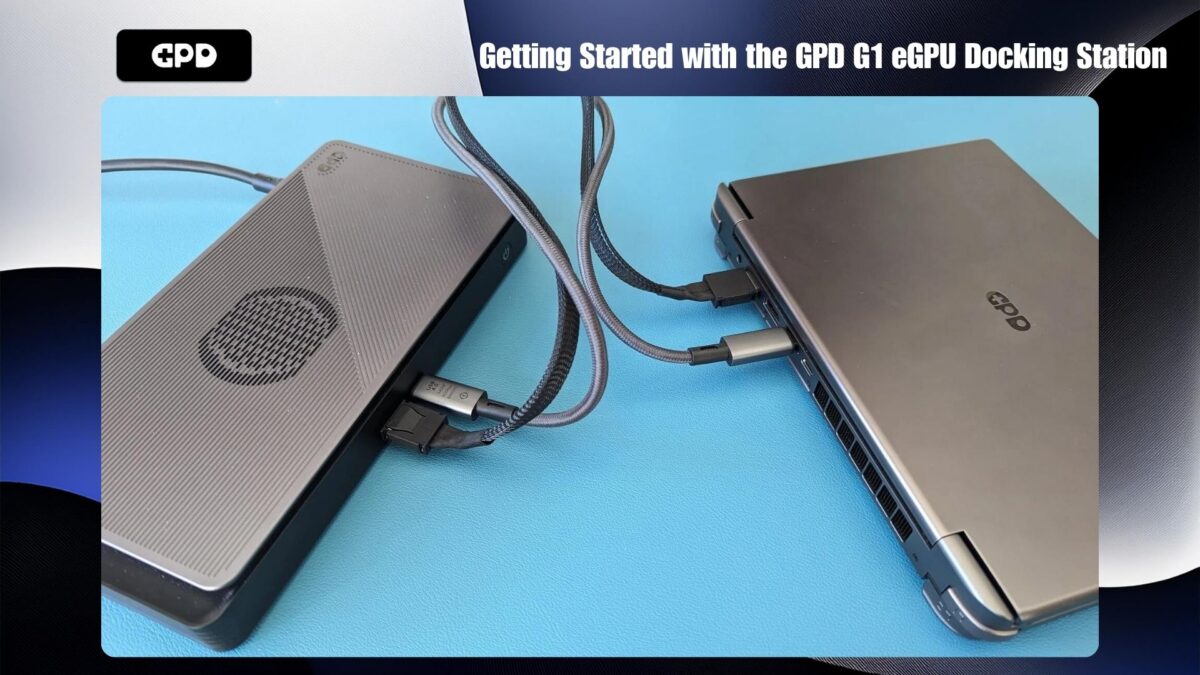
OCuLink 接続を使用する場合、ドッキングステーションのポートを使用したい場合は、OCuLink ケーブルとUSB 4 ケーブルの両方を接続することを忘れないでください。USB 接続は USB 周辺機器、SD カードリーダー、ビデオ出力に必要です。OCuLink ケーブルや USB 4.0 ケーブルを接続する前に、GPD G1 とデバイスの電源がオフになっていることを確認してください。
OCuLinkなしでの接続
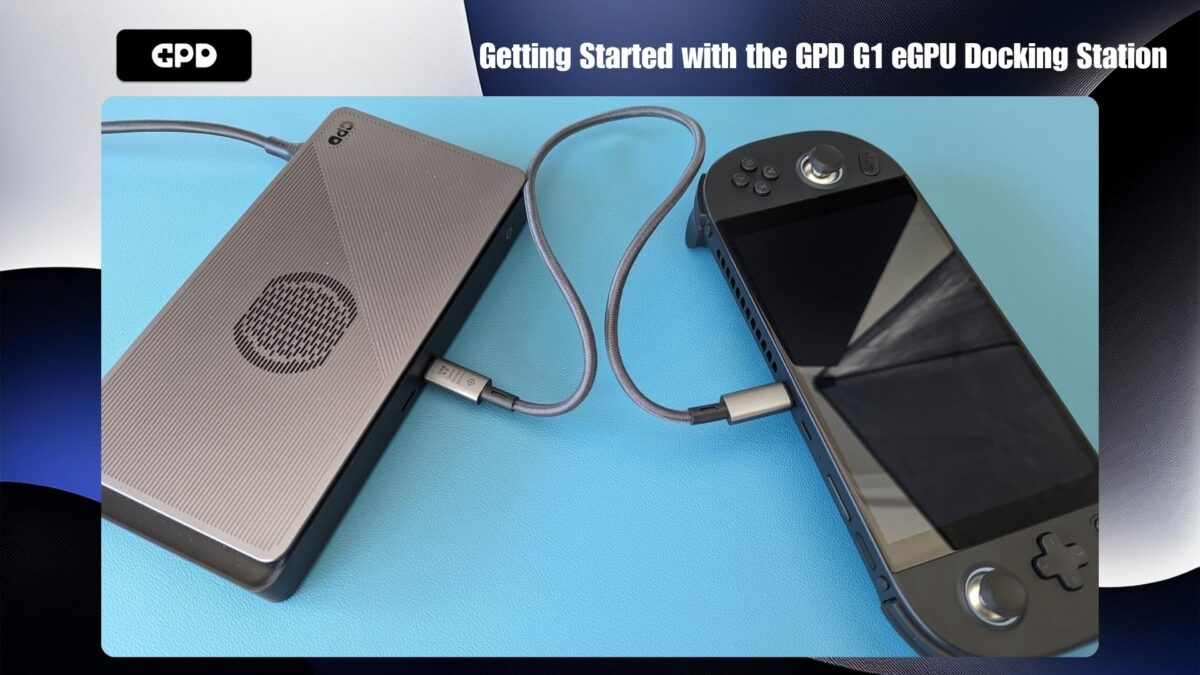
お使いのデバイスにOCuLinkポートがない場合は、USB 4ケーブルをGPD G1とデバイスの間に接続するだけです。お使いのデバイスのどのポートがUSB 4.0に対応しているか再確認してください。
電源オン
すべての接続が完了したら、まず GPD G1 eGPU ドッキングステーションの電源を入れます。数秒待ってからデバイスの電源を入れます。しばらくすると、デバイスが Windows で起動し、GPD G1 で強化されたパフォーマンスを楽しむ準備が整います!
AMDグラフィックスドライバの更新とインストール
グラフィックドライバがすでに最新である場合、GPD G1は自動的に必要なドライバを設定し、インストールすることができます。確認するには、Windowsの[デバイスマネージャ] > [ディスプレイデバイス]を開きます。AMD Radeon RX 7600M XTが表示されていれば、ドライバは正常にインストールされています。
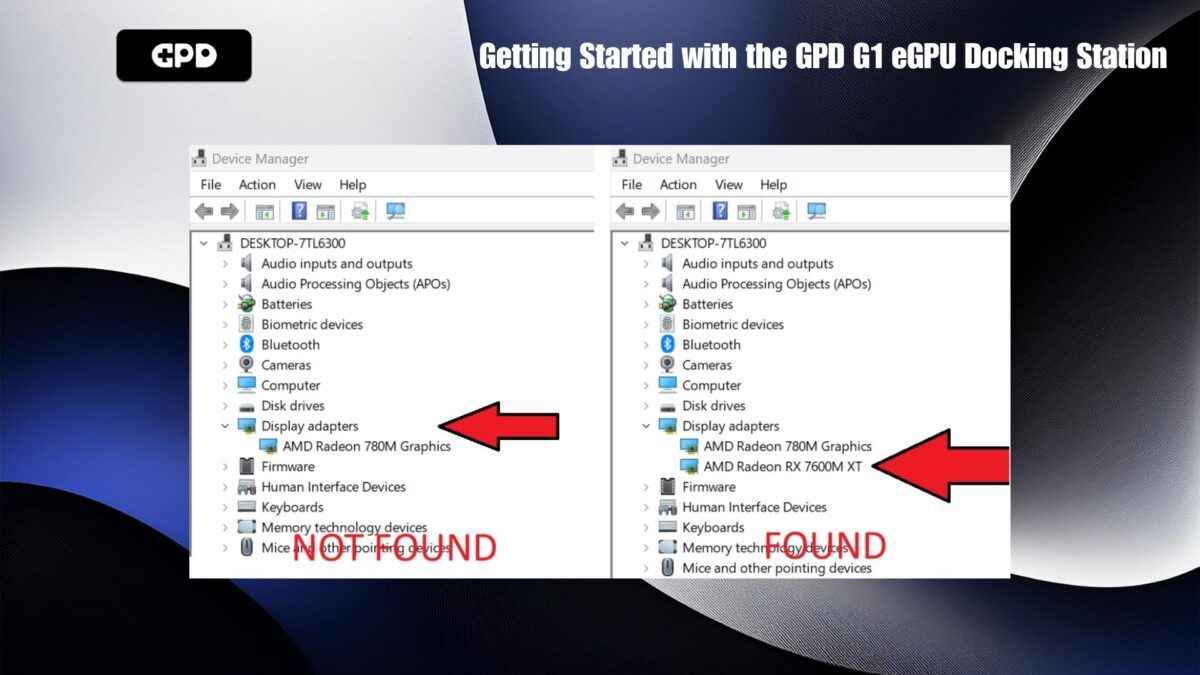
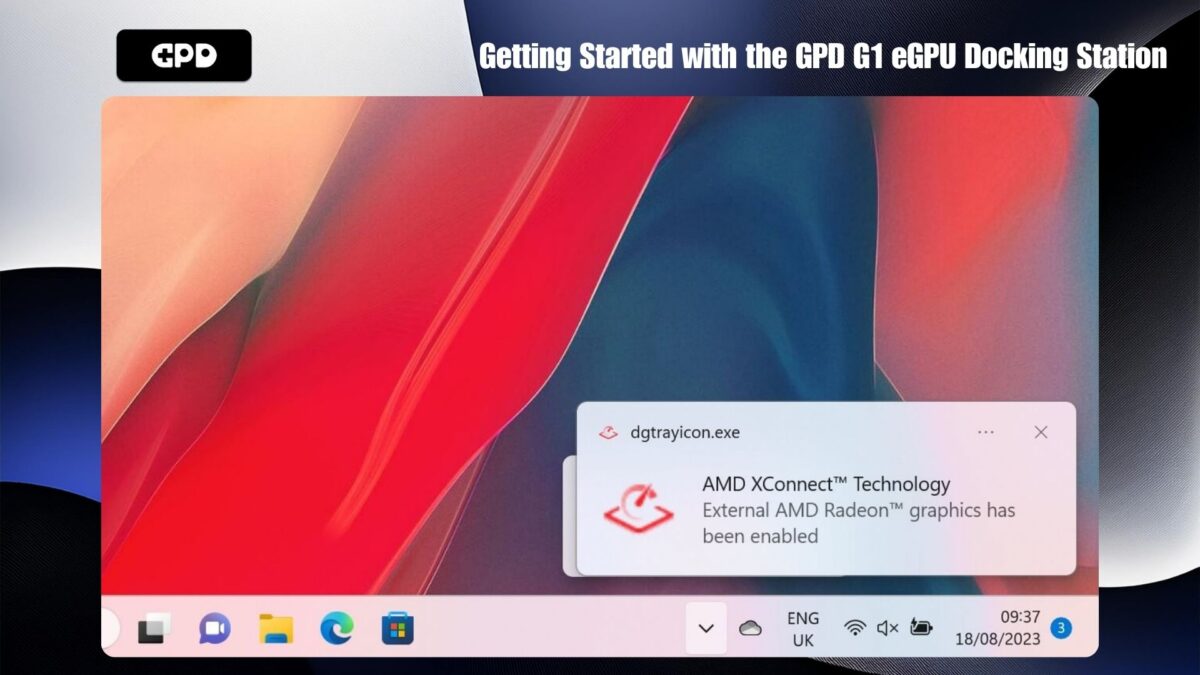
USB 4のみで接続した場合、AMD XConnectテクノロジーが有効であることを示す通知も表示されます。OCuLinkが使用されている場合、この通知は表示されません。
ドライバーのトラブルシューティングとアップデート
eGPUが検出されない場合、または最新のドライバにアップデートしたい場合は、こちらのステップバイステップガイドに従ってください:AMDグラフィックスドライバのアンインストールとインストール方法。
ドライバをアップデートまたはインストールした後、デバイスをシャットダウンし、GPD G1の電源を切ります。しばらく待ってからGPD G1の電源を入れ、デバイスの電源を入れます。
インストールの確認
Windowsが再び起動したら、Windowsの[デバイスマネージャ] > [ディスプレイデバイス]にAMD Radeon RX 7600M XTが表示されていることを確認します。表示されない場合は、GPD G1の電源を切り、10秒待ってから電源を入れ直します。AMD Radeon RX 7600M XTがDisplay Devicesに表示されるはずです。
GPD G1 BIOSのアップデート(オプション)
GPD G1のBIOSをアップデートする必要がある場合、その手順はシンプルで簡単です。専用のG1 BIOSアップデートガイドに従ってください。
GPD G1 eGPUのトラブルシューティング
ゲームの動作が予想より遅いのはなぜ?
ゲームの動作が予想以上に遅い場合、いくつかの要因が考えられます。トラブルシューティングの手順をいくつかご紹介します:
ゲームが正しいGPUを使用していることを確認する:ゲームがAMD Radeon 780Mなどのデバイス内蔵グラフィックスではなく、AMD Radeon RX 7600M XT eGPUを使用していることを確認します。ゲームのビデオ設定またはディスプレイ設定を確認し、GPUを選択するオプションがあるかどうかを確認します。この設定は、”GPU “や “Monitor “などの名前で表示されている場合があります。
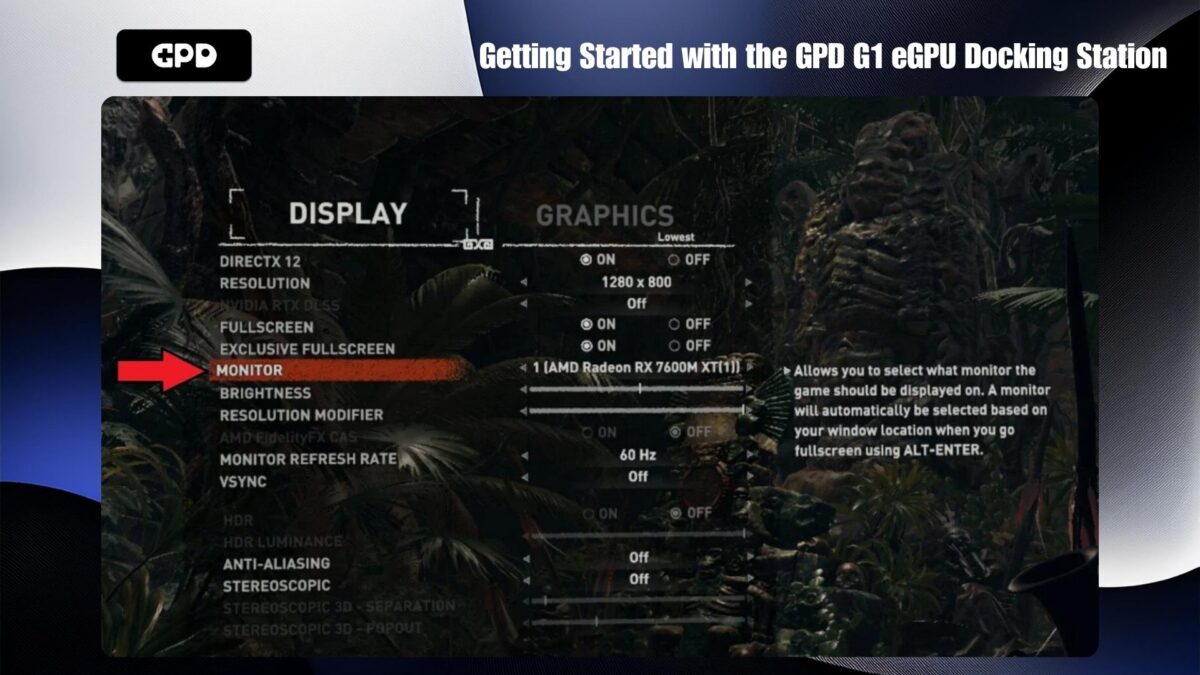
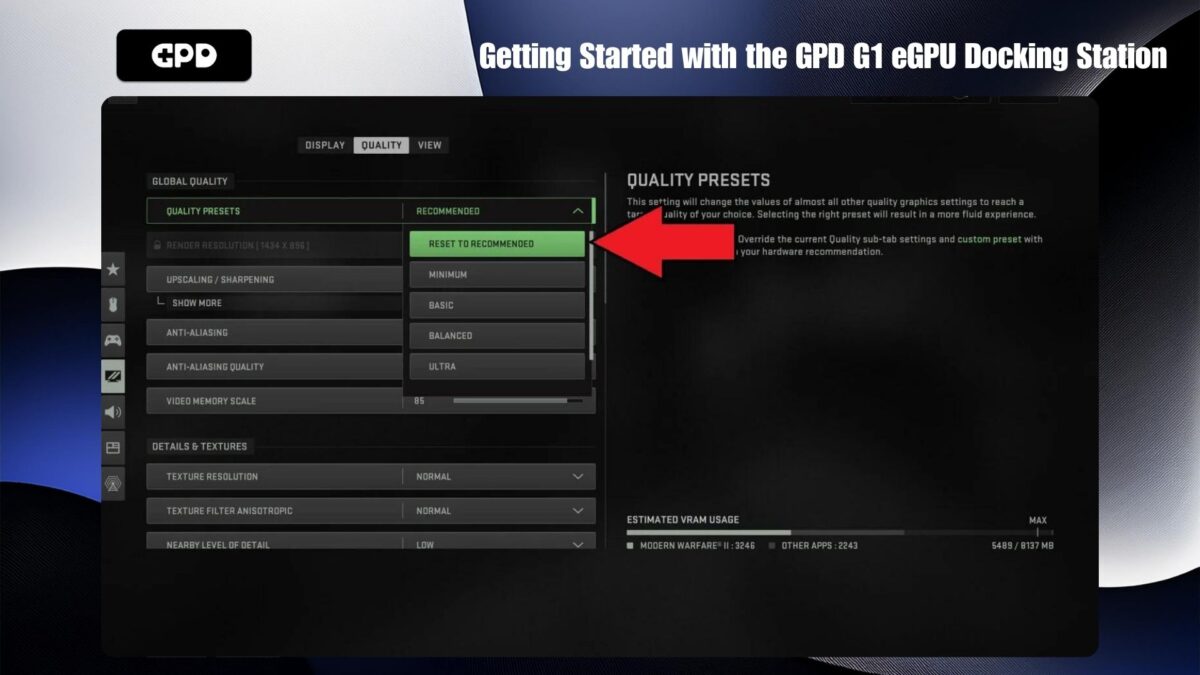
ゲームのビデオ設定を調整する:ビデオ設定が高すぎると、ゲームが期待通りに動作しない場合があります。多くのゲームでは、ハードウェアに応じてグラフィックスを自動的に最適化する推奨設定が用意されています。それでも問題が解決しない場合は、画面解像度を1440P、1080P、あるいは720Pに下げてみてください。または、デフォルトのグラフィック設定を低めに設定し、パフォーマンスが低下し始めるまで徐々に設定を上げます。その後、以前の安定した設定に戻します。
内蔵ディスプレイの考慮事項:ハンドヘルド機の内蔵ディスプレイを使用すると、eGPUの効率が低下することがあります。これは、データがハンドヘルドからGPD G1まで往復する必要があり、USB 4ケーブルを通じて2倍の帯域幅を消費するためです。パフォーマンスを向上させるには、可能な限り外部ディスプレイを使用することをお勧めします。
AMD Radeon RX 7600M XTが検出されない
お使いのデバイスがAMD Radeon RX 7600M XTを検出しない場合は、以下の手順に従ってください:
デバイスの互換性を確認する:お使いのデバイスがOCuLinkまたはUSB 4.0に対応していることを確認してください。すべてのケーブルの両端が正しいポートにしっかりと挿入されていることを確認してください。
USB 4の使用:お使いのデバイスにOCuLinkポートがない場合は、USB 4ポートに接続していることを確認してください。デバイスに複数のType-Cポートがある場合は、マニュアルを参照して正しいUSB 4.0ポートを確認してください。
GPD G1の電源を切る:GPD G1の電源を切り、しばらく待ってから電源を入れ直します。Windowsがデバイスを認識し、デフォルトのUSB接続音が聞こえるはずです。USB 4経由で接続されている場合は、AMD XConnect Technologyが有効になった旨の通知も表示されるはずです。
ドライバを再インストールする:新しいドライバと古いドライバのバージョンが競合することがあります。上記のガイドの手順に従ってドライバを再インストールし、完全にアンインストールして新しいドライバを再インストールしてみてください。
GPD G1の接続性に関する問題の解決
GPD G1の追加ポートを使用するには、OCuLinkケーブルがGPUのデータ転送のみを行うため、USBケーブルを接続する必要があります。GPD G1にはUSB 4.0ケーブルが付属しており、このケーブルを使用することをお勧めします。他のケーブルは、USB 3.0または単なる充電ケーブルである可能性があり、必要な機能を提供しません。
OCuLinkおよびUSB 4.0ケーブルの購入先
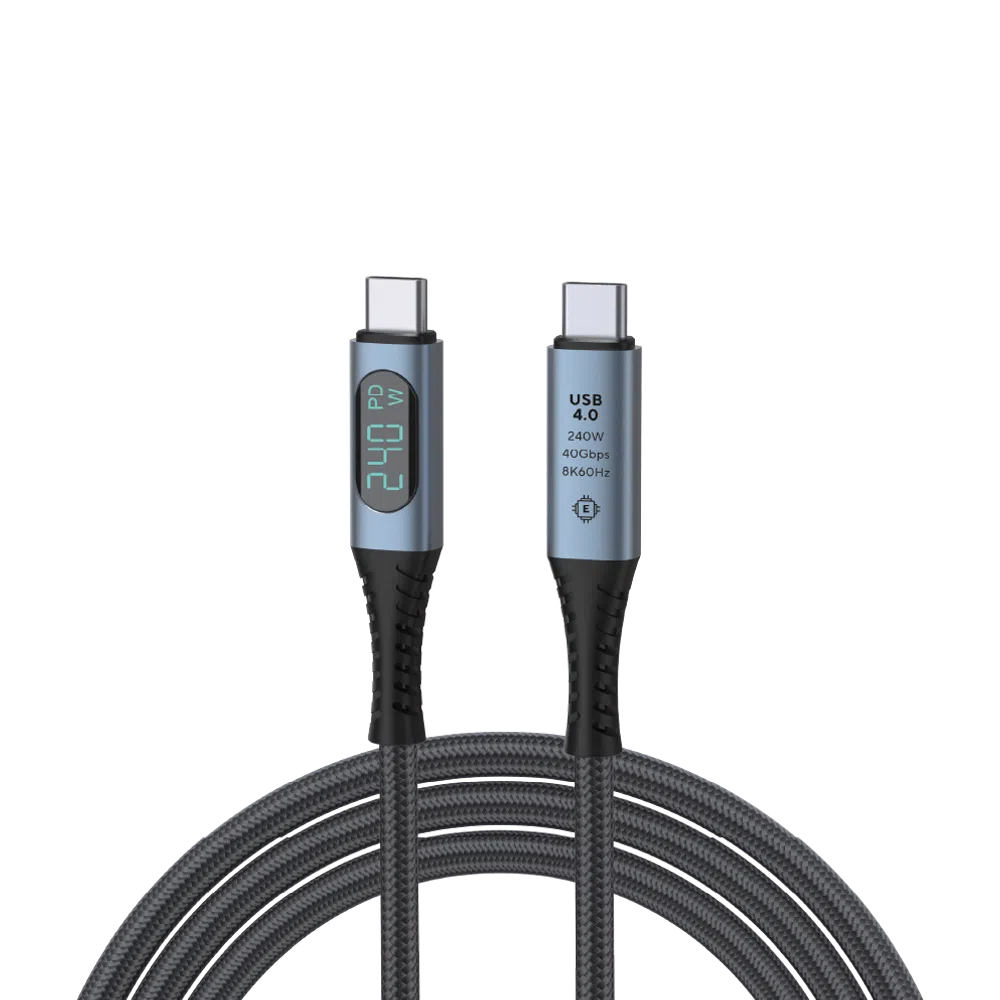
USB 4.0 Type-C Cable
- 40Gbps Data Transfer Speed
- Thunderbolt 3 & 4
- Up to 240W Power Delivery
- Supports up to 8K @ 60Hz Video Output
- Built-In Wattage Display
柔軟で安全な支払いオプション
We use the latest technology in Payment Processing, which allows you to checkout via your Debit/Credit Card, or PayPal for a fast and secure experience.
全GPD製品に2年保証
2 Years Warranty from DROIX Global for your peace of mind
QUALITY ASSURANCE & PRE-DISPATCH TESTING
Ensuring Customer Satisfaction at the Highest Standard: Every device undergoes rigorous testing and a multi-point quality assurance check before it is shipped. Our dedicated team verifies performance, functionality, and component integrity to guarantee your GPD device is in perfect working order upon arrival, providing you with confidence and peace of mind.
価格・税金・送料
Note:
- United States Customers: The displayed price does NOT include TAX nor duties. Liability to clear customs and pay any associated tax/duties lies on the customer.
- EU Customers: The displayed price includes applicable TAX, which may be up to 25% depending on your country.
- Canada Customers: The displayed price includes applicable taxes, which may include 5% GST and additional Provincial Sales Taxes (PST), Harmonized Sales Tax (HST), or Quebec Sales Tax (QST), depending on your province.
For Our USA Customers: Orders are dispatched DAP (Delivered At Place). While customers are responsible for payment of any applicable tariffs, we draw on our extensive experience shipping from the UK to ensure you pay the least possible charge. Based on our records, these charges typically do not exceed 10% of the item value.
For EU Customers ONLY: Express DDP (Delivered Duty Paid). This means:
- All customs duties and taxes are included in the price displayed on the product page.
- You will not need to pay any additional charges upon delivery.
- In the rare event of customs-related issues, our team will handle the customs clearance process on your behalf to ensure a smooth delivery experience.
- If you decide to return your order or request a refund, please be aware that taxes and duties paid on your behalf under DDP terms cannot be refunded.
Important Information About Returns:
Please refer to our Terms & Conditions for detailed information.
カスタマーサポート
Got a question? We’re a short text away from having your issue sorted!
Please refer to our Terms & Conditions for detailed information.
同梱内容
- 1x USB 4.0 Type-C Cable
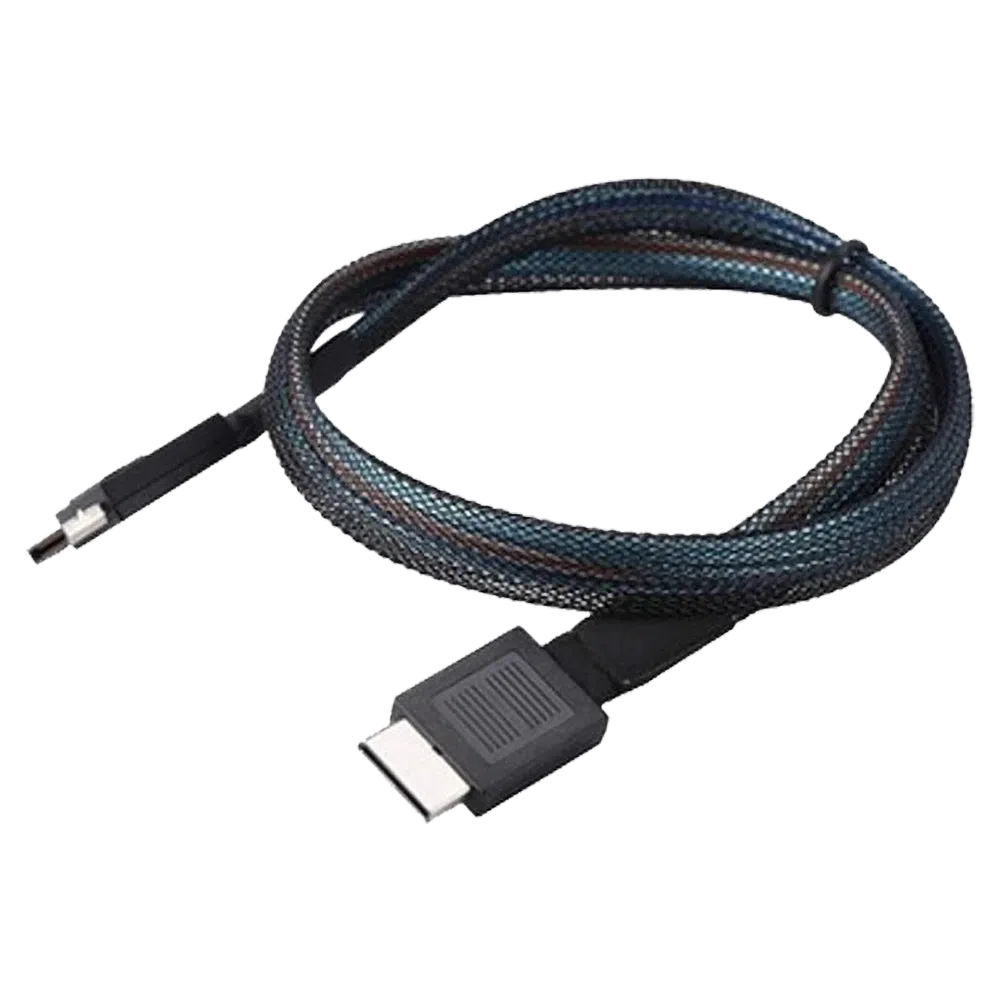
GPD OCuLink SFF8611 Cable
- Official GPD OCuLink Cable
- Compatible With GPD G1 eGPU
- Adapter For Devices Without OCuLink
- Support for PCIe Gen 4.0 & 5.0
- Speeds Up To 16GT/s & 32 GT/s Per Lane
柔軟で安全な支払いオプション
We use the latest technology in Payment Processing, which allows you to checkout via your Debit/Credit Card, or PayPal for a fast and secure experience.
全GPD製品に2年保証
2 Years Warranty from DROIX Global for your peace of mind
QUALITY ASSURANCE & PRE-DISPATCH TESTING
Ensuring Customer Satisfaction at the Highest Standard: Every device undergoes rigorous testing and a multi-point quality assurance check before it is shipped. Our dedicated team verifies performance, functionality, and component integrity to guarantee your GPD device is in perfect working order upon arrival, providing you with confidence and peace of mind.
価格・税金・送料
Note:
- United States Customers: The displayed price does NOT include TAX nor duties. Liability to clear customs and pay any associated tax/duties lies on the customer.
- EU Customers: The displayed price includes applicable TAX, which may be up to 25% depending on your country.
- Canada Customers: The displayed price includes applicable taxes, which may include 5% GST and additional Provincial Sales Taxes (PST), Harmonized Sales Tax (HST), or Quebec Sales Tax (QST), depending on your province.
For Our USA Customers: Orders are dispatched DAP (Delivered At Place). While customers are responsible for payment of any applicable tariffs, we draw on our extensive experience shipping from the UK to ensure you pay the least possible charge. Based on our records, these charges typically do not exceed 10% of the item value.
For EU Customers ONLY: Express DDP (Delivered Duty Paid). This means:
- All customs duties and taxes are included in the price displayed on the product page.
- You will not need to pay any additional charges upon delivery.
- In the rare event of customs-related issues, our team will handle the customs clearance process on your behalf to ensure a smooth delivery experience.
- If you decide to return your order or request a refund, please be aware that taxes and duties paid on your behalf under DDP terms cannot be refunded.
Important Information About Returns:
Please refer to our Terms & Conditions for detailed information.
カスタマーサポート
Got a question? We’re a short text away from having your issue sorted!
Please refer to our Terms & Conditions for detailed information.
同梱内容
- 1x GPD OCuLink SFF8611 Cable
- 1x M.2 8612 Adapter Card
¥7 098
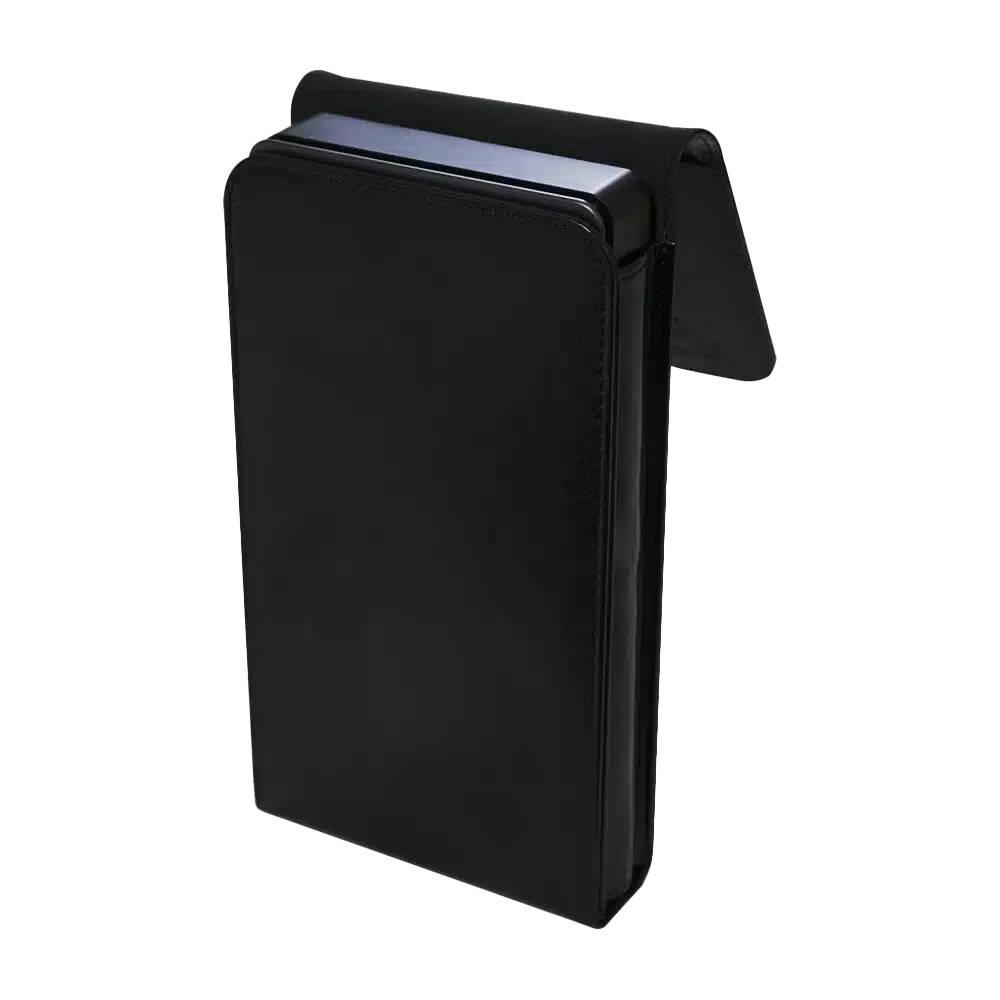
GPD G1 eGPU Docking Station – Protective Case
- Official GPD G1 eGPU Case
- Small Yet Secure
- Sleek & Stylish Design
- Soft Lined Interior
- Snug Fit For The GPD G1
柔軟で安全な支払いオプション
We use the latest technology in Payment Processing, which allows you to checkout via your Debit/Credit Card, or PayPal for a fast and secure experience.
全GPD製品に2年保証
2 Years Warranty from DROIX Global for your peace of mind
QUALITY ASSURANCE & PRE-DISPATCH TESTING
Ensuring Customer Satisfaction at the Highest Standard: Every device undergoes rigorous testing and a multi-point quality assurance check before it is shipped. Our dedicated team verifies performance, functionality, and component integrity to guarantee your GPD device is in perfect working order upon arrival, providing you with confidence and peace of mind.
価格・税金・送料
Note:
- United States Customers: The displayed price does NOT include TAX nor duties. Liability to clear customs and pay any associated tax/duties lies on the customer.
- EU Customers: The displayed price includes applicable TAX, which may be up to 25% depending on your country.
- Canada Customers: The displayed price includes applicable taxes, which may include 5% GST and additional Provincial Sales Taxes (PST), Harmonized Sales Tax (HST), or Quebec Sales Tax (QST), depending on your province.
For Our USA Customers: Orders are dispatched DAP (Delivered At Place). While customers are responsible for payment of any applicable tariffs, we draw on our extensive experience shipping from the UK to ensure you pay the least possible charge. Based on our records, these charges typically do not exceed 10% of the item value.
For EU Customers ONLY: Express DDP (Delivered Duty Paid). This means:
- All customs duties and taxes are included in the price displayed on the product page.
- You will not need to pay any additional charges upon delivery.
- In the rare event of customs-related issues, our team will handle the customs clearance process on your behalf to ensure a smooth delivery experience.
- If you decide to return your order or request a refund, please be aware that taxes and duties paid on your behalf under DDP terms cannot be refunded.
Important Information About Returns:
Please refer to our Terms & Conditions for detailed information.
カスタマーサポート
Got a question? We’re a short text away from having your issue sorted!
Please refer to our Terms & Conditions for detailed information.
同梱内容
- 1x GPD G1 Case
Questions on this guide
1 answeredRyzen Z1 Extreme搭載モデルへの対応を是非お願いします。

すでにそうなっていると思いますが、この CPU モデルでは AMD ドライバーが非常に問題になる場合があります。


