



GPD Windows Handheld Gaming PC:t ja konsolit

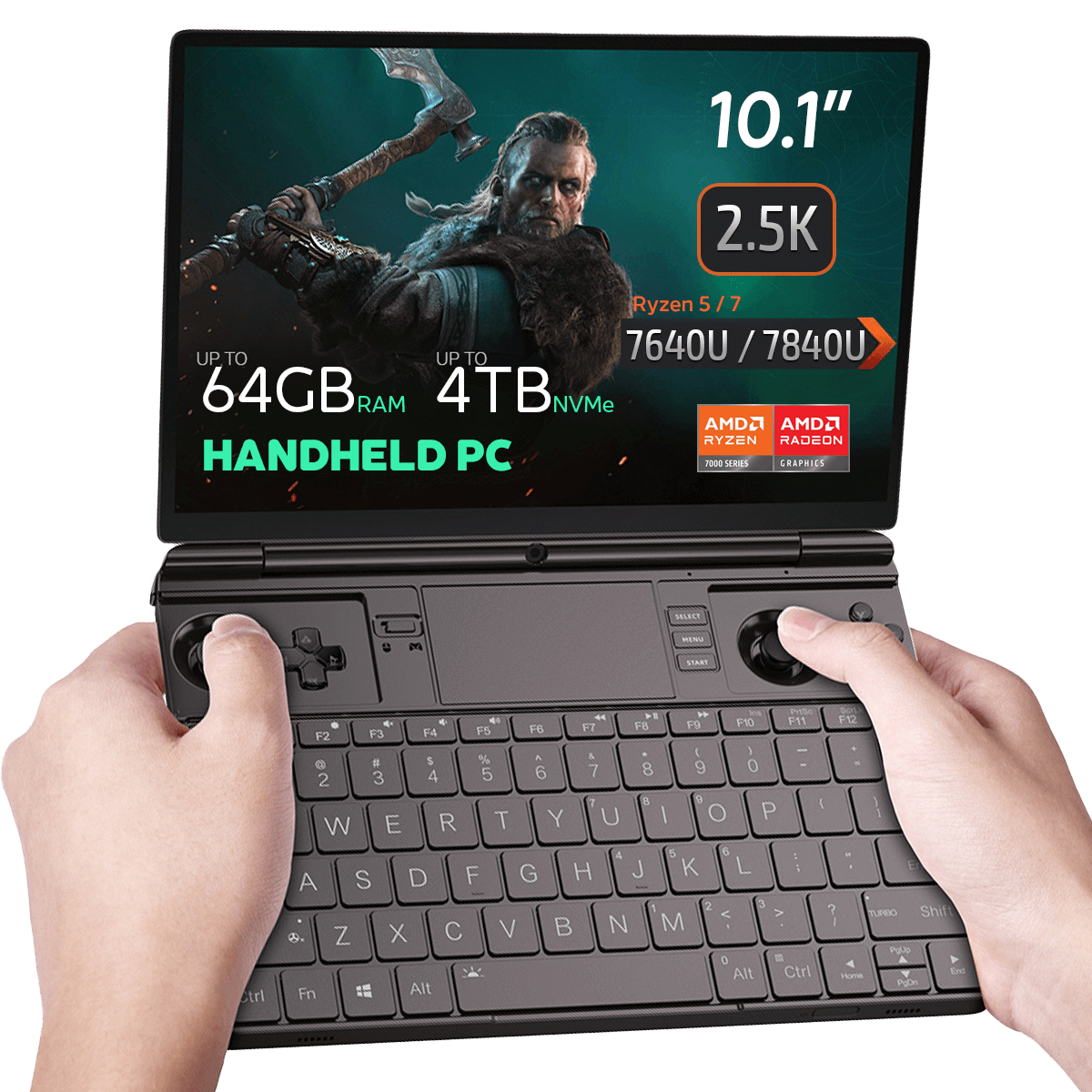
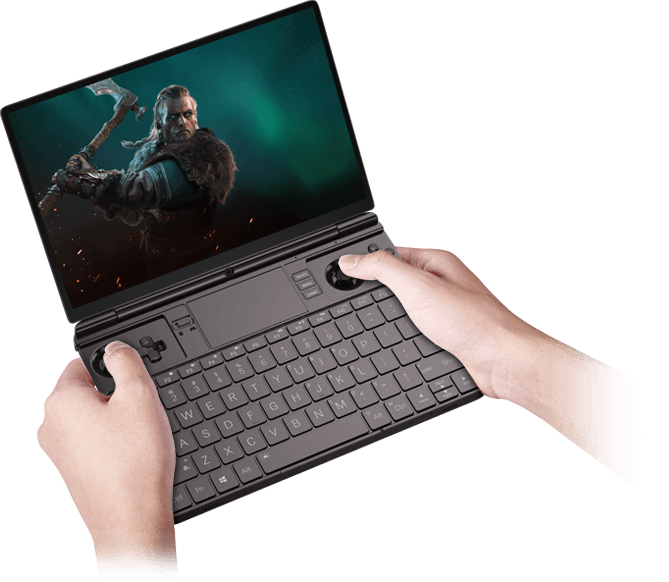
GPD WIN MAX 2 2023 pelikäyttöön tarkoitettu kannettava tietokone

67Wh Battery Key Feature
67Wh Battery

AMD Radeon GPU
AMD Radeon

AMD Ryzen Processor
AMD Ryzen

Bluetooth 5.2 Key Feature
Bluetooth 5.2

Wi-Fi 6 Key Feature
Wi-Fi 6

Mini PC ready for Windows 11 Update
Windows 11

  • CPU: 7 7640U / 7840U.
  • GPU: AMD Radeon 760M / 780M
  • RAM-muisti: enintään 64 Gt LPDDR5X @ 6400 MT/s
  • TALLENNUS: jopa 4TB Gen 3 PCI-E NVMe SSD-levy
  • LIITÄNTÄ: Wi-Fi 6 & Bluetooth 5.2 -tuki
Maksutiedot

Käytämme uusinta tekniikkaa maksujen käsittelyssä, jonka avulla voit tehdä maksun pankki- tai luottokortilla tai PayPalilla, mikä takaa nopean ja turvallisen kokemuksen.

Takuu
Laadunvarmistus ja lÄhetystÄ edeltÄvÄ testaus

Asiakastyytyväisyyden varmistaminen korkeimmalla tasolla: Jokainen laite testataan tiukasti ja sille tehdään monipisteinen laadunvarmistustarkastus ennen sen lähettämistä. Asialle omistautunut tiimimme tarkistaa suorituskyvyn, toimivuuden ja komponenttien eheyden, jotta GPD-laitteesi on saapuessaan täydellisessä toimintakunnossa, mikä antaa sinulle luottamusta ja mielenrauhaa.

Hinnoittelu, verot ja toimitukset

Huom:

  • Yhdysvallat Asiakkaat: Asiakkaat: Näytetty hinta EI sisällä veroja eikä tulleja. Vastuu tulliselvityksestä ja siihen liittyvien verojen/tullien maksamisesta on asiakkaalla.
  • EU:n asiakkaat: Näytetty hinta sisältää sovellettavan veron, joka voi olla jopa 25 % maastasi riippuen.
  • Kanada Asiakkaat: Näytetty hinta sisältää sovellettavat verot, joihin voi sisältyä 5 % GST ja ylimääräisiä maakunnallisia myyntiveroja (PST), harmonisoitua myyntiveroa (HST) tai Quebecin myyntiveroa (QST) maakunnasta riippuen.

AINOASTAAN EU:n asiakkaille: Express DDP (Delivered Duty Paid). Tämä tarkoittaa:

  • Kaikki tullit ja verot sisältyvät tuotesivulla ilmoitettuun hintaan.
  • Sinun ei tarvitse maksaa lisämaksuja toimituksen yhteydessä.
  • Harvinaisissa tulliin liittyvissä tapauksissa tiimimme hoitaa tulliselvitysprosessin puolestasi varmistaakseen sujuvan toimituksen.
  • Tärkeää tietoa palautuksista:

  • Jos päätät palauttaa tilauksesi tai pyytää palautusta, ota huomioon, että DDP-ehtojen mukaisesti puolestasi maksettuja veroja ja tulleja ei voida palauttaa.
  • Katso yksityiskohtaiset tiedot käyttöehdoistamme.

Asiakastuki

Onko kysyttävää? Olemme lyhyen tekstiviestin päässä siitä, että ongelmasi on ratkaistu!

Katso yksityiskohtaiset tiedot käyttöehdoistamme.

MitÄ sisÄltyy
  • 1x GPD WIN MAX 2 2023
  • 1x virtalähde
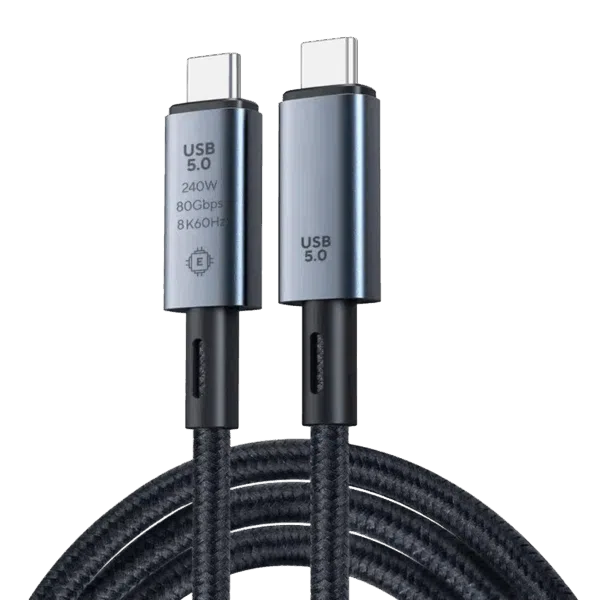
  • 1x USB Type-C-kaapeli
  • 1x Käyttöohje

Saatavuus:

Varasto loppu

871,55  inc.TAX

16ihmistä katsoo tätä juuri nyt

Tuotetta ei ole varastossa eikä myytävänä.

-

gpd win max 2

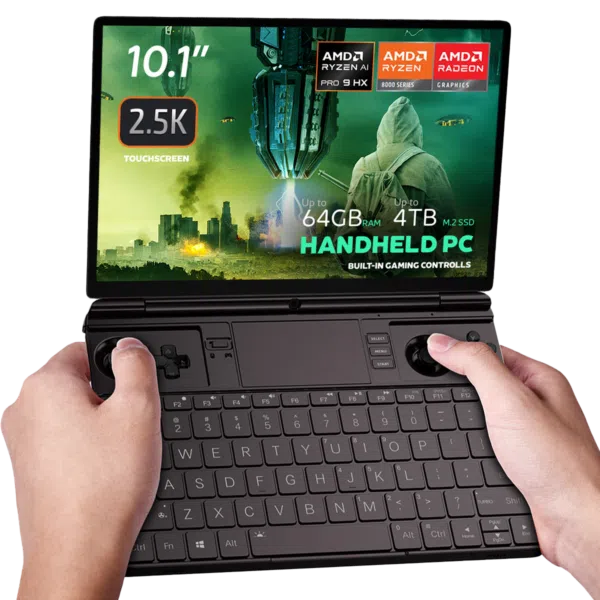
GPD WIN MAX 2 2023 Handheld Gaming PC – AMD Ryzen 7 7840U (Zen 4), 10.1″ 2.5K Display, 64GB RAM, OcuLink Support

Why pay 2025 flagship prices when the GPD WIN MAX 2 2023 remains a top-tier contender? Powered by the legendary AMD Ryzen 7 7840U, this device is the ultimate “Silicon Sweet Spot” for gamers and professionals who demand 2.5K resolution and desktop-grade multitasking without the 2025 premium.

Engineered for Excellence: Monipuolisuus ja älykäs jäähdytys.
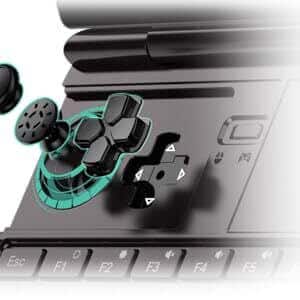
painikkeen poisto gpd win max 2:lle

Hall-anturin etu: Miten magneettinen induktio poistaa “keppien ajautumisen” ja fyysisen kulumisen.

Perinteinen potentiometritikku, joka luottaa vastusharjaan jännitesignaalin luomiseksi, on altis ”ajautumisongelmille”, jotka johtuvat kulumisesta pitkäaikaisessa käytössä. WIN Max 2 2023:n myötä olemme ensimmäistä kertaa tuoneet markkinoille Hall-anturitikut, joissa on sisäänrakennettu induktanssikela. Magneettisen induktion toimintaperiaate (eri magneettivuo syntyy, kun keppi pyörii eri asentoihin, mikä puolestaan tuottaa erilaisia jännitesignaaleja) määrää sen, että Hall-anturikepit eivät kulu, eikä niissä näin ollen esiinny keppien ajautumista.

magneettikannet gpd:tä varten

Magnetic Stealth Covers: Hide the joysticks for a clean, professional look in meetings.

Kädessä pidettävään pelitietokoneeseen sisäänrakennettu peliohjain voi tehdä siitä sopimattoman työpaikalle! Ongelman ratkaisemiseksi lisäsimme WIN Max 2 2023:een kaksi tikun suojusta. Magneettinen muotoilu varmistaa, etteivät nämä kaksi suojusta putoa irti laitetta käytettäessä. Kun pelaat pelejä, voit myös pakata kannet takalokeroon, mikä auttaa estämään vahingossa tapahtuvan katoamisen!
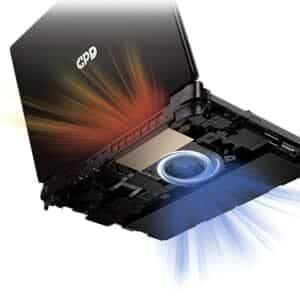
jäähdytys win max 2

Kehittynyt laitteisto: Lämpöjohtimet: Korkean suorituskyvyn turbofanin ja kahden lämpöputken hyödyntäminen vankan ilmavirran aikaansaamiseksi.

GPD WIN MAX 2 2023:ssa on parannettu PC-luokan jäähdytysjärjestelmä, jossa on suuri turbofan + kaksi lämpöputkea, joissa on suuri sivuttaisilmapuhallus ja erittäin älykäs nopeuden säätö. Kun sisälämpötila on alle 40 °C, tuulettimen nopeus ei ylitä 20 % maksimitehosta. Kun sisälämpötila nousee yli 40 °C:n, tuulettimen nopeus nousee 2 %:n PWM-askeleilla, kunnes se saavuttaa maksimikynnyksen (100 %).

VISUAALINEN ILO: 10,1 TUUMAN KOSKETUSNÄYTTÖ
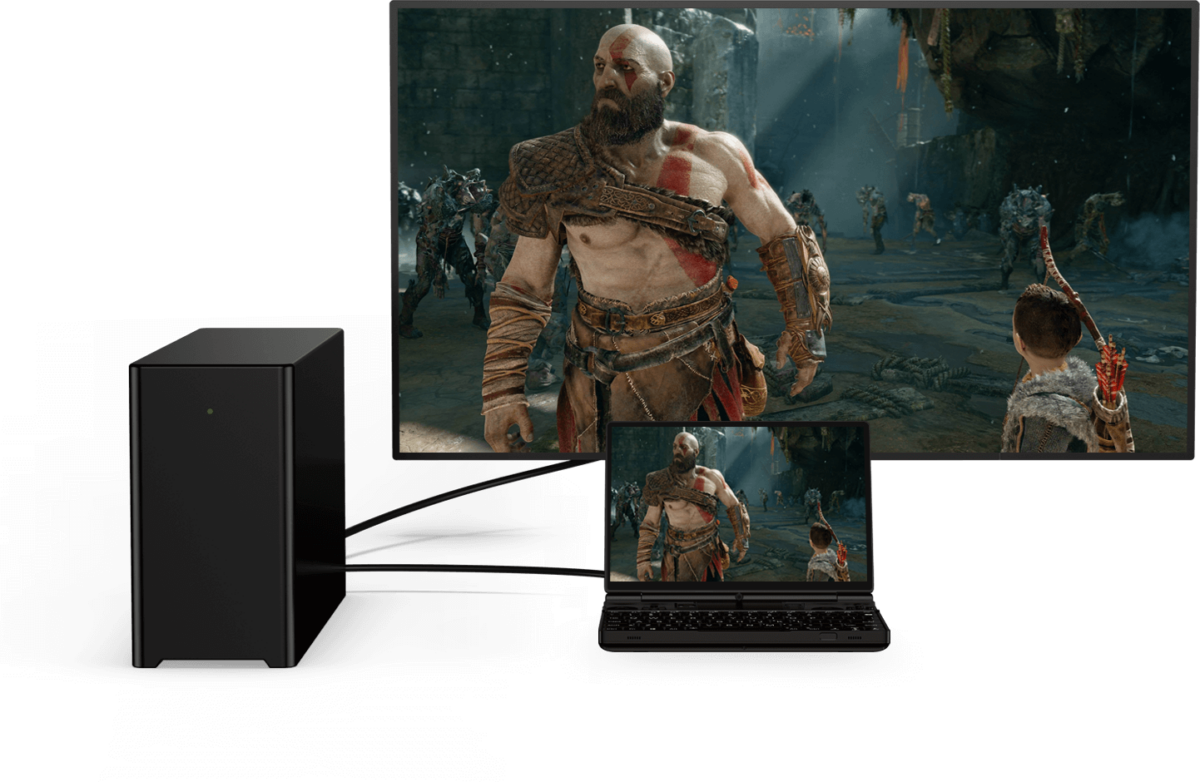
GPD win max PC:llä

Valmistaudu hämmästymään GPD WIN MAX 2 2023:n 10,1 tuuman 10-pisteen Touch Control -kosketusnäytöstä. 16:10-kuvasuhteen ja 1920×1200-resoluution ansiosta tämä elinvoimainen näyttö tarjoaa upeaa visuaalista kuvaa. Se tukee jopa 2560×1600-resoluutiota ja 299 PPI:n pikselitiheyttä , joten jokainen yksityiskohta on terävä ja selkeä, mikä takaa mukaansatempaavan pelikokemuksen.

Zen 4 Performance: The Emulation King

The 7840U Phoenix architecture remains a fan favorite in 2025 for its incredible efficiency.

Native OcuLink: Skip the USB4 bottlenecks. Connect directly to the GPD G1 eGPU for a 4K desktop experience.

Pro-Grade Emulation: Native AVX-512 support allows for superior PS3 (RPCS3) and Xbox 360 (Xenia) performance compared to many newer, more expensive handhelds.

Software Boosted: Fully compatible with AMD AFMF 2 and FSR 3.1, allowing you to play AAA titles at smooth frame rates on the 10.1″ screen.

HÄMMÄSTYTTÄVÄ GRAFIIKKA: AMD RADEON 780M GPU

GPD WIN MAX 2 2023:n upeat grafiikat saavat sinut häkeltymään AMD Radeon 780M -näytönohjaimen ansiosta . Tämä tehokas näytönohjain tarjoaa tasaiset ruudunpäivitysnopeudet ja henkeäsalpaavat grafiikat visuaalisesti upeaa pelikokemusta varten.

VERTAANSA VAILLA OLEVA MUISTI: JOPA 64 GIGATAVUA LPDDR5-MUISTIA

GPD WIN MAX 2 2023 on varustettu salamannopealla 6400 MT/s LPDDR5 RAM-muistilla, joka takaa nopeat latausajat, saumattoman moniajon ja sujuvan pelaamisen vaativissa tilanteissa.

PALJON SÄILYTYSTILAA: M.2 NVME 2280 SSD 4TB.

Unohda tallennustilan loppuminen tilavan M.2 NVME 2280 SSD-levyn kanssa, jonka kapasiteetti on huikeat 4 Tt. Sano hyvästit pelien poistamiselle tilan vuoksi; GPD WIN MAX 2 2023:n avulla mahdollisuudet ovat rajattomat.

PYSY YHTEYDESSÄ: WI-FI 6 JA BLUETOOTH 5.2.

Liitettävyys on avainasemassa, sillä WiFi 6 tarjoaa salamannopeat ja vakaat internetyhteydet, jotka takaavat sujuvan verkkopelikokemuksen. Bluetooth 5.2: n avulla voit liittää langattomia oheislaitteita, jotta pelikokemus olisi todella mukaansatempaava.

SAUMATON LIITETTÄVYYS: MONIPUOLISET PORTIT

GPD WIN MAX 2 2023:ssa on useita portteja kaikkiin peli- ja oheislaitetarpeisiin. 1x USB 4, 1x USB 3.2 Gen 2 Type-C, 2x USB 3.2 Gen 2 Type-A -portti ja OCuLink(SFF-8612)-portti mahdollistavat ulkoisten laitteiden liittämisen helposti.

PARANNETUT OMINAISUUDET TAKAAVAT VERTAANSA VAILLA OLEVAN MUKAVUUDEN

GPD WIN MAX 2 2023 tarjoaa saumattoman pelikokemuksen sormenjälkitunnistimella, joka mahdollistaa laitteen lukituksen nopean ja turvallisen avaamisen. Microsoft Precision Touchpad (PTP) varmistaa kursorin sujuvan ja tarkan ohjauksen, ja taustavalaistu näppäimistö mahdollistaa pelaamisen hämärässä.

VOIMAA, JOKA KESTÄÄ: PITKÄKESTOINEN AKUN KÄYTTÖIKÄ

GPD WIN MAX 2 2023:n 67Wh:n Li-polymeeriakku tarjoaa jopa 3 tuntia kovaa käyttöä, 6-8 tuntia kohtalaista käyttöä ja vaikuttavan 14 tuntia kevyttä käyttöä, mikä takaa luotettavan ja pitkäikäisen virtalähteen pelaajille.

KOMPAKTI JA KEVYT RAKENNE

GPD WIN MAX 2 2023 tarjoaa tehokkaan suorituskyvyn kompaktissa ja kevyessä rakenteessa, jonka mitat ovat vain 8,9 x 6,2 x 0,9 tuumaa ja paino vain 1005 g. Se on valmistettu korkealaatuisista materiaaleista, mikä takaa kestävyyden ja laadukkaan rakenteen matkalla tapahtuvaa pelaamista varten.

WINDOWS 11 HOME ESIASENNETTUNA

GPD WIN MAX 2 2023 on esiasennettu Windows 11 Home-käyttöjärjestelmällä , joka tarjoaa optimoidun pelikokemuksen intuitiivisen käyttöliittymän ja parannettujen peliominaisuuksien ansiosta.

PÄÄTELMÄ

GPD WIN MAX 2 2023 on äärimmäinen kannettava pelitietokone, joka tarjoaa huippuluokan pelisuorituskykyä kompaktissa muodossa. AMD Ryzen 7 7840U- tai Ryzen 5 7640U -suorittimen, AMD Radeon 780M -näytönohjaimen ja jopa 64 Gt:n RAM-muistin ansiosta se takaa erinomaisen suorituskyvyn vaativissa peleissä. 10,1 tuuman kosketusohjausnäyttö, monipuoliset liitäntävaihtoehdot ja kätevät ominaisuudet tekevät pelaamisesta matkalla helppoa. Pitkäkestoisen akun ja kompaktin muotoilun ansiosta voit nauttia pelaamisesta ilman rajoja.

GPD WIN MAX 2 2023:n hyvät puolet:

  1. Powerful Performance: AMD Ryzen 7 7840U CPU and Ryzen 5 7640U with AMD Radeon 780M GPU deliver impressive performance for demanding games.
  2. Compact and Portable: The GPD WIN MAX 2 2023 offers unparalleled portability, making it easy to game on the go.
  3. Stunning Display: The 10.1″ touch control display provides vibrant visuals and a high-resolution experience.
  4. Versatile Connectivity: The GPD WIN MAX 2 2023 offers a range of ports and wireless connectivity options, ensuring seamless integration with peripherals and online gaming experiences.
  5. Ample Storage: The spacious 4TB SSD eliminates the need to constantly delete and reinstall games.

Order Your GPD WIN MAX 2 – In Stock & Ready to Ship

Get the industry’s most versatile work-and-play hybrid with a full 12-month official warranty.

  • Status: In Stock (Ships within 24 hours).
  • Shipping: Insured worldwide express delivery.
  • Support: Authorized GPD technical assistance included.

Lue koko GPD WIN MAX 2 2023 -arvostelumme täältä yksityiskohtaisten toimintojen, vertailuarvojen, pelattavuuden ja emuloinnin suorituskyvyn osalta.
Lisätiedot

More

Kunto

New, Refurbished (Class A), Refurbished (Class B)

Merkki

Käyttöjärjestelmä

Windows 11 Home

Prosessorin (CPU) merkki

AMD

Prosessori (CPU) Perustaajuus

AMD Ryzen™ 5 7640U – 3.5GHz, AMD Ryzen™ 7 7840U – 3.3GHz

Prosessori (CPU) Maksimitaajuus

AMD Ryzen™ 5 7640U – 4.9GHz, AMD Ryzen™ 7 7840U – 5.1GHz

Prosessori (CPU) Ytimet / säikeet

AMD Ryzen™ 5 7640U – 6 Cores / 12 Threads, AMD Ryzen™ 7 7840U – 8 Cores / 16 Threads

Prosessori (CPU) TDP

15-30W

Grafiikkayksikön (GPU) merkki

AMD

Grafiikka (GPU) Maksimitaajuus

Radeon™ 760M – 2600 MHz, Radeon™ 780M – 2700 MHz

Grafiikkaytimet (GPU)

Radeon™ 760M – 8, Radeon™ 780M – 12

Näytön tarkkuus / PPI

2560*1600 @ 299 PPI

Muistin (RAM) kapasiteetti

, ,

Muisti (RAM) Tekniikka

Muisti (RAM) Nopeus

6400 MT/s

Varastointikapasiteetti

, ,

Tallennuksen laajentaminen

1x Micro SD Card Slot, 1x PCI-e 22*30 NVMe Port, 1x PCI-e 22*80 NVMe Port (Used)

Varastointiteknologia

I/O Audio

3.5mm Headphone&Microphone Combo Jack, Built-In: Stereo Speakers / Microphone Setup

I/O USB

1x USB 3.2 Gen 2 Type-C, 1x USB 4.0 Type-C @ 40GB/s, 2x USB Type-A 3.2 Gen 2

Wi-Fi

Bluetooth

Paino

1005 g (gramma)

Mitat

227 × 16 × 23 cm (senttimetri)

Lataukset

Kaikki variantit

Fix / Patch
3D Printing Files for M.2 to Oculink Adapter Cover — GPD G1, GPD WIN MAX 2 2023-09-13 · 412.3 KB · isännöi DROIX
Lataa
Muutosloki
VIIMEISIN 2023-09-13 412.3 KB ← nykyinen lataus
  • 3D Printing Files for M.2 to Oculink Adapter Cover | 2023-09-13 | Intermediate open cover for matching M.2 to Oculink on WIN Max 2 (6800U, 7640U, 7840U). Download and print yourself.
  • 3D Printing Files for M.2 to Oculink Adapter Cover | 2023-09-13 | Intermediate open cover for matching M.2 to Oculink on WIN Max 2 (6800U, 7640U, 7840U).
  • 3D Printing Files for M.2 to Oculink Adapter Cover | 2023-09-13 | Intermediate open cover for M.2 to Oculink adapter on WIN Max 2 (6800U, 7640U, 7840U). Download and print yourself.

Vanhemmat versiot pysyvät ladattavissa palautusta varten – jokainen versio säilyttää oman vahvistetun tiedostonsa.

Firmware
Fix the WIN Max 2 Battery Icon 2025-12-10 · 864 B · isännöi DROIX
Lataa
Muutosloki
VIIMEISIN 2025-12-10 864 B ← nykyinen lataus
  • Fix the WIN Max 2 Battery Icon | — | 2025-12-10 | After downloading, unzip the file. Double-click to execute, or right-click and select "Run as administrator"

Vanhemmat versiot pysyvät ladattavissa palautusta varten – jokainen versio säilyttää oman vahvistetun tiedostonsa.

Manual
WIN MAX 2 (2025) User Manual 2024-12-06 · 15.5 MB · isännöi DROIX
Lataa
Muutosloki
VIIMEISIN 2024-12-06 15.5 MB ← nykyinen lataus
  • WIN MAX 2 (2025) User Manual **(current)** | 2024-12-06 | PDF — functional key descriptions for the GPD WIN Max 2 (2025)

Vanhemmat versiot pysyvät ladattavissa palautusta varten – jokainen versio säilyttää oman vahvistetun tiedostonsa.

Driver
DTS:X Audio Driver — GPD WIN 4, GPD WIN MAX 2, GPD WIN Mini 2024-02-19 · 472.4 MB · isännöi DROIX
Lataa
Muutosloki
VIIMEISIN 2024-02-19 472.4 MB ← nykyinen lataus
  • DTS:X Audio Driver | 2024-02-19 | Right-click `DTS_install.bat` → "Run as administrator" to install; `DTS_uninstall.bat` to uninstall.

Vanhemmat versiot pysyvät ladattavissa palautusta varten – jokainen versio säilyttää oman vahvistetun tiedostonsa.

Tool
AMD Handheld Control — GPD DUO, GPD Pocket 4, GPD WIN 4, GPD WIN 5, GPD WIN MAX 2, GPD WIN Mini v1.0.0 · 2026-02-04 · 97.9 MB · isännöi DROIX
Lataa
Muutosloki
VIIMEISIN v1.0.0 2026-02-04 · 97.9 MB ← nykyinen lataus
  • AMD Handheld Control v1.0.0 | v1.0.0 | 2026-02-04 | By Deen0X; AMD-processor systems only (relevant with AMD eGPU setups).

Vanhemmat versiot pysyvät ladattavissa palautusta varten – jokainen versio säilyttää oman vahvistetun tiedostonsa.

Driver
GPD Shared Driver Package V4.1.0 · 2025-01-18 · 1.5 GB · isännöi DROIX
Lataa
Muutosloki
VIIMEISIN V4.1.0 2025-01-18 · 1.5 GB ← nykyinen lataus
  • GPD DUO (8840U / 370) Drivers **(current)** | v4.1.0 | 2025-01-18 | Both variants | Latest driver package. After extracting, double-click `AutoInstallDrivers.bat` for automatic installation.
  • WIN 4 (8840U / 7840U / 7640U / 6800U) Drivers **(current)** | v4.1.0 | 2025-01-18
  • GPD WIN 4 2025 (8840U / 370) Drivers **(current)** | V4.1.0 | 2025-01-18 | Latest driver package. After extracting, double-click `AutoInstallDrivers.bat` for automatic installation.
  • WIN Max 2 (8840U / 7840U / 7640U / 6800U) Drivers **(current)** | v4.1.0 | 2025-01-18
  • Vendor page: https://www.amd.com/en/support/download/drivers.html

Vanhemmat versiot pysyvät ladattavissa palautusta varten – jokainen versio säilyttää oman vahvistetun tiedostonsa.

Tool
DTS:X Audio Technology (3D Sound Field) — GPD DUO, GPD WIN 4, GPD WIN 5, GPD WIN MAX 2, GPD WIN Mini 2024-12-24 · 2025-12-24 · 659.5 MB · isännöi DROIX
Lataa
Muutosloki
VIIMEISIN 2024-12-24 2025-12-24 · 659.5 MB ← nykyinen lataus
  • DTS:X Audio Technology, 3D Sound Field | 2024-12-24 | After downloading, decompress and execute `DTS_install.bat` to install automatically
  • DTS:X Audio Technology, 3D Sound Field | 2025-12-24 | After downloading, decompress and execute `DTS_install.bat` to install automatically

Vanhemmat versiot pysyvät ladattavissa palautusta varten – jokainen versio säilyttää oman vahvistetun tiedostonsa.

OS Image
GPD WIN 4 / WIN Max 2 — Windows 11 24H2 Home Firmware 24H2 · 2024-12-20 · 13.7 GB · isännöi DROIX
Lataa
Muutosloki
VIIMEISIN 24H2 2024-12-20 · 13.7 GB ← nykyinen lataus
  • WIN 4 (8840U / 7840U / 7640U / 6800U) Windows 11 24H2 Home Firmware **(current)** | 2024-12-20 | `730BD7B9D989797488C1509E590085FD9941E80C`
  • GPD WIN 4 2025 (8840U / 370) Windows 11 24H2 Home Firmware **(current)** | 2024-12-20 | `730BD7B9D989797488C1509E590085FD9941E80C` | Covers both 8840U and AI 9 HX 370 variants. Includes integrated Windows 11 drivers. Reinstallation removes all data on drive C — back up first. SHA1 tool: [HashTools](https://www.binaryfortress.com/HashTools/Download/) ·
  • WIN 4 (6800U) Windows 11 24H2 Home Firmware **(current)** | 2024-12-20 | `730BD7B9D989797488C1509E590085FD9941E80C`
  • WIN Max 2 (8840U / 7840U / 7640U / 6800U) Windows 11 24H2 Home Firmware **(current)** | 2024-12-20 | `730BD7B9D989797488C1509E590085FD9941E80C`

Vanhemmat versiot pysyvät ladattavissa palautusta varten – jokainen versio säilyttää oman vahvistetun tiedostonsa.

Tool
GPD GamePad Test Calibration Tool V1.03 · 2024-09-02 · 1.6 MB · isännöi DROIX
Lataa
Versiot (2)
VIIMEISIN V1.03 2024-09-02 · 1.6 MB ← nykyinen lataus
  • GamePad Test Calibration Tool | V1.03 | 2024-09-02 | Tool for WIN Max 2 grip back button mapping, programming, and vibration adjustment
  • GamePad Test Calibration Tool | V1.03 | 2024-09-02 | Tool for WIN Mini grip back button mapping, programming, and vibration adjustment
V1.02 2022-09-02 · 1.6 MB ↓ V1.02

Vanhemmat versiot pysyvät ladattavissa palautusta varten – jokainen versio säilyttää oman vahvistetun tiedostonsa.

Tool
MotionAssistant (GPD Handheld Front-end Tool) v1.2.0.9 (Portable) · 2026-02-08 · 42.6 MB · 1 latausta · isännöi DROIX
Lataa
Versiot (3)
VIIMEISIN v1.2.0.9 (Portable) 2026-02-08 · 42.6 MB ← nykyinen lataus
  • Portable build — no installation required. Unzip password: 123.
  • MotionAssistant uses the Winring0 driver for TDP adjustment, hardware monitoring and fan control. If these features stop working, allow MotionAssistant in Windows Security Center — Microsoft may flag the driver.
  • What's new in v1.2.0.9:
  • Adapted the gyroscope in the Legion Go 2 device body (controller gyroscope and fan control not yet adapted).
  • Adapted support for various recently-released AMD rebranded models.
  • Added a "Disable Tablet Mode" option in Advanced Settings; when disabled, Tablet Mode turns off on the next launch.
  • Added an OSD toggle hotkey in the RTSS OSD settings; temperature display added to simplified mode.
  • Added a 30-second TDP reset cycle that reapplies the current TDP if an abnormal decrease is detected; added TDP ±5 hotkeys.
  • Optimized the Win5 keyboard key: press to bring up the on-screen keyboard, press again to close it.
  • Optimized the CPU frequency upper-limit control via "Optimize CPU Frequency"; maximum frequency is restored when the option is disabled.
  • Improved some controls in Dark Mode; the title bar is now a darker colour.
  • Optimized gyroscope simulation after resuming from hibernation, fixing failures on some devices after wake-up.
  • Optimized hotkey detection (shorter judgment interval); brightness hotkeys now adjust by ±10.
  • Specified ze_loader.dll as 1.11.0. Intel models unable to lock the GPU frequency should install the Intel 6647 iGPU driver first, then update to the latest.
  • Fixed the power limit being locked at 65W and not restorable when the GPD Win5 is powered via USB-C.
  • Corrected some text displays; fixed OSD monitoring showing incorrectly when hardware monitoring is off.
  • Fixed LT/RT not registering as hotkeys.
  • Fixed a freeze when setting TDP consecutively.
  • Fixed certain game-profile options (e.g. CPU frequency limits) not applying automatically.
  • Fixed frame locking failing in some game profiles; frame locking now uses an RTSS process-specific configuration instead of a global one.
  • Fixed a crash when refreshing the tray icon.
v1.2.0.9 (Installer) 2026-02-08 · 45 MB ↓ v1.2.0.9 (Installer)
  • Installer build (Setup) of the same v1.2.0.9 release — installs to Program Files rather than running portable.
v1.2.0.9 (RTSS) 2026-02-08 · 17.2 MB ↓ v1.2.0.9 (RTSS)
  • RivaTuner Statistics Server companion build (RTSS 737) for the MotionAssistant on-screen display (OSD) and frame-lock monitoring. Install alongside MotionAssistant.

Vanhemmat versiot pysyvät ladattavissa palautusta varten – jokainen versio säilyttää oman vahvistetun tiedostonsa.

Manual
WIN Max 2 Q & A 2022-09-02 · 2.3 MB · isännöi DROIX
Lataa
Muutosloki
VIIMEISIN 2022-09-02 2.3 MB ← nykyinen lataus
  • WIN Max 2 Q & A | 2022-09-02 | PDF with frequently asked questions.

Vanhemmat versiot pysyvät ladattavissa palautusta varten – jokainen versio säilyttää oman vahvistetun tiedostonsa.

Manual
WIN MAX 2 (2023) User Manual 2023-09-06 · 16 MB · isännöi DROIX
Lataa
Muutosloki
VIIMEISIN 2023-09-06 16 MB ← nykyinen lataus
  • WIN MAX 2 (2023) User Manual | 2023-09-06 | PDF with functional key descriptions.

Vanhemmat versiot pysyvät ladattavissa palautusta varten – jokainen versio säilyttää oman vahvistetun tiedostonsa.

Fix / Patch
WIN Max 2 Screen Color Calibration File 2025-05-15 · 627.9 KB · isännöi DROIX
Lataa
Muutosloki
VIIMEISIN 2025-05-15 627.9 KB ← nykyinen lataus
  • WIN Max 2 Screen Color Calibration File | 2025-05-15 | ICM profiles in D65 and D70 color temperatures. See installation steps below.
  • WIN Max 2 Screen Color Calibration File | 2025-05-15 | .icm format files for Windows only. Two variants: D65 (6500K, average daylight) and D70 (7000K, cooler white point calibration). Installation: copy .icm to `C:WindowsSystem32spooldriverscolor`, open Color Management, select device, check "Use my settings for this device", click Add and select the profile. In Advanced tab, click "Change system defaults", check "Use Windows display calibration", click "Reload current calibration".

Vanhemmat versiot pysyvät ladattavissa palautusta varten – jokainen versio säilyttää oman vahvistetun tiedostonsa.

Firmware
WIN Max 2 Touchpad Firmware v1.0.3 · 125.9 KB · isännöi DROIX
Lataa
Muutosloki
VIIMEISIN v1.0.3 125.9 KB ← nykyinen lataus
  • WIN Max 2 Touchpad Firmware | v1.0.3 | 2023-12-19 | For WIN Max 2 (6800U). Brand new optimizations.

Vanhemmat versiot pysyvät ladattavissa palautusta varten – jokainen versio säilyttää oman vahvistetun tiedostonsa.

Firmware
WinControls — GPD WIN 4 / WIN MAX 2 / WIN Mini v1.16 · 4.5 MB · isännöi DROIX
Lataa
Versiot (2)
VIIMEISIN v1.16 4.5 MB ← nykyinen lataus
  • WinControls **(current)** | v1.16 | 2024-12-26 | WIN 4 grip customization tool. Fixed issue with grip mapping key defaulting to mouse mode. Tutorial:. Unzip Password: `123`
  • WinControls **(current)** | v1.16 | 2024-12-26 | WIN Mini/Max 2 grip customization tool. Fixed issue with grip mapping key defaulting to mouse mode. Tutorial:. Unzip Password: `123`
v1.16 (Q&A PDF) 4.1 MB ↓ v1.16 (Q&A PDF)
  • WinControls **(current)** | v1.16 | 2024-12-26 | WIN 4 grip customization tool. Fixed issue with grip mapping key defaulting to mouse mode. Tutorial:. Unzip Password: `123`
  • WinControls **(current)** | v1.16 | 2024-12-26 | WIN Mini/Max 2 grip customization tool. Fixed issue with grip mapping key defaulting to mouse mode. Tutorial:. Unzip Password: `123`

Vanhemmat versiot pysyvät ladattavissa palautusta varten – jokainen versio säilyttää oman vahvistetun tiedostonsa.

Manual
WIN Max 2 (2023) Q & A 2023-09-06 · 2.3 MB · isännöi DROIX
Lataa
Muutosloki
VIIMEISIN 2023-09-06 2.3 MB ← nykyinen lataus
  • WIN Max 2 (2023) Q & A | 2023-09-06 | PDF with frequently asked questions.

Vanhemmat versiot pysyvät ladattavissa palautusta varten – jokainen versio säilyttää oman vahvistetun tiedostonsa.

Tool
MotionAssistant — Power Mod (community fork) Latest (GitHub) · 2026-02-10 · 2 latausta · ulkoinen · github.com
Hae osoitteessa github.com
Versiot (3)
VIIMEISIN Latest (GitHub) 2026-02-10 ← nykyinen lataus
  • Community shell-based UI modification of MotionAssistant by ThatUsernameAlreadyExist — NOT an official GPD release.
  • Always get the newest build from the GitHub releases page (latest: MotionAssistant v1.2.0.9 + Power Mod 2.2.2).
Installer (DROIX mirror) 2026-02-10 · 47.0 MB ↓ Installer (DROIX mirror)
  • DROIX-hosted mirror of the Power Mod installer (MotionAssistant Setup + Power Mod).
Portable (DROIX mirror) 2026-02-10 · 44.6 MB ↓ Portable (DROIX mirror)
  • DROIX-hosted mirror of the Power Mod portable build.

Vanhemmat versiot pysyvät ladattavissa palautusta varten – jokainen versio säilyttää oman vahvistetun tiedostonsa.

Tool
GPD Tool (GPD Official Handheld Front-end Tool) v1.65 · 2026-09-18 · 29 MB · 4 latausta · isännöi DROIX
Lataa
Versiot (7)
VIIMEISIN v1.65 2026-09-18 · 29 MB ← nykyinen lataus
  • Removed the UAC prompt when launching RTSS and disabled automatic updates for a smoother user experience.
  • Improved the stability of the frame-rate limiter UI.
  • Fixed a bug with the power linkage feature.
  • Fixed an issue where TDP was not automatically applied on first launch.
  • Added screen refresh-rate adjustment settings.
  • Added controller vibration adjustment options.
  • Increased the adjustable power limit to 100W on WIN 5 and 40W on other models.
  • Added 144 FPS as a new frame-rate limit option.
  • Added helpful tips for the functions at the top of the interface.
  • Added OSK and TabTip keyboard options to the on-screen keyboard settings. Right-click the button to select an option
  • On WIN 5, the physical button can be used to bring up the keyboard.
  • Fixed several bugs.
v1.62 2026-07-28 · 45 MB ↓ v1.62
  • After closing the UI, the background service will no longer execute any operations. This fixes an issue causing abnormal fan behavior on system startup.
  • Added power tuning parameters for the GPD MAX3.
  • Fixed hidden bugs.
v1.60 2026-06-01 · 45 MB ↓ v1.60
  • Updated kernel driver for improved stability; no need to add to whitelist, no antivirus warnings.
  • Fixed issue with automatic multi-language settings during installation.
  • Added Chinese, Japanese, and Korean prompts to the performance monitoring horizontal and vertical buttons.
  • Modified TDP PL2 calculation method to PL1+1 for more accurate power consumption locking.
v1.49 2026-03-19 · 42.4 MB ↓ v1.49
  • Source guide: GPD Tool Download, Setup Guide & Troubleshooting for GPD Devices
v1.48 42.4 MB ↓ v1.48
v1.45 2026-03-19 · 42.4 MB ↓ v1.45
  • Source guide: GPD Tool Download, Setup Guide & Troubleshooting for GPD Devices
v1.31 2026-03-19 · 42.6 MB ↓ v1.31
  • Source guide: GPD Tool Download, Setup Guide & Troubleshooting for GPD Devices

Vanhemmat versiot pysyvät ladattavissa palautusta varten – jokainen versio säilyttää oman vahvistetun tiedostonsa.

Firmware
GPD Keyboard Assistant Tool v1.06 · 369.7 KB · isännöi DROIX
Lataa
Muutosloki
VIIMEISIN v1.06 369.7 KB ← nykyinen lataus
  • GPD Keyboard Assistant Tool | v1.06 | 2021-12-16 | Download and unzip, then double-click to run the installation

Vanhemmat versiot pysyvät ladattavissa palautusta varten – jokainen versio säilyttää oman vahvistetun tiedostonsa.

Tool
AOKZOE A1 Pro / AYANEO SLIDE / GPD WIN 4 — AYASpace 2 Unversioned · 2023-06-28 · ulkoinen · github.com
Hae osoitteessa github.com
Muutosloki
VIIMEISIN Unversioned 2023-06-28 ← nykyinen lataus
  • Source guide: Getting Started with the AYANEO SLIDE
  • Source guide: Getting Started with the ONEXPLAYER ONEXFLY
  • Source guide: Getting started with the GPD WIN Mini (2023 & 2024)
  • Source guide: Getting started with the GPD WIN MAX 2 2023
  • Source guide: Getting started with the GPD WIN 4 (2023 & 2024)
  • Source guide: Getting Started with Your Handheld Gaming PC
  • Source guide: Getting started with the AOKZOE A1 Pro
  • Source guide: Handheld Companion – Easy to use all in one performance metrics, TDP and motion input control

Vanhemmat versiot pysyvät ladattavissa palautusta varten – jokainen versio säilyttää oman vahvistetun tiedostonsa.

BIOS
GPD Win Max / GPD WIN MAX 2 — BIOS V0.35 · 2023-08-23 · ulkoinen · droidbox.sharepoint.com
Hae osoitteessa droidbox.sharepoint.com
Versiot (3)
VIIMEISIN V0.35 2023-08-23 ← nykyinen lataus
  • Source guide: Getting started with the GPD WIN MAX 2 2023
V0.30 2023-08-23 ↓ V0.30
  • Source guide: Getting started with the GPD WIN MAX 2 2023
V0.29 2023-08-23 ↓ V0.29
  • Source guide: Getting started with the GPD WIN MAX 2 2023

Vanhemmat versiot pysyvät ladattavissa palautusta varten – jokainen versio säilyttää oman vahvistetun tiedostonsa.

Firmware
GPD WIN MAX 2 — Touchpad firmware Unversioned · 2022-11-25 · 125 KB · ulkoinen · drive.google.com
Hae osoitteessa drive.google.com
Muutosloki
VIIMEISIN Unversioned 2022-11-25 · 125 KB ← nykyinen lataus
  • Source guide: How to update the GPD WIN MAX 2 Touchpad Firmware

Vanhemmat versiot pysyvät ladattavissa palautusta varten – jokainen versio säilyttää oman vahvistetun tiedostonsa.

GPD WIN MAX 2 2022 (6800U)

BIOS
GPD WIN Max 2 (6800U) — BIOS V1.05 · 2022-12-22 · 5.8 MB · isännöi DROIX
Lataa
Muutosloki
VIIMEISIN V1.05 2022-12-22 · 5.8 MB ← nykyinen lataus
  • WIN Max 2 (6800U) BIOS **(current for 6800U)** | V1.05 | 2022-12-22 | Fixes: (1) wireless screen projection failure with yellow exclamation in Device Manager; (2) eGPU not auto-connecting after 10-second unplug; (3) Power mode option added to BIOS Setup → Advanced; (4) cursor removed from boot logo.

Vanhemmat versiot pysyvät ladattavissa palautusta varten – jokainen versio säilyttää oman vahvistetun tiedostonsa.

OS Image
GPD OS (WIN Max 2 6800U) — Manjaro/SteamOS 2022-12-13 · 5.8 MB · isännöi DROIX
Lataa
Muutosloki
VIIMEISIN 2022-12-13 5.8 MB ← nykyinen lataus
  • GPD OS (WIN Max 2 6800U) — Manjaro/SteamOS | 2022-12-13 | Linux Kernel 6.0, Manjaro desktop + Steam OS game mode. **Install BIOS v1.03 before flashing** (otherwise USB may not be recognized). Use balenaEtcher. First boot: connect Wi-Fi, launch Steam before switching to Deck GamePad UI. [Setup video](https://youtu.be/aekVivINoOQ) — BIOS v1.03: | [Mirror](https://mirror.fkardame.com/Linux/Images/GPD/)
  • GPD OS (WIN Max 2 6800U) Firmware | 2022-12-13 | Manjaro/SteamOS-like Linux by Furkan Kardame. Linux Kernel 6.0. Before installing, update to BIOS v1.03 (required or USB devices may fail to recognise). Use balenaEtcher to install. | [Download](https://mirror.fkardame.com/Linux/Images/GPD/) ·

Vanhemmat versiot pysyvät ladattavissa palautusta varten – jokainen versio säilyttää oman vahvistetun tiedostonsa.

Firmware
WIN Max 2 (6800U) Camera Firmware 2022-12-05 · 1.3 MB · isännöi DROIX
Lataa
Muutosloki
VIIMEISIN 2022-12-05 1.3 MB ← nykyinen lataus
  • WIN Max 2 (6800U) Camera Firmware | — | 2022-12-05 | Fixes WeChat camera not opening and microphone not picking up voice in Skype/Teams.

Vanhemmat versiot pysyvät ladattavissa palautusta varten – jokainen versio säilyttää oman vahvistetun tiedostonsa.

OS Image
GPD 2022–2024 handhelds — Windows recovery image Unversioned · 2023-05-31 · ulkoinen · drive.google.com
Hae osoitteessa drive.google.com
Muutosloki
VIIMEISIN Unversioned 2023-05-31 ← nykyinen lataus
  • Source guide: How to Reinstall Windows on GPD WIN Devices

Vanhemmat versiot pysyvät ladattavissa palautusta varten – jokainen versio säilyttää oman vahvistetun tiedostonsa.

GPD WIN MAX 2 2023 (7640U / 7840U)

BIOS
GPD WIN Max 2 (2023/2024) — BIOS v0.42 · 2024-10-23 · 6.6 MB · isännöi DROIX
Lataa
Muutosloki
VIIMEISIN v0.42 2024-10-23 · 6.6 MB ← nykyinen lataus
  • WIN Max 2 (2023 & 2024) BIOS **(current)** | v0.42 | 2024-10-23 | Applicable to WIN Max 2 (7640U, 7840U, 8840U). Device must be charging during upgrade. Resolves flickering screen issue on some displays.

Vanhemmat versiot pysyvät ladattavissa palautusta varten – jokainen versio säilyttää oman vahvistetun tiedostonsa.

Firmware
WIN Max 2 2023 Gamepad/Keyboard-Mouse Firmware v3.14 · 6.9 MB · isännöi DROIX
Lataa
Muutosloki
VIIMEISIN v3.14 6.9 MB ← nykyinen lataus
  • WIN Max 2 2023 Gamepad/Keyboard-Mouse Firmware **(current)** | v3.14 / v1.23 | 2023-12-15 | Applicable to WIN Max 2 (6800U, 7640U, 7840U). After upgrade, adjust dead zones through WinControls V1.15. Upgrade instructions included.
  • WIN Max 2 Gamepad/Keyboard-Mouse Firmware | v3.14 / v1.23 | 2023-12-15 | Applicable to WIN Max 2 (6800U, 7640U, 7840U). After upgrade, adjust dead zones through WinControls V1.15. Upgrade instructions included.

Vanhemmat versiot pysyvät ladattavissa palautusta varten – jokainen versio säilyttää oman vahvistetun tiedostonsa.

GPD WIN MAX 2 2025 (8840U / HX 370)

BIOS
GPD WIN MAX 2 2025 — BIOS Unversioned · 2025-08-12 · 28.3 MB · 1 latausta · isännöi DROIX
Lataa
Muutosloki
VIIMEISIN Unversioned 2025-08-12 · 28.3 MB ← nykyinen lataus
  • Source guide: How to update the GPD WIN MAX 2 2025 BIOS

Vanhemmat versiot pysyvät ladattavissa palautusta varten – jokainen versio säilyttää oman vahvistetun tiedostonsa.

Fix / Patch
GPD WIN MAX 2 2025 — Battery icon fix Unversioned · 2025-10-10 · ulkoinen · gofile.me
Hae osoitteessa gofile.me
Muutosloki
VIIMEISIN Unversioned 2025-10-10 ← nykyinen lataus
  • Source guide: How to fix battery icon disappearing on the GPD WIN MAX 2 2025

Vanhemmat versiot pysyvät ladattavissa palautusta varten – jokainen versio säilyttää oman vahvistetun tiedostonsa.

OS Image
GPD 2025 handhelds — Windows recovery image Unversioned · 2023-05-31 · ulkoinen · drive.google.com
Hae osoitteessa drive.google.com
Muutosloki
VIIMEISIN Unversioned 2023-05-31 ← nykyinen lataus
  • Source guide: How to Reinstall Windows on GPD WIN Devices

Vanhemmat versiot pysyvät ladattavissa palautusta varten – jokainen versio säilyttää oman vahvistetun tiedostonsa.

Chris bright ✓ Verified Purchase
Sep 27, 2024

GPd win max 2 2024 64 GB ram 2 tb storage

Received my device a few days ago , all in all a good capable machine , if your looking for a in-between laptop and gaming console then this is what you have been looking for
DIRECT
Was this helpful?
Mark Brown ✓ Verified Purchase
Mar 23, 2024

Changed my life!

I have previously spent ages looking for small yet powerful devices, and even made my own laptop with a desktop 1080 inside! I had been considering doing another build like this when I found the GPD Win Max 2 2023.i wanted something to replace my desktop and laptop, that could hook up to a gpu for high performance VR. This ticked all the boxes, and my only concern was using it for work with the game pad showing, until I saw it has covers! CPU performance is about the same for gaming as my desktop CPU was (10600k),but with faster ram, a faster SSD and the option to be portable or connect to my GPU this has become my everything device. There are a few tools to get used to on it/figure out, however this has been great in the office with additional monitors, great for gaming and all in such a tiny device. The keyboard is excellent to type on, the track pad is usable when really needed but I only really ever use/used a mouse so it's a nice to have backup. The gaming pad isn't as good as a normal controller, but is another nice to have. Cooling and performance is good, although using Ptm is seen as a good mod to do so I plan to do that at some point. This is expensive, but when you add up the cost of a motherboard, cpu, ram, cooler, screen, ssd, etc in a desktop this is not too bad for such a small device. If you use the vr app immersed then this is even better for a day in the office! Highly recommend to others, it has its quirks, but so far I have sorted or got around most of them, one I haven't though is that the keyboard reflects light too much, so if you have a light above you, you might not be able to see the letters on the keyboard too well. Otherwise very happy, thanks GPD/Droix
DIRECT
Was this helpful?
Krzysztof Polowczyk ✓ Verified Purchase
Oct 17, 2024

A great laptop in a very small package.

This little laptop is amazing, it can do everything like a desktop computer. I bought it as a very powerful handheld tablet and after a week of use it became my only and main device. In my opinion it is a computer for everything on which you can play in a very comfortable way, of course for photo editing, video etc. I connect an external monitor and you can connect up to three of them without any adapters.
I love it
DIRECT
Was this helpful?
Sonny Visawadia ✓ Verified Purchase
Jan 15, 2024

Great mini laptop

Really good unit . Great form
Factor. Just be aware you can’t use both sd card slots at the same time on the 2023 model.
DIRECT
Was this helpful?
Dario Bertagna ✓ Verified Purchase
Sep 30, 2023

Amazing

I am truly impressed by the performance of this tiny machine. It can run act 3 in Baldurs Gate 3, which is knows to stress GPUs, with no issues. Also running Lies of P with maxed out graphics and resolution! Wow. Some people complain about the comfort but works very well for me, especially when laying down. I think my steam deck will retire soon…Thanks Droix!
DIRECT
Was this helpful?

Questions & Answers

Have a question about this product? Get answers from our community.

5
Kysymykset
✓ Answered
5
Q
Asked by What is price 🤔
Nov 14, 2025
What is price
A
Support Team
Hi, Unfortunetly, the product is not in stock and we are not expecting new stock as no longer under production with manufacturer.
Was this helpful?
Q
Asked by Cameron Sexton
Nov 14, 2025
Is it possible to upgrade the RAM on the unit?
A
Support Team
Hey, The RAM on the GPD Win Max 2 (2024) is not upgradeable because it is soldered directly to the motherboard.
Was this helpful?
Q
Asked by miguel
Nov 14, 2025
what monitor type and refresh rate?
A
Support Team
Hi, The GPD Win Max 2 (2024) features a 10.1-inch IPS touchscreen display with a default resolution of 1920×1200 and a maximum resolution of 2560×1600. The display has a pixel density of 299 PPI and supports a 16:10 aspect ratio. Additionally, it boasts a brightness of 400 nits and covers 80.2% of the DCI-P3 color gamut, making it suitable for vibrant visuals and gaming experiences. In terms of refresh rate, the GPD Win Max 2 operates at 60Hz.
Was this helpful?
Q
Asked by Customer
Nov 14, 2025
Does the Max 2 support Linux, such as Mint Linux?
A
Support Team
Hi, Yes, The GPD Win Max 2 does support Linux, including distributions like Mint Linux. Users have reported successful installations of various Linux distributions on the device.
Was this helpful?
Q
Asked by Customer
Nov 14, 2025
Will you be getting any 64GB versions of the 2024 GPD Win Max 2 back in stock? I noticed it wasn’t even listed as a “sold out” option in the configuration selector so I wondered if that variation is no longer even an option going forward.
A
Support Team
Hey, Unfortunately, the manufacturer has discontinued production of the 64GB RAM variant of this model. As a result, we are unable to restock that configuration.

At this time, the 32GB RAM variant is the only available option. We apologize for any inconvenience this may cause and hope it still meets your requirements.

If you have any additional questions or need assistance in choosing the right configuration, please don’t hesitate to contact us.
Was this helpful?