Correção da eGPU para dispositivos GPD HX 365 e HX 370 baseados em CPU
Se estiver a ter problemas com os seus dispositivos GPD WIN 4 2025, GPD WIN MAX 2 2025, GPD WIN MINI 2025, GPD Pocket 4 ou GPD Duo quando utilizados com uma eGPU como o GPD G1os controladores AMD Adrenalin mais recentes resolverão o problema.
Se os seus controladores AMD forem anteriores à versão 25.3.1, a atualização para os controladores mais recentes resolverá o problema de fiabilidade dos dispositivos HX 365 e HX 370 da GPD.
Carregamento do software AMD Adrenalin
Para verificar se os controladores estão actualizados. Pode verificar na barra de tarefas a aplicação AMD Adrenalin.
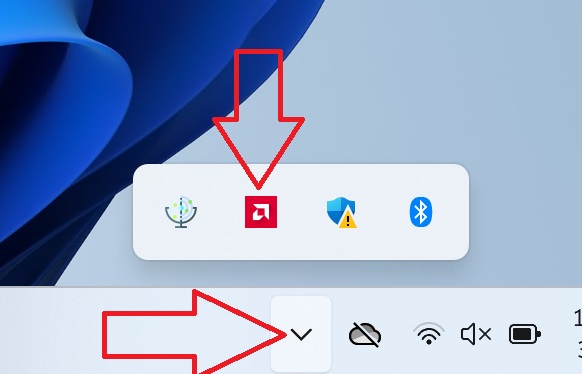
Se o ícone não estiver a aparecer. Digite“AMD” na pesquisa da barra de tarefas e ele aparecerá nos resultados.
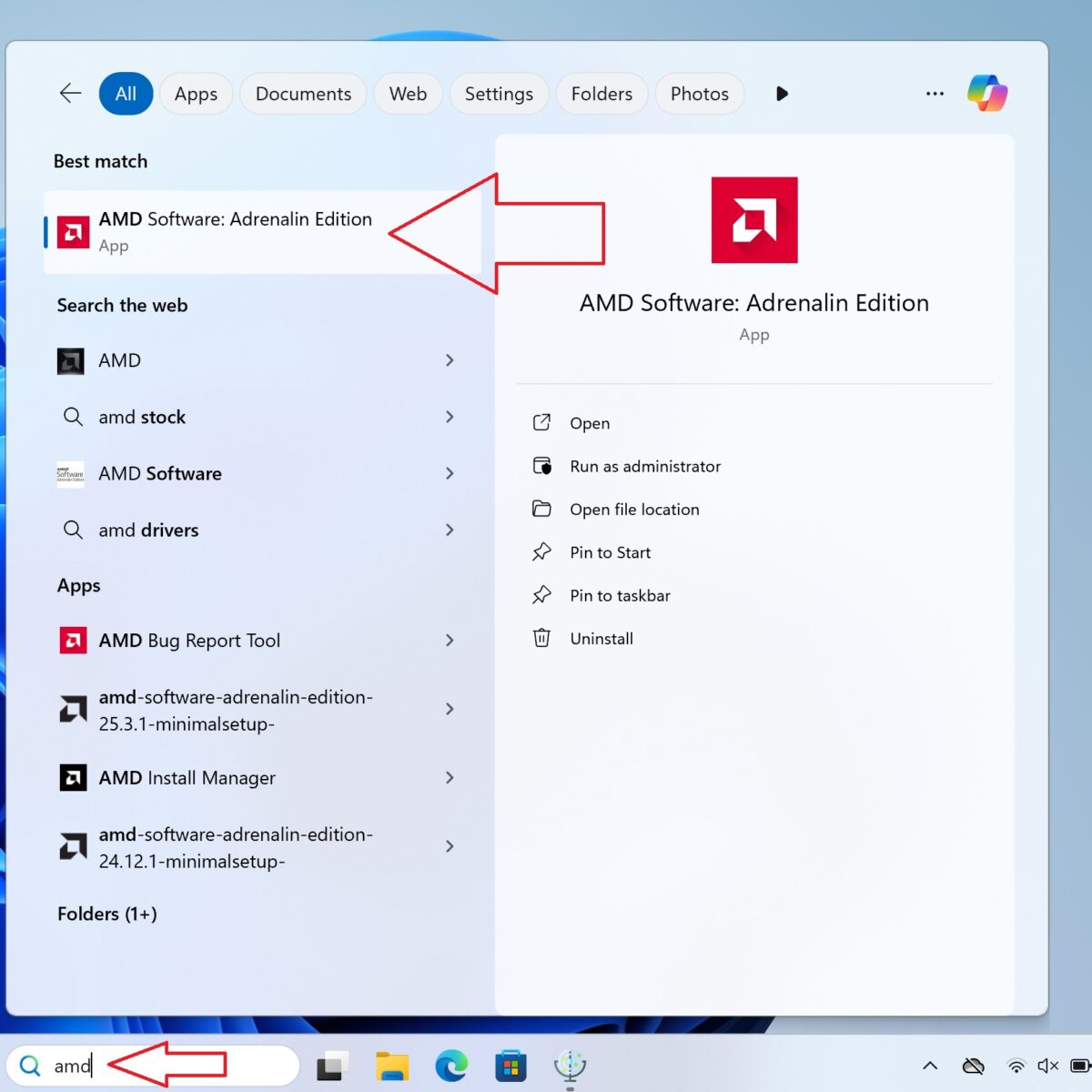
Se o software também não for apresentado aqui, é possível que não tenha o software AMD Adrenalin instalado. Consulte o nosso guia sobre como instalar os controladores AMD aqui. Isto irá instalar automaticamente os controladores mais recentes como parte do processo e estará pronto a utilizar o seu dispositivo com uma eGPU.
Verificar e instalar actualizações de controladores
Quando o software AMD Adrenaline estiver carregado. A área superior direita mostrará a versão atual do controlador e um botão para Verificar actualizações, clique neste botão.
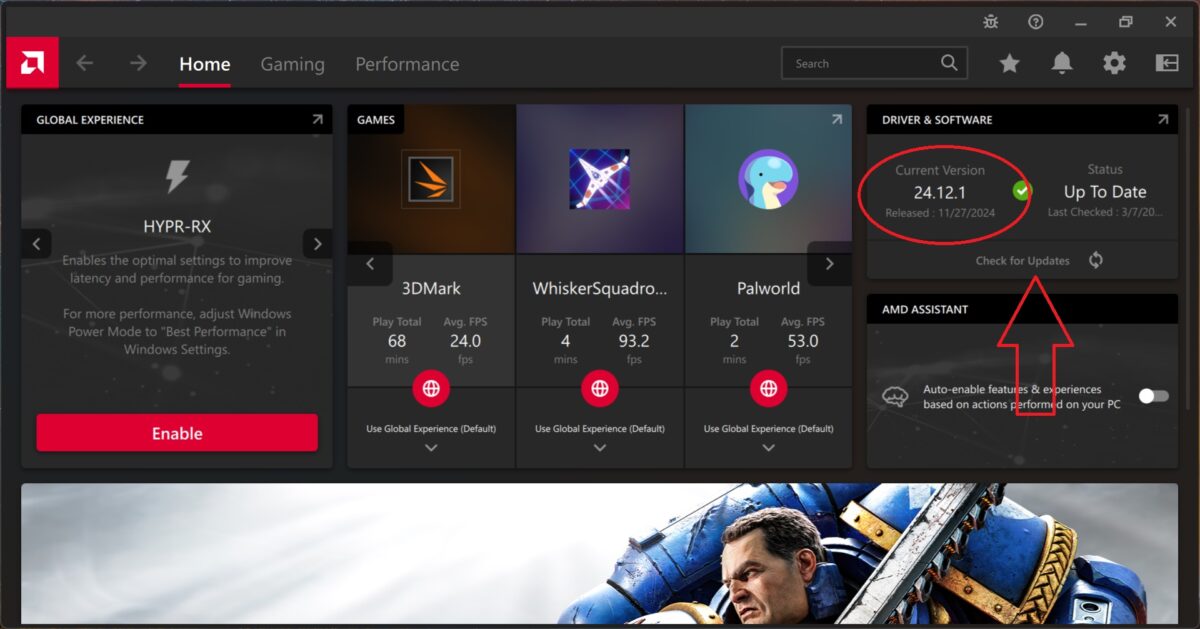
Após alguns instantes, deverá ser-lhe pedido para Descarregar a atualização, escolha esta opção.
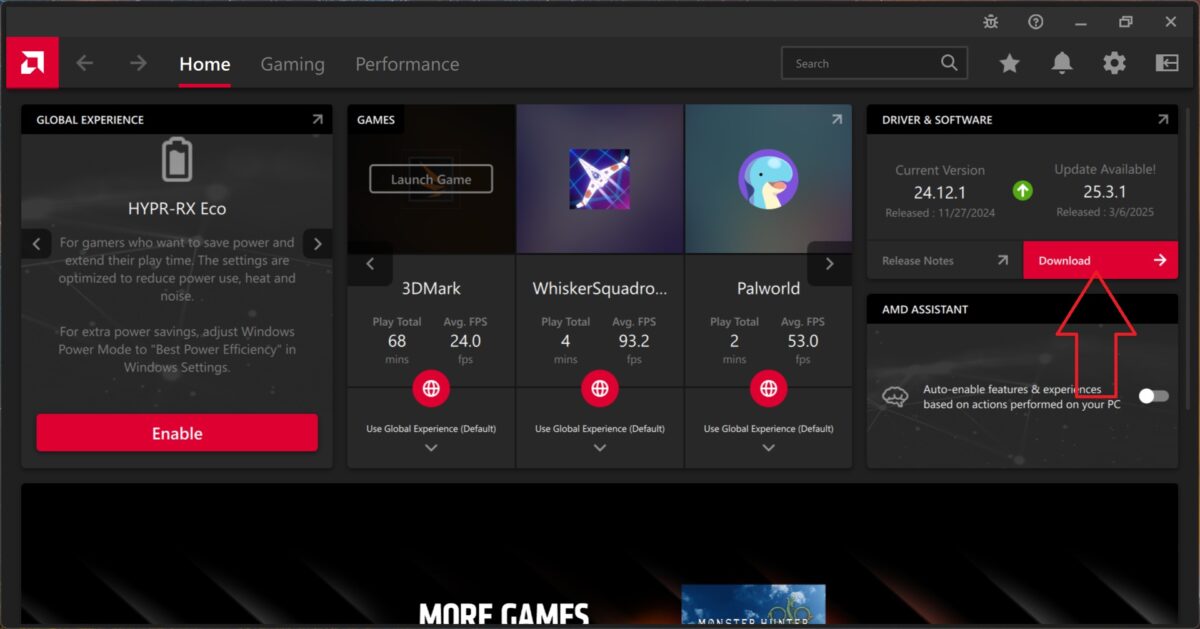
Quando a transferência estiver concluída, ser-lhe-á apresentada uma opção Instalar, escolha-a e siga as instruções para atualizar os controladores. Uma vez actualizados, reinicie o seu dispositivo e este estará pronto a ser utilizado com a sua eGPU.
Se ainda não tiver configurado a sua eGPU, como a GPD G1, siga o nosso guia aqui.
Perguntas neste guia
8 respondidasHi, followed the instructions and still it still crashes both through USB and Oculink.

Thank you for the feedback, we have passed this on to GPD engineers to look into further.
FYI: with my GPD G1 and GPD Duo HX 370
We replied to your other comment to say we have passed this on to GPD engineers to look into further. Thanks.
Hi, Thank you for continuing to improve.
But unfortunately, OCulink still crashes on GPD Win4 (2025/HX) with G1(2024).
The error no longer occurred immediately, but when I ran benchmark (FF XV) software, AMD generated an error and stopped recognizing G1.
When connected via USB4, the G1 works without problems regardless of whether or not this patch is applied.
Thank you for the feedback. We have passed this on to GPD engineers to look into further. We will update this page with any further information and fixes. Thanks.

Same issue with oculink I would hold of from purchasing until this is fixed
GPD are still working on a proper fix for this. We will update when it is available. Thanks.
The new AMD drivers 25.3.1 fixes the issue with eGPUs. We ran a few different game benchmarks multiple times and had no issues at all.
I have tested with Oculink and still not getting proper speeds with the 25.3.1 AMD drivers. I get perfect scores in benchmarks, but Steam games refuse to use the GPU above 15% utilization.
I replied to your other message.
I have the drivers of 25.3.1 and am not getting any crashes. But when I run a game, I get 20fps and only 16% GPU utilization no matter what settings I pick. If i run a benchmark I get full performance of the GPU and the expected FPS. I am using OcuLink with a 7800XT GPU.
I have tested the same GPU on a thunderbolt dock and got the expect results, it seems to only be affecting my oculink port.
Can you first check the refresh rate of the screen in Windows Display Settings, and also in the AMD settings and going by your other message on Steam Settings. It sounds like you may have a frame limiter enabled somewhere if all games are doing it.
Have you tried a fresh install of the latest drivers? Follow our guide at https://gpdstore.net/kb/software-guides/kb-article/how-to-uninstall-and-install-amd-graphics-drivers/ for how to fully remove the drivers and reinstall them.
If you are still having issues. Which eGPU and OCuLink cable do you have? The OCuLink cable especially can have issues if not fully compatible with certain eGPUs. The one we sell has been tested with the GPD G1 and ONEXGPU series eGPUs.
Hi, Win 4 (HX 370) Oculink with driver 25.5.1 still crashing. Tried with multiple gpu (3060 ti;3070 ti), dock(-JHH DOCK-OC4
-ADAT-LINK F9G), multiple oculink cable and multiple psu. Still no luck 🙁
Have you installed the latest drivers for NVIDIA GPU? Unfortunately we do not have these docks so are not able to specifically try them.

Nvidia 576.52; amd 25.6.1; still crashing. Is an amd egpu more stable?
We have only really tried with AMD GPUs such as the GPD G1 etc and had no issues with compatibility since the initial bug with the 2025 models which has now been fixed. But yeah we see less issues with AMD cards being used.
Egpu just refuses to work when I connect the occulink port and won’t display anything and stay on a coma type mode
We have a guide for the GPD G1 eGPU at https://gpdstore.net/kb/accessories-support-hub/kb-article/getting-started-with-the-gpd-g1-egpu-docking-station/ which shows how to set up and use the GPD G1. If you are still having an issue and purchased the G1 and/or the GPD device from us, please get in contact with your order number and some details to [email protected]. Thanks.
onexgpu 2 and win4 hx370, when using oculink, unit does not open, but when i use the onexgpu 2 on my 6800u winmax 2, it is recognized
Please check that you are are using a GPD compatible OCuLink cable. The booting sequence should be, connect the cables, power on the eGPU and then power on the Win 4. If you are still having an issue please contact our customer service at [email protected] with you order number and our team can look into it further.