



PCs e consolas de jogos portáteis GPD Windows

GPD WIN MAX 2 2023 PC de mão para jogos

67Wh Battery Key Feature
67Wh Battery

AMD Radeon GPU
AMD Radeon

AMD Ryzen Processor
AMD Ryzen

Bluetooth 5.2 Key Feature
Bluetooth 5.2

Wi-Fi 6 Key Feature
Wi-Fi 6

Mini PC ready for Windows 11 Update
Windows 11

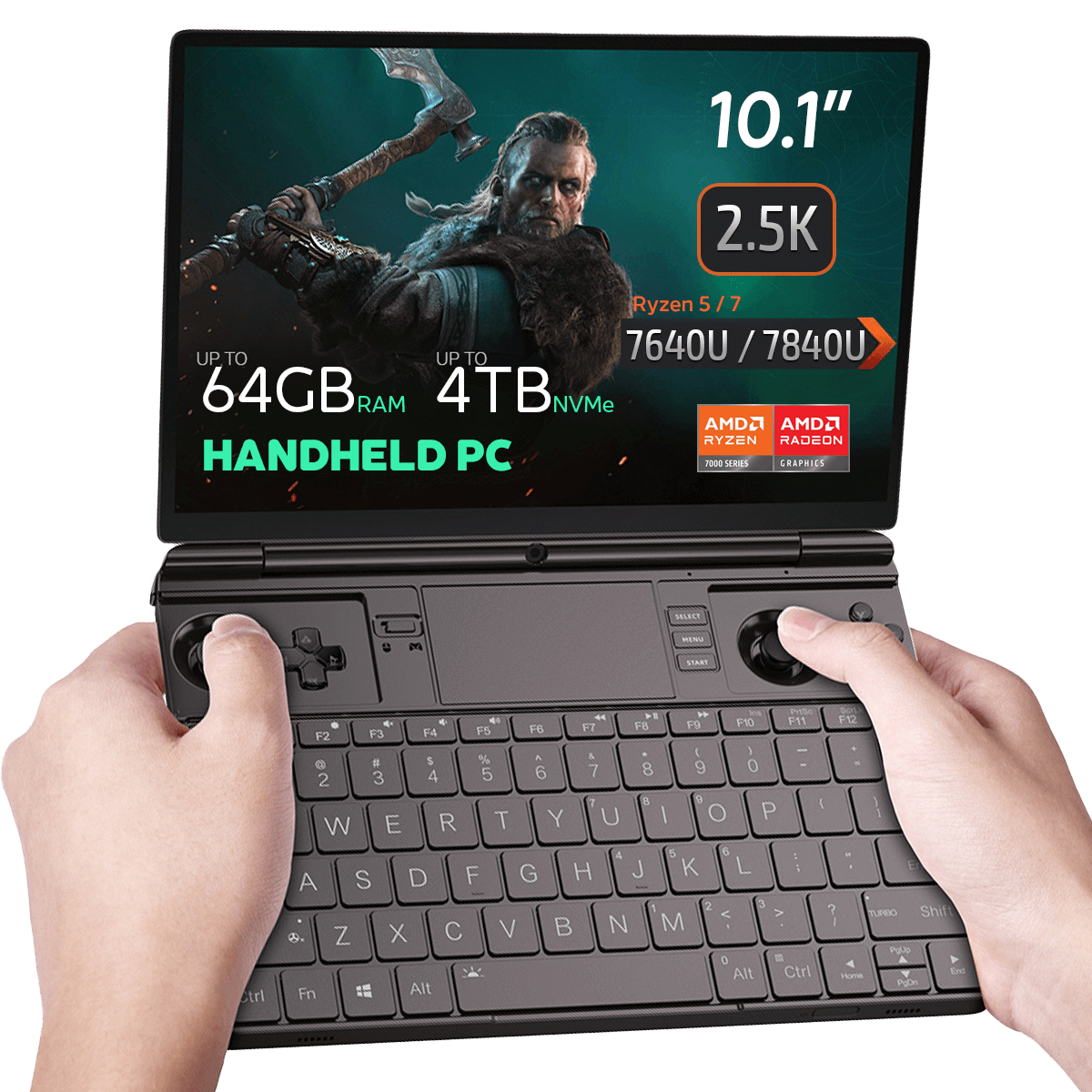
  • CPU: AMD Ryzen 5 / 7 7640U / 7840U
  • GPU: AMD Radeon 760M / 780M
  • RAM: até 64GB LPDDR5X @ 6400 MT/s
  • ARMAZENAMENTO: até 4TB Gen 3 PCI-E NVMe SSD
  • CONECTIVIDADE: Suporta Wi-Fi 6 e Bluetooth 5.2
InformaÇÕes de pagamento

Utilizamos a mais recente tecnologia em processamento de pagamentos, o que lhe permite efetuar o checkout através do seu cartão de débito/crédito ou PayPal para uma experiência rápida e segura.

Garantia

2 anos de garantia da DROIX Global para a sua paz de espírito

Garantia de qualidade e ensaios prÉ-expediÇÃo

Garante a satisfação do cliente ao mais alto nível: Todos os dispositivos são submetidos a testes rigorosos e a uma verificação de garantia de qualidade multiponto antes de serem enviados. A nossa equipa dedicada verifica o desempenho, a funcionalidade e a integridade dos componentes para garantir que o teu dispositivo GPD está em perfeitas condições de funcionamento à chegada, proporcionando-te confiança e paz de espírito.

PreÇos, impostos e envio

Nota:

  • Clientes dos Estados Unidos: O preço apresentado NÃO inclui TAXAS nem impostos. A responsabilidade pelo desalfandegamento e pelo pagamento de quaisquer impostos/taxas associadas recai sobre o cliente.
  • Clientes da UE: O preço apresentado inclui o IMPOSTO aplicável, que pode ir até 25% consoante o país.
  • Clientes do Canadá: O preço apresentado inclui os impostos aplicáveis, que podem incluir 5% de GST e impostos adicionais sobre vendas provinciais (PST), imposto sobre vendas harmonizado (HST) ou imposto sobre vendas do Quebec (QST), dependendo da sua província.

APENAS para clientes da UE: Expresso DDP (Delivered Duty Paid). Isto significa que:

  • Todos os direitos aduaneiros e impostos estão incluídos no preço apresentado na página do produto.
  • Não terá de pagar quaisquer encargos adicionais aquando da entrega.
  • Na rara eventualidade de problemas relacionados com a alfândega, a nossa equipa tratará do processo de desalfandegamento em seu nome para garantir uma experiência de entrega sem problemas.
  • Informações importantes sobre as devoluções:

  • Se decidir devolver a sua encomenda ou solicitar um reembolso, tenha em atenção que os impostos e direitos pagos em seu nome ao abrigo das condições DDP não podem ser reembolsados.
  • Consulte os nossos Termos e Condições para obter informações pormenorizadas.

Apoio ao cliente

Tem uma pergunta? Estamos a uma curta mensagem de texto de ter o seu problema resolvido!

Consulte os nossos Termos e Condições para obter informações pormenorizadas.

O que estÁ incluÍdo
  • 1x GPD WIN MAX 2 2023
  • 1x Adaptador de alimentação
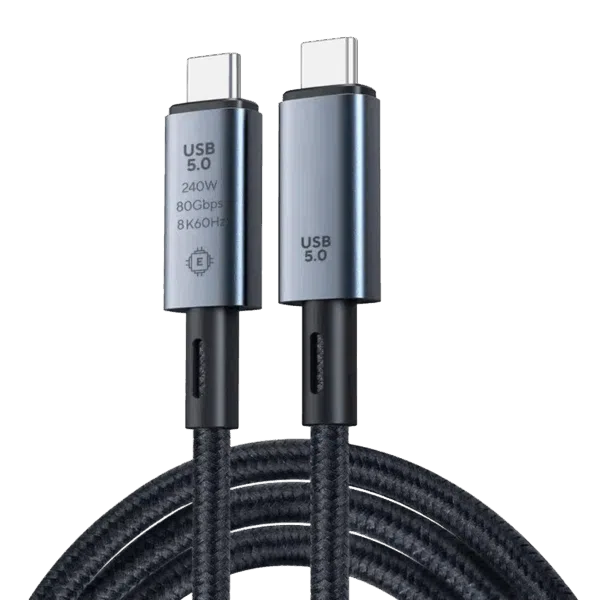
  • 1x Cabo USB tipo C
  • 1x Manual do utilizador

Disponibilidade:

Fora de stock

864,52  inc.TAX

18pessoas estão a ver isto agora

Este produto está esgotado e indisponível.

-

gpd win max 2

GPD WIN MAX 2 2023 Handheld Gaming PC – AMD Ryzen 7 7840U (Zen 4), 10.1″ 2.5K Display, 64GB RAM, OcuLink Support

Why pay 2025 flagship prices when the GPD WIN MAX 2 2023 remains a top-tier contender? Powered by the legendary AMD Ryzen 7 7840U, this device is the ultimate “Silicon Sweet Spot” for gamers and professionals who demand 2.5K resolution and desktop-grade multitasking without the 2025 premium.

Concebido para a excelência: Controlos de precisão, versatilidade profissional e refrigeração inteligente
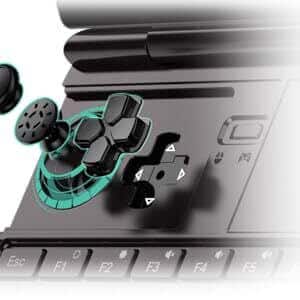
remoção de botões para gpd win max 2

A vantagem do sensor Hall: como a indução magnética elimina o “desvio do stick” e o desgaste físico.

O potenciómetro tradicional que se baseia na escova de resistência para gerar o sinal de tensão é propenso a problemas de “deriva” causados pelo desgaste durante uma utilização prolongada. Com o WIN Max 2 2023, introduzimos pela primeira vez sticks com sensor Hall com bobinas de indutância incorporadas. O princípio de funcionamento da indução magnética (são gerados diferentes fluxos magnéticos quando o bastão roda para diferentes posições, o que, por sua vez, gera diferentes sinais de tensão) determina que os bastões com sensor Hall não têm desgaste e, por conseguinte, não têm o problema do desvio do bastão

tampas magnéticas para gpd

Magnetic Stealth Covers: Hide the joysticks for a clean, professional look in meetings.

O controlador de jogos incorporado no PC de jogos portátil pode torná-lo inadequado para o local de trabalho! Para resolver este problema, adicionámos duas capas de stick para o WIN Max 2 2023. O design magnético garante que as duas capas não caem durante a utilização do dispositivo. Quando jogas, também podes guardar as capas no compartimento traseiro, o que ajuda a evitar perdas acidentais!
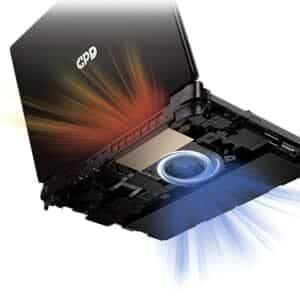
arrefecimento win max 2

Hardware avançado: Aproveita um turbofan de alto desempenho e tubos de calor duplos para um fluxo de ar robusto.

O GPD WIN MAX 2 2023 inclui um sistema de arrefecimento melhorado para PC com um turbofan de grandes dimensões + tubos de calor duplos, que se caracteriza por um sopro de ar lateral de grande volume e um controlo de velocidade altamente inteligente. Quando a temperatura interna for inferior a 40°C, a velocidade da ventoinha não excederá 20% da sua capacidade máxima. Quando a temperatura interna atinge mais de 40°C, a velocidade da ventoinha aumenta em incrementos de 2% PWM até atingir o seu limite máximo (100%).

UM PRAZER VISUAL: ECRÃ TÁCTIL DE CONTROLO DE 10,1 POLEGADAS
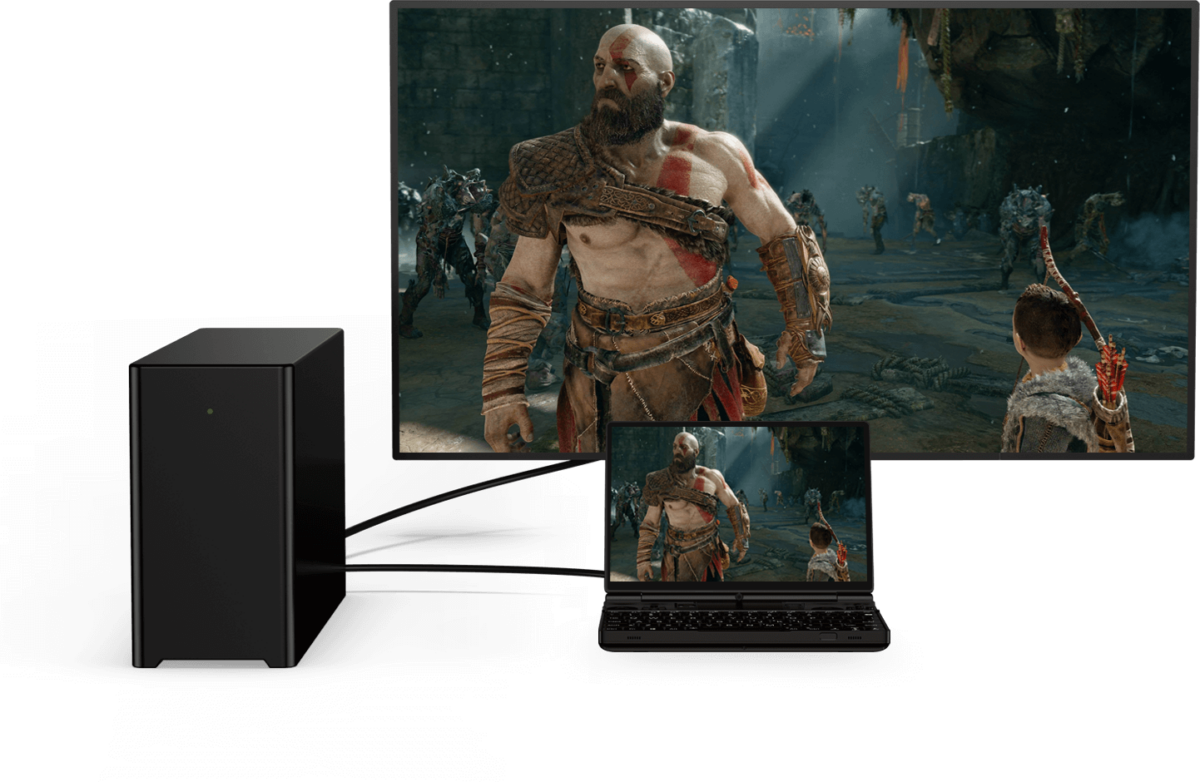
GPD win max com PC

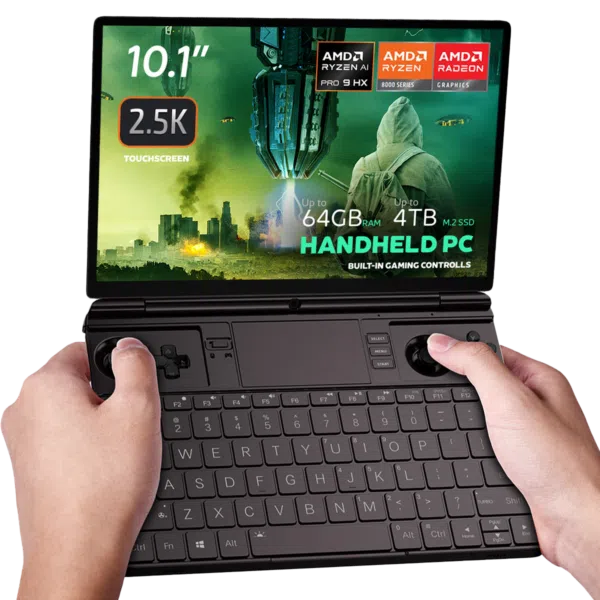
Prepara-te para te surpreenderes com o ecrã tátil de 10,1″ com controlo de toque de 10 pontos do GPD WIN MAX 2 2023. Com uma relação de aspeto 16:10 e uma resolução de 1920×1200, este ecrã vibrante proporciona imagens impressionantes. Suportando resoluções até 2560×1600 e uma densidade de píxeis de 299 PPI, todos os detalhes são nítidos e claros para uma experiência de jogo envolvente.

Zen 4 Performance: The Emulation King

The 7840U Phoenix architecture remains a fan favorite in 2025 for its incredible efficiency.

Native OcuLink: Skip the USB4 bottlenecks. Connect directly to the GPD G1 eGPU for a 4K desktop experience.

Pro-Grade Emulation: Native AVX-512 support allows for superior PS3 (RPCS3) and Xbox 360 (Xenia) performance compared to many newer, more expensive handhelds.

Software Boosted: Fully compatible with AMD AFMF 2 and FSR 3.1, allowing you to play AAA titles at smooth frame rates on the 10.1″ screen.

GRÁFICOS QUE SURPREENDEM: AMD RADEON 780M GPU

Deixa-te impressionar pelos visuais deslumbrantes do GPD WIN MAX 2 2023, graças à sua GPU AMD Radeon 780M. Esta potente placa gráfica proporciona taxas de fotogramas suaves e gráficos de cortar a respiração para uma experiência de jogo visualmente deslumbrante.

MEMÓRIA INIGUALÁVEL: ATÉ 64 GB DE RAM LPDDR5

O GPD WIN MAX 2 2023 está equipado com uma memória RAM LPDDR5 de 6400 MT/s extremamente rápida, que garante tempos de carregamento rápidos, multitarefas sem problemas e uma jogabilidade suave em cenários exigentes.

ARMAZENAMENTO AMPLO: M.2 NVME 2280 SSD 4TB

Esquece a possibilidade de ficar sem espaço de armazenamento com o espaçoso SSD M.2 NVME 2280 com uma capacidade impressionante de 4 TB. Diz adeus à eliminação de jogos por falta de espaço; com o GPD WIN MAX 2 2023, as possibilidades são infinitas.

MANTÉM-TE LIGADO: WI-FI 6 E BLUETOOTH 5.2

A conetividade é fundamental com o WiFi 6 para ligações à Internet extremamente rápidas e estáveis, garantindo experiências de jogo online suaves. O Bluetooth 5.2 permite-te ligar periféricos sem fios para uma experiência de jogo verdadeiramente envolvente.

CONECTIVIDADE SEM FALHAS: PORTAS VERSÁTEIS

O GPD WIN MAX 2 2023 dispõe de uma gama de portas para todas as necessidades de jogos e periféricos. Com 1x USB 4, 1x USB 3.2 Gen 2 Type-C, 2x portas USB 3.2 Gen 2 Type-A e uma porta OCuLink(SFF-8612), liga facilmente dispositivos externos.

CARACTERÍSTICAS MELHORADAS PARA UMA COMODIDADE INIGUALÁVEL

O GPD WIN MAX 2 2023 proporciona-te uma experiência de jogo perfeita com um sensor de impressões digitais para um desbloqueio rápido e seguro do dispositivo. O Microsoft Precision Touchpad (PTP) garante um controlo suave e preciso do cursor, e o teclado retroiluminado permite jogar em ambientes com pouca luz.

ENERGIA QUE DURA: BATERIA DE LONGA DURAÇÃO

A bateria de polímero de lítio de 67Wh do GPD WIN MAX 2 2023 proporciona até 3 horas de utilização intensa, 6-8 horas de utilização moderada e umas impressionantes 14 horas de utilização ligeira, garantindo uma fonte de alimentação fiável e duradoura para os jogadores.

DESIGN COMPACTO E LEVE

O GPD WIN MAX 2 2023 oferece um desempenho poderoso num design compacto e leve, medindo apenas 8,9 x 6,2 x 0,9 polegadas e pesando apenas 1005g. Fabricado com materiais de alta qualidade, garante durabilidade e qualidade de construção para jogos em movimento.

WINDOWS 11 HOME PRÉ-INSTALADO

O GPD WIN MAX 2 2023 vem pré-instalado com o Windows 11 Home, oferecendo uma experiência de jogo optimizada com a sua interface intuitiva e funcionalidades de jogo melhoradas.

CONCLUSÃO

O GPD WIN MAX 2 2023 é o derradeiro PC de jogos portátil, proporcionando um desempenho de jogo topo de gama num formato compacto. Com o CPU AMD Ryzen 7 7840U ou Ryzen 5 7640U, GPU AMD Radeon 780M e até 64 GB de RAM, garante um desempenho excecional para jogos exigentes. O ecrã de controlo tátil de 10,1″, as opções de conetividade versáteis e as funcionalidades práticas tornam os jogos em movimento muito fáceis. Com uma bateria de longa duração e um design compacto, desfruta de jogos sem limites.

Prós do GPD WIN MAX 2 2023:

  1. Powerful Performance: AMD Ryzen 7 7840U CPU and Ryzen 5 7640U with AMD Radeon 780M GPU deliver impressive performance for demanding games.
  2. Compact and Portable: The GPD WIN MAX 2 2023 offers unparalleled portability, making it easy to game on the go.
  3. Stunning Display: The 10.1″ touch control display provides vibrant visuals and a high-resolution experience.
  4. Versatile Connectivity: The GPD WIN MAX 2 2023 offers a range of ports and wireless connectivity options, ensuring seamless integration with peripherals and online gaming experiences.
  5. Ample Storage: The spacious 4TB SSD eliminates the need to constantly delete and reinstall games.

Order Your GPD WIN MAX 2 – In Stock & Ready to Ship

Get the industry’s most versatile work-and-play hybrid with a full 12-month official warranty.

  • Status: In Stock (Ships within 24 hours).
  • Shipping: Insured worldwide express delivery.
  • Support: Authorized GPD technical assistance included.

Lê a nossa análise completa do GPD WIN MAX 2 2023 aqui para conheceres as funções detalhadas, os benchmarks, a jogabilidade e o desempenho da emulação.
Informações adicionais

More

Estado

New, Refurbished (Class A), Refurbished (Class B)

Modelo do processador (CPU)

,

Modelo de gráficos (GPU)

,

Marca

Sistema operativo

Windows 11 Home

Marca do processador (CPU)

AMD

Frequência base do processador (CPU)

AMD Ryzen™ 5 7640U – 3.5GHz, AMD Ryzen™ 7 7840U – 3.3GHz

Processador (CPU) Frequência máxima

AMD Ryzen™ 5 7640U – 4.9GHz, AMD Ryzen™ 7 7840U – 5.1GHz

Processador (CPU) Núcleos / Threads

AMD Ryzen™ 5 7640U – 6 Cores / 12 Threads, AMD Ryzen™ 7 7840U – 8 Cores / 16 Threads

Processador (CPU) TDP

15-30W

Marca de gráficos (GPU)

AMD

Gráficos (GPU) Frequência máxima

Radeon™ 760M – 2600 MHz, Radeon™ 780M – 2700 MHz

Núcleos gráficos (GPU)

Radeon™ 760M – 8, Radeon™ 780M – 12

Resolução do ecrã / PPI

2560*1600 @ 299 PPI

Capacidade de memória (RAM)

, ,

Tecnologia de memória (RAM)

Memória (RAM) Velocidade

6400 MT/s

Capacidade de armazenamento

, ,

Expansão do armazenamento

1x Micro SD Card Slot, 1x PCI-e 22*30 NVMe Port, 1x PCI-e 22*80 NVMe Port (Used)

Tecnologia de armazenamento

Áudio I/O

3.5mm Headphone&Microphone Combo Jack, Built-In: Stereo Speakers / Microphone Setup

I/O USB

1x USB 3.2 Gen 2 Type-C, 1x USB 4.0 Type-C @ 40GB/s, 2x USB Type-A 3.2 Gen 2

Wi-Fi

Bluetooth

Peso

1005 g

Dimensões

227 × 16 × 23 cm

Downloads

Todas as variantes

Fix / Patch
3D Printing Files for M.2 to Oculink Adapter Cover — GPD G1, GPD WIN MAX 2 2023-09-13 · 412.3 KB · hospedado por DROIX
Download
Registro de alterações
MAIS RECENTE 2023-09-13 412.3 KB ← download atual
  • 3D Printing Files for M.2 to Oculink Adapter Cover | 2023-09-13 | Intermediate open cover for matching M.2 to Oculink on WIN Max 2 (6800U, 7640U, 7840U). Download and print yourself.
  • 3D Printing Files for M.2 to Oculink Adapter Cover | 2023-09-13 | Intermediate open cover for matching M.2 to Oculink on WIN Max 2 (6800U, 7640U, 7840U).
  • 3D Printing Files for M.2 to Oculink Adapter Cover | 2023-09-13 | Intermediate open cover for M.2 to Oculink adapter on WIN Max 2 (6800U, 7640U, 7840U). Download and print yourself.

Versões mais antigas podem ser baixadas para reversões – cada versão mantém seu próprio arquivo verificado.

Firmware
Fix the WIN Max 2 Battery Icon 2025-12-10 · 864 B · hospedado por DROIX
Download
Registro de alterações
MAIS RECENTE 2025-12-10 864 B ← download atual
  • Fix the WIN Max 2 Battery Icon | — | 2025-12-10 | After downloading, unzip the file. Double-click to execute, or right-click and select "Run as administrator"

Versões mais antigas podem ser baixadas para reversões – cada versão mantém seu próprio arquivo verificado.

Manual
WIN MAX 2 (2025) User Manual 2024-12-06 · 15.5 MB · hospedado por DROIX
Download
Registro de alterações
MAIS RECENTE 2024-12-06 15.5 MB ← download atual
  • WIN MAX 2 (2025) User Manual **(current)** | 2024-12-06 | PDF — functional key descriptions for the GPD WIN Max 2 (2025)

Versões mais antigas podem ser baixadas para reversões – cada versão mantém seu próprio arquivo verificado.

Tool
DTS:X Audio Technology (3D Sound Field) — GPD DUO, GPD WIN 4, GPD WIN 5, GPD WIN MAX 2, GPD WIN Mini 2024-12-24 · 2025-12-24 · 659.5 MB · hospedado por DROIX
Download
Registro de alterações
MAIS RECENTE 2024-12-24 2025-12-24 · 659.5 MB ← download atual
  • DTS:X Audio Technology, 3D Sound Field | 2024-12-24 | After downloading, decompress and execute `DTS_install.bat` to install automatically
  • DTS:X Audio Technology, 3D Sound Field | 2025-12-24 | After downloading, decompress and execute `DTS_install.bat` to install automatically

Versões mais antigas podem ser baixadas para reversões – cada versão mantém seu próprio arquivo verificado.

OS Image
GPD WIN 4 / WIN Max 2 — Windows 11 24H2 Home Firmware 24H2 · 2024-12-20 · 13.7 GB · hospedado por DROIX
Download
Registro de alterações
MAIS RECENTE 24H2 2024-12-20 · 13.7 GB ← download atual
  • WIN 4 (8840U / 7840U / 7640U / 6800U) Windows 11 24H2 Home Firmware **(current)** | 2024-12-20 | `730BD7B9D989797488C1509E590085FD9941E80C`
  • GPD WIN 4 2025 (8840U / 370) Windows 11 24H2 Home Firmware **(current)** | 2024-12-20 | `730BD7B9D989797488C1509E590085FD9941E80C` | Covers both 8840U and AI 9 HX 370 variants. Includes integrated Windows 11 drivers. Reinstallation removes all data on drive C — back up first. SHA1 tool: [HashTools](https://www.binaryfortress.com/HashTools/Download/) ·
  • WIN 4 (6800U) Windows 11 24H2 Home Firmware **(current)** | 2024-12-20 | `730BD7B9D989797488C1509E590085FD9941E80C`
  • WIN Max 2 (8840U / 7840U / 7640U / 6800U) Windows 11 24H2 Home Firmware **(current)** | 2024-12-20 | `730BD7B9D989797488C1509E590085FD9941E80C`

Versões mais antigas podem ser baixadas para reversões – cada versão mantém seu próprio arquivo verificado.

Tool
GPD GamePad Test Calibration Tool V1.03 · 2024-09-02 · 1.6 MB · hospedado por DROIX
Download
Versões (2)
MAIS RECENTE V1.03 2024-09-02 · 1.6 MB ← download atual
  • GamePad Test Calibration Tool | V1.03 | 2024-09-02 | Tool for WIN Max 2 grip back button mapping, programming, and vibration adjustment
  • GamePad Test Calibration Tool | V1.03 | 2024-09-02 | Tool for WIN Mini grip back button mapping, programming, and vibration adjustment
V1.02 2022-09-02 · 1.6 MB ↓ V1.02

Versões mais antigas podem ser baixadas para reversões – cada versão mantém seu próprio arquivo verificado.

Tool
MotionAssistant (GPD Handheld Front-end Tool) v1.2.0.9 (Portable) · 2026-02-08 · 42.6 MB · hospedado por DROIX
Download
Versões (3)
MAIS RECENTE v1.2.0.9 (Portable) 2026-02-08 · 42.6 MB ← download atual
  • Portable build — no installation required. Unzip password: 123.
  • MotionAssistant uses the Winring0 driver for TDP adjustment, hardware monitoring and fan control. If these features stop working, allow MotionAssistant in Windows Security Center — Microsoft may flag the driver.
  • What's new in v1.2.0.9:
  • Adapted the gyroscope in the Legion Go 2 device body (controller gyroscope and fan control not yet adapted).
  • Adapted support for various recently-released AMD rebranded models.
  • Added a "Disable Tablet Mode" option in Advanced Settings; when disabled, Tablet Mode turns off on the next launch.
  • Added an OSD toggle hotkey in the RTSS OSD settings; temperature display added to simplified mode.
  • Added a 30-second TDP reset cycle that reapplies the current TDP if an abnormal decrease is detected; added TDP ±5 hotkeys.
  • Optimized the Win5 keyboard key: press to bring up the on-screen keyboard, press again to close it.
  • Optimized the CPU frequency upper-limit control via "Optimize CPU Frequency"; maximum frequency is restored when the option is disabled.
  • Improved some controls in Dark Mode; the title bar is now a darker colour.
  • Optimized gyroscope simulation after resuming from hibernation, fixing failures on some devices after wake-up.
  • Optimized hotkey detection (shorter judgment interval); brightness hotkeys now adjust by ±10.
  • Specified ze_loader.dll as 1.11.0. Intel models unable to lock the GPU frequency should install the Intel 6647 iGPU driver first, then update to the latest.
  • Fixed the power limit being locked at 65W and not restorable when the GPD Win5 is powered via USB-C.
  • Corrected some text displays; fixed OSD monitoring showing incorrectly when hardware monitoring is off.
  • Fixed LT/RT not registering as hotkeys.
  • Fixed a freeze when setting TDP consecutively.
  • Fixed certain game-profile options (e.g. CPU frequency limits) not applying automatically.
  • Fixed frame locking failing in some game profiles; frame locking now uses an RTSS process-specific configuration instead of a global one.
  • Fixed a crash when refreshing the tray icon.
v1.2.0.9 (Installer) 2026-02-08 · 45 MB ↓ v1.2.0.9 (Installer)
  • Installer build (Setup) of the same v1.2.0.9 release — installs to Program Files rather than running portable.
v1.2.0.9 (RTSS) 2026-02-08 · 17.2 MB ↓ v1.2.0.9 (RTSS)
  • RivaTuner Statistics Server companion build (RTSS 737) for the MotionAssistant on-screen display (OSD) and frame-lock monitoring. Install alongside MotionAssistant.

Versões mais antigas podem ser baixadas para reversões – cada versão mantém seu próprio arquivo verificado.

Driver
DTS:X Audio Driver — GPD WIN 4, GPD WIN MAX 2, GPD WIN Mini 2024-02-19 · 472.4 MB · hospedado por DROIX
Download
Registro de alterações
MAIS RECENTE 2024-02-19 472.4 MB ← download atual
  • DTS:X Audio Driver | 2024-02-19 | Right-click `DTS_install.bat` → "Run as administrator" to install; `DTS_uninstall.bat` to uninstall.

Versões mais antigas podem ser baixadas para reversões – cada versão mantém seu próprio arquivo verificado.

Tool
AMD Handheld Control — GPD DUO, GPD Pocket 4, GPD WIN 4, GPD WIN 5, GPD WIN MAX 2, GPD WIN Mini v1.0.0 · 2026-02-04 · 97.9 MB · hospedado por DROIX
Download
Registro de alterações
MAIS RECENTE v1.0.0 2026-02-04 · 97.9 MB ← download atual
  • AMD Handheld Control v1.0.0 | v1.0.0 | 2026-02-04 | By Deen0X; AMD-processor systems only (relevant with AMD eGPU setups).

Versões mais antigas podem ser baixadas para reversões – cada versão mantém seu próprio arquivo verificado.

Driver
GPD Shared Driver Package V4.1.0 · 2025-01-18 · 1.5 GB · hospedado por DROIX
Download
Registro de alterações
MAIS RECENTE V4.1.0 2025-01-18 · 1.5 GB ← download atual
  • GPD DUO (8840U / 370) Drivers **(current)** | v4.1.0 | 2025-01-18 | Both variants | Latest driver package. After extracting, double-click `AutoInstallDrivers.bat` for automatic installation.
  • WIN 4 (8840U / 7840U / 7640U / 6800U) Drivers **(current)** | v4.1.0 | 2025-01-18
  • GPD WIN 4 2025 (8840U / 370) Drivers **(current)** | V4.1.0 | 2025-01-18 | Latest driver package. After extracting, double-click `AutoInstallDrivers.bat` for automatic installation.
  • WIN Max 2 (8840U / 7840U / 7640U / 6800U) Drivers **(current)** | v4.1.0 | 2025-01-18
  • Vendor page: https://www.amd.com/en/support/download/drivers.html

Versões mais antigas podem ser baixadas para reversões – cada versão mantém seu próprio arquivo verificado.

Manual
WIN Max 2 Q & A 2022-09-02 · 2.3 MB · hospedado por DROIX
Download
Registro de alterações
MAIS RECENTE 2022-09-02 2.3 MB ← download atual
  • WIN Max 2 Q & A | 2022-09-02 | PDF with frequently asked questions.

Versões mais antigas podem ser baixadas para reversões – cada versão mantém seu próprio arquivo verificado.

Manual
WIN MAX 2 (2023) User Manual 2023-09-06 · 16 MB · hospedado por DROIX
Download
Registro de alterações
MAIS RECENTE 2023-09-06 16 MB ← download atual
  • WIN MAX 2 (2023) User Manual | 2023-09-06 | PDF with functional key descriptions.

Versões mais antigas podem ser baixadas para reversões – cada versão mantém seu próprio arquivo verificado.

Fix / Patch
WIN Max 2 Screen Color Calibration File 2025-05-15 · 627.9 KB · hospedado por DROIX
Download
Registro de alterações
MAIS RECENTE 2025-05-15 627.9 KB ← download atual
  • WIN Max 2 Screen Color Calibration File | 2025-05-15 | ICM profiles in D65 and D70 color temperatures. See installation steps below.
  • WIN Max 2 Screen Color Calibration File | 2025-05-15 | .icm format files for Windows only. Two variants: D65 (6500K, average daylight) and D70 (7000K, cooler white point calibration). Installation: copy .icm to `C:WindowsSystem32spooldriverscolor`, open Color Management, select device, check "Use my settings for this device", click Add and select the profile. In Advanced tab, click "Change system defaults", check "Use Windows display calibration", click "Reload current calibration".

Versões mais antigas podem ser baixadas para reversões – cada versão mantém seu próprio arquivo verificado.

Firmware
WIN Max 2 Touchpad Firmware v1.0.3 · 125.9 KB · hospedado por DROIX
Download
Registro de alterações
MAIS RECENTE v1.0.3 125.9 KB ← download atual
  • WIN Max 2 Touchpad Firmware | v1.0.3 | 2023-12-19 | For WIN Max 2 (6800U). Brand new optimizations.

Versões mais antigas podem ser baixadas para reversões – cada versão mantém seu próprio arquivo verificado.

Firmware
WinControls — GPD WIN 4 / WIN MAX 2 / WIN Mini v1.16 · 4.5 MB · hospedado por DROIX
Download
Versões (2)
MAIS RECENTE v1.16 4.5 MB ← download atual
  • WinControls **(current)** | v1.16 | 2024-12-26 | WIN 4 grip customization tool. Fixed issue with grip mapping key defaulting to mouse mode. Tutorial:. Unzip Password: `123`
  • WinControls **(current)** | v1.16 | 2024-12-26 | WIN Mini/Max 2 grip customization tool. Fixed issue with grip mapping key defaulting to mouse mode. Tutorial:. Unzip Password: `123`
v1.16 (Q&A PDF) 4.1 MB ↓ v1.16 (Q&A PDF)
  • WinControls **(current)** | v1.16 | 2024-12-26 | WIN 4 grip customization tool. Fixed issue with grip mapping key defaulting to mouse mode. Tutorial:. Unzip Password: `123`
  • WinControls **(current)** | v1.16 | 2024-12-26 | WIN Mini/Max 2 grip customization tool. Fixed issue with grip mapping key defaulting to mouse mode. Tutorial:. Unzip Password: `123`

Versões mais antigas podem ser baixadas para reversões – cada versão mantém seu próprio arquivo verificado.

Manual
WIN Max 2 (2023) Q & A 2023-09-06 · 2.3 MB · hospedado por DROIX
Download
Registro de alterações
MAIS RECENTE 2023-09-06 2.3 MB ← download atual
  • WIN Max 2 (2023) Q & A | 2023-09-06 | PDF with frequently asked questions.

Versões mais antigas podem ser baixadas para reversões – cada versão mantém seu próprio arquivo verificado.

Tool
AOKZOE A1 Pro / AYANEO SLIDE / GPD WIN 4 — AYASpace 2 Unversioned · 2023-06-28 · externo · github.com
Obtenha em github.com
Registro de alterações
MAIS RECENTE Unversioned 2023-06-28 ← download atual
  • Source guide: Getting Started with the AYANEO SLIDE
  • Source guide: Getting Started with the ONEXPLAYER ONEXFLY
  • Source guide: Getting started with the GPD WIN Mini (2023 & 2024)
  • Source guide: Getting started with the GPD WIN MAX 2 2023
  • Source guide: Getting started with the GPD WIN 4 (2023 & 2024)
  • Source guide: Getting Started with Your Handheld Gaming PC
  • Source guide: Getting started with the AOKZOE A1 Pro
  • Source guide: Handheld Companion – Easy to use all in one performance metrics, TDP and motion input control

Versões mais antigas podem ser baixadas para reversões – cada versão mantém seu próprio arquivo verificado.

BIOS
GPD Win Max / GPD WIN MAX 2 — BIOS V0.35 · 2023-08-23 · externo · droidbox.sharepoint.com
Obtenha em droidbox.sharepoint.com
Versões (3)
MAIS RECENTE V0.35 2023-08-23 ← download atual
  • Source guide: Getting started with the GPD WIN MAX 2 2023
V0.30 2023-08-23 ↓ V0.30
  • Source guide: Getting started with the GPD WIN MAX 2 2023
V0.29 2023-08-23 ↓ V0.29
  • Source guide: Getting started with the GPD WIN MAX 2 2023

Versões mais antigas podem ser baixadas para reversões – cada versão mantém seu próprio arquivo verificado.

Tool
MotionAssistant — Power Mod (community fork) Latest (GitHub) · 2026-02-10 · 2 downloads · externo · github.com
Obtenha em github.com
Versões (3)
MAIS RECENTE Latest (GitHub) 2026-02-10 ← download atual
  • Community shell-based UI modification of MotionAssistant by ThatUsernameAlreadyExist — NOT an official GPD release.
  • Always get the newest build from the GitHub releases page (latest: MotionAssistant v1.2.0.9 + Power Mod 2.2.2).
Installer (DROIX mirror) 2026-02-10 · 47.0 MB ↓ Installer (DROIX mirror)
  • DROIX-hosted mirror of the Power Mod installer (MotionAssistant Setup + Power Mod).
Portable (DROIX mirror) 2026-02-10 · 44.6 MB ↓ Portable (DROIX mirror)
  • DROIX-hosted mirror of the Power Mod portable build.

Versões mais antigas podem ser baixadas para reversões – cada versão mantém seu próprio arquivo verificado.

Tool
GPD Tool (GPD Official Handheld Front-end Tool) v1.65 · 2026-09-18 · 29 MB · 2 downloads · hospedado por DROIX
Download
Versões (7)
MAIS RECENTE v1.65 2026-09-18 · 29 MB ← download atual
  • Removed the UAC prompt when launching RTSS and disabled automatic updates for a smoother user experience.
  • Improved the stability of the frame-rate limiter UI.
  • Fixed a bug with the power linkage feature.
  • Fixed an issue where TDP was not automatically applied on first launch.
  • Added screen refresh-rate adjustment settings.
  • Added controller vibration adjustment options.
  • Increased the adjustable power limit to 100W on WIN 5 and 40W on other models.
  • Added 144 FPS as a new frame-rate limit option.
  • Added helpful tips for the functions at the top of the interface.
  • Added OSK and TabTip keyboard options to the on-screen keyboard settings. Right-click the button to select an option
  • On WIN 5, the physical button can be used to bring up the keyboard.
  • Fixed several bugs.
v1.62 2026-07-28 · 45 MB ↓ v1.62
  • After closing the UI, the background service will no longer execute any operations. This fixes an issue causing abnormal fan behavior on system startup.
  • Added power tuning parameters for the GPD MAX3.
  • Fixed hidden bugs.
v1.60 2026-06-01 · 45 MB ↓ v1.60
  • Updated kernel driver for improved stability; no need to add to whitelist, no antivirus warnings.
  • Fixed issue with automatic multi-language settings during installation.
  • Added Chinese, Japanese, and Korean prompts to the performance monitoring horizontal and vertical buttons.
  • Modified TDP PL2 calculation method to PL1+1 for more accurate power consumption locking.
v1.49 2026-03-19 · 42.4 MB ↓ v1.49
  • Source guide: GPD Tool Download, Setup Guide & Troubleshooting for GPD Devices
v1.48 42.4 MB ↓ v1.48
v1.45 2026-03-19 · 42.4 MB ↓ v1.45
  • Source guide: GPD Tool Download, Setup Guide & Troubleshooting for GPD Devices
v1.31 2026-03-19 · 42.6 MB ↓ v1.31
  • Source guide: GPD Tool Download, Setup Guide & Troubleshooting for GPD Devices

Versões mais antigas podem ser baixadas para reversões – cada versão mantém seu próprio arquivo verificado.

Firmware
GPD Keyboard Assistant Tool v1.06 · 369.7 KB · hospedado por DROIX
Download
Registro de alterações
MAIS RECENTE v1.06 369.7 KB ← download atual
  • GPD Keyboard Assistant Tool | v1.06 | 2021-12-16 | Download and unzip, then double-click to run the installation

Versões mais antigas podem ser baixadas para reversões – cada versão mantém seu próprio arquivo verificado.

Firmware
GPD WIN MAX 2 — Touchpad firmware Unversioned · 2022-11-25 · 125 KB · externo · drive.google.com
Obtenha em drive.google.com
Registro de alterações
MAIS RECENTE Unversioned 2022-11-25 · 125 KB ← download atual
  • Source guide: How to update the GPD WIN MAX 2 Touchpad Firmware

Versões mais antigas podem ser baixadas para reversões – cada versão mantém seu próprio arquivo verificado.

GPD WIN MAX 2 2022 (6800U)

BIOS
GPD WIN Max 2 (6800U) — BIOS V1.05 · 2022-12-22 · 5.8 MB · hospedado por DROIX
Download
Registro de alterações
MAIS RECENTE V1.05 2022-12-22 · 5.8 MB ← download atual
  • WIN Max 2 (6800U) BIOS **(current for 6800U)** | V1.05 | 2022-12-22 | Fixes: (1) wireless screen projection failure with yellow exclamation in Device Manager; (2) eGPU not auto-connecting after 10-second unplug; (3) Power mode option added to BIOS Setup → Advanced; (4) cursor removed from boot logo.

Versões mais antigas podem ser baixadas para reversões – cada versão mantém seu próprio arquivo verificado.

OS Image
GPD OS (WIN Max 2 6800U) — Manjaro/SteamOS 2022-12-13 · 5.8 MB · hospedado por DROIX
Download
Registro de alterações
MAIS RECENTE 2022-12-13 5.8 MB ← download atual
  • GPD OS (WIN Max 2 6800U) — Manjaro/SteamOS | 2022-12-13 | Linux Kernel 6.0, Manjaro desktop + Steam OS game mode. **Install BIOS v1.03 before flashing** (otherwise USB may not be recognized). Use balenaEtcher. First boot: connect Wi-Fi, launch Steam before switching to Deck GamePad UI. [Setup video](https://youtu.be/aekVivINoOQ) — BIOS v1.03: | [Mirror](https://mirror.fkardame.com/Linux/Images/GPD/)
  • GPD OS (WIN Max 2 6800U) Firmware | 2022-12-13 | Manjaro/SteamOS-like Linux by Furkan Kardame. Linux Kernel 6.0. Before installing, update to BIOS v1.03 (required or USB devices may fail to recognise). Use balenaEtcher to install. | [Download](https://mirror.fkardame.com/Linux/Images/GPD/) ·

Versões mais antigas podem ser baixadas para reversões – cada versão mantém seu próprio arquivo verificado.

Firmware
WIN Max 2 (6800U) Camera Firmware 2022-12-05 · 1.3 MB · hospedado por DROIX
Download
Registro de alterações
MAIS RECENTE 2022-12-05 1.3 MB ← download atual
  • WIN Max 2 (6800U) Camera Firmware | — | 2022-12-05 | Fixes WeChat camera not opening and microphone not picking up voice in Skype/Teams.

Versões mais antigas podem ser baixadas para reversões – cada versão mantém seu próprio arquivo verificado.

OS Image
GPD 2022–2024 handhelds — Windows recovery image Unversioned · 2023-05-31 · externo · drive.google.com
Obtenha em drive.google.com
Registro de alterações
MAIS RECENTE Unversioned 2023-05-31 ← download atual
  • Source guide: How to Reinstall Windows on GPD WIN Devices

Versões mais antigas podem ser baixadas para reversões – cada versão mantém seu próprio arquivo verificado.

GPD WIN MAX 2 2023 (7640U / 7840U)

BIOS
GPD WIN Max 2 (2023/2024) — BIOS v0.42 · 2024-10-23 · 6.6 MB · hospedado por DROIX
Download
Registro de alterações
MAIS RECENTE v0.42 2024-10-23 · 6.6 MB ← download atual
  • WIN Max 2 (2023 & 2024) BIOS **(current)** | v0.42 | 2024-10-23 | Applicable to WIN Max 2 (7640U, 7840U, 8840U). Device must be charging during upgrade. Resolves flickering screen issue on some displays.

Versões mais antigas podem ser baixadas para reversões – cada versão mantém seu próprio arquivo verificado.

Firmware
WIN Max 2 2023 Gamepad/Keyboard-Mouse Firmware v3.14 · 6.9 MB · hospedado por DROIX
Download
Registro de alterações
MAIS RECENTE v3.14 6.9 MB ← download atual
  • WIN Max 2 2023 Gamepad/Keyboard-Mouse Firmware **(current)** | v3.14 / v1.23 | 2023-12-15 | Applicable to WIN Max 2 (6800U, 7640U, 7840U). After upgrade, adjust dead zones through WinControls V1.15. Upgrade instructions included.
  • WIN Max 2 Gamepad/Keyboard-Mouse Firmware | v3.14 / v1.23 | 2023-12-15 | Applicable to WIN Max 2 (6800U, 7640U, 7840U). After upgrade, adjust dead zones through WinControls V1.15. Upgrade instructions included.

Versões mais antigas podem ser baixadas para reversões – cada versão mantém seu próprio arquivo verificado.

GPD WIN MAX 2 2025 (8840U / HX 370)

BIOS
GPD WIN MAX 2 2025 — BIOS Unversioned · 2025-08-12 · 28.3 MB · 1 downloads · hospedado por DROIX
Download
Registro de alterações
MAIS RECENTE Unversioned 2025-08-12 · 28.3 MB ← download atual
  • Source guide: How to update the GPD WIN MAX 2 2025 BIOS

Versões mais antigas podem ser baixadas para reversões – cada versão mantém seu próprio arquivo verificado.

Fix / Patch
GPD WIN MAX 2 2025 — Battery icon fix Unversioned · 2025-10-10 · externo · gofile.me
Obtenha em gofile.me
Registro de alterações
MAIS RECENTE Unversioned 2025-10-10 ← download atual
  • Source guide: How to fix battery icon disappearing on the GPD WIN MAX 2 2025

Versões mais antigas podem ser baixadas para reversões – cada versão mantém seu próprio arquivo verificado.

OS Image
GPD 2025 handhelds — Windows recovery image Unversioned · 2023-05-31 · externo · drive.google.com
Obtenha em drive.google.com
Registro de alterações
MAIS RECENTE Unversioned 2023-05-31 ← download atual
  • Source guide: How to Reinstall Windows on GPD WIN Devices

Versões mais antigas podem ser baixadas para reversões – cada versão mantém seu próprio arquivo verificado.

Charles Magee
Oct 10, 2023

Tiny but Powerful

This thing is a power house with exceptionally solid construction. Using the OcuLink and USB4 ports you can get desktop like power/expansion, without sacrificing the insane portability. I only wish the display was a higher refresh rate, but if that lets it keep the amazing battery life it's a small price to pay.
DIRECT
Was this helpful?
Adrian Gut
Jul 25, 2024

GPD WIN MAX 2 2024

Alles in einem der "Laptop/die Spiele Konsole" ist Super. Nutze es zum größten Teil mit Emulatoren oder mit der egpu G1 Version 2024 als mini PC zum Spielen. Das einzige Nachteil ist die Tastatur ist nur in US englisch verfügbar, habe zwar eine Deutsche Tastatur gefunden allerdings nur zum selbst einbau. Wenn ich das selbst versuche und was kaputt geht gibt es halt keine Garantie mehr.
DIRECT
Was this helpful?
Pavel Samarkin
Oct 8, 2024

Amazing little powerhouse

I was looking for a small laptop and was impressed by the GPD's tech specs. After carefully reading a lot of reviews about the disappointing quality and lack of customer support, I've decided to find a trusted retailer – the unit I received from DroiX was perfect – not even a single dead pixel, and 2 year warranty.
DIRECT
Was this helpful?
Calvin Morse
Oct 9, 2023
GPD WIN MAX 2 2023
DIRECT
Was this helpful?
Kevin Low
Jan 15, 2024

Exactly everything that I wanted.

Exactly everything that I wanted. I had the GPD Win 4 and while it is a great device, I found myself carrying around a 10" portable monitor, compact keyboard, mouse, dock, and all its cables and connecting all that up fairly often. I guess I'm not too much of a handheld gamer and more of a productivity person. It was then that I decided that the Max 2 was going to be more suitable for my needs. It is so nice to finally have everything that I was carrying around all in one machine. Having magnetic controller covers is just icing on the cake, especially since they can be stored in the machine itself!

Despite the pictures, the machine is purple. This is easier to see in videos. Think iPhone 14 Pro Deep Purple, but maybe less saturated?

The performance is great and is what I expected. Games like Valorant can get 60fps a good chunk of the time. The screen is very nice since it's slightly taller than 1080p.

Also, don't be alarmed, but the ports are upside down: HDMI, SD Card Reader, USB-A (and honestly, probably the USB-C ports as well).

Overall, I am very happy with this device. I'll still use the Win 4, but this is going to be my main go to.
DIRECT
Was this helpful?
khoa ngo
Jul 28, 2023

Great hybrid laptop

I’ve owned several GPD devices (Win Max, Pocket, Pocket 3, Win 4, and Win Max 2) and the Win Max 2 is definitely a great hybrid device! If you like gaming primarily using mouse and keyboard with occasional controller use, this is the best device.
DIRECT
Was this helpful?
Matthew Faber
Oct 16, 2023

Works perfectly

Everything was as expected and shipping only took a few days from GB to US.
DIRECT
Was this helpful?
Arnaud Cottenceau
Jul 8, 2024

Gpd win max 2 2024

Interesting system but hangs sometimes.
Dont know if it is linked to GPU driver but sometimes it will reboot the pc while changing ingame resolution when in fullscreen. No probem in windowed fullscreen.

Also had green screen hard hangs After gaming for some time. Had to set ram frequency to 6400 MHz...

Sometimes the system will freeze for some seconds. Need to reboot ... Maybe bound to motion assistant... Will try without it.

Also had green flicker when watching Netflix in edge browser. Will try in the ms store app or in another browser.

Last when plugged to external monitor and the gpd is closed then the mouse will sometimes move alone... Had to disable the touch screen in device mgr.

Lots of problems for an expansive device that is in its 4th version...
DIRECT
Was this helpful?
Simon Tse
Mar 26, 2024
GPD WIN MAX 2 2023
DIRECT
Was this helpful?
Ryan
Nov 23, 2024

Best laptop I have ever owned

I am not exaggerating when I say that this is the best laptop that I have ever owned. The form factor is perfect, it's small enough to be ultra-portable but not too small as to not be able to work comfortably with it. I had a GPD Pocket 2 before this and while I enjoyed the portability of it, I always felt that it was a tad too small.

The build quality of the Win Max 2 is exceptional. You can really see and feel the quality, with the all metal construction. The keyboard is great to type on and the trackpad is quite good for it's size (supports multi-touch gestures).

The built in game controls are amazing. The only things I would personally like to see changed with them for the next generation is that I would prefer the left thumbstick to be on the right of the directional pad instead of the left. It's awkward to work the left triggers with the position that it's in.

The mouse control mode for the game controls is also not as flexible as it should be in the sense that the triggers can't be remapped at all, and the a, b, x, y buttons can't be mapped to click or scroll (which would be great). It should also be possible to set the cursor sensitivity and acceleration.

I personally don't use the built in mouse mode at all, I instead use the Handheld Companion software which is amazing. I have it so when I long press the start button it switches between game control and desktop control modes in the software. I have the x, b buttons mapped as left and right click, and the a, y buttons mapped as scroll down, scroll up.

I find this extremely comfortable to use and I have been using the joystick to control the mouse almost all the time as I find it more comfortable to use than the trackpad. It reminds me of using the mouse control knub on my old IBM Thinkpad, only it's more comfortable and precise. It's really cool to be able to use a combination of the joystick, the trackpad, and the touchscreen to control the mouse. Sometimes I switch it up a bit to help with fatigue.

I have the model with the AMD 8840U CPU, 64GB of RAM, 2TB OS drive, I have added a 2TB M.2 SSD in the expansion port and a 1.5TB SD card in the Micro-SD slot. This thing is powerful enough to play even recent games at reasonable settings. It's also nice to be able to control the TDP via Handheld Companion to reduce battery drain. I have it use the full 28W TDP when plugged in but it scales down to 15W TDP automaatically when on battery. The CPU has 8 cores, 16 threads, boosting to as high as 5ghz.

If you're looking for an ultra compact powerhouse this is it. I highly highly recommend it.
DIRECT
Was this helpful?

Questions & Answers

Have a question about this product? Get answers from our community.

5
Perguntas
✓ Answered
5
Q
Asked by What is price 🤔
Nov 14, 2025
What is price
A
Support Team
Hi, Unfortunetly, the product is not in stock and we are not expecting new stock as no longer under production with manufacturer.
Was this helpful?
Q
Asked by Cameron Sexton
Nov 14, 2025
Is it possible to upgrade the RAM on the unit?
A
Support Team
Hey, The RAM on the GPD Win Max 2 (2024) is not upgradeable because it is soldered directly to the motherboard.
Was this helpful?
Q
Asked by miguel
Nov 14, 2025
what monitor type and refresh rate?
A
Support Team
Hi, The GPD Win Max 2 (2024) features a 10.1-inch IPS touchscreen display with a default resolution of 1920×1200 and a maximum resolution of 2560×1600. The display has a pixel density of 299 PPI and supports a 16:10 aspect ratio. Additionally, it boasts a brightness of 400 nits and covers 80.2% of the DCI-P3 color gamut, making it suitable for vibrant visuals and gaming experiences. In terms of refresh rate, the GPD Win Max 2 operates at 60Hz.
Was this helpful?
Q
Asked by Customer
Nov 14, 2025
Does the Max 2 support Linux, such as Mint Linux?
A
Support Team
Hi, Yes, The GPD Win Max 2 does support Linux, including distributions like Mint Linux. Users have reported successful installations of various Linux distributions on the device.
Was this helpful?
Q
Asked by Customer
Nov 14, 2025
Will you be getting any 64GB versions of the 2024 GPD Win Max 2 back in stock? I noticed it wasn’t even listed as a “sold out” option in the configuration selector so I wondered if that variation is no longer even an option going forward.
A
Support Team
Hey, Unfortunately, the manufacturer has discontinued production of the 64GB RAM variant of this model. As a result, we are unable to restock that configuration.

At this time, the 32GB RAM variant is the only available option. We apologize for any inconvenience this may cause and hope it still meets your requirements.

If you have any additional questions or need assistance in choosing the right configuration, please don’t hesitate to contact us.
Was this helpful?