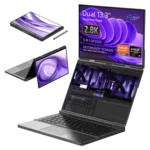
Začíname používať GPD Duo
Welcome to our guide on getting started with the GPD Duo. The GPD Duo is a state-of-the-art mini laptop that merges the power of a desktop with the convenience of a pocket-sized device. Equipped with the AMD Ryzen AI 9 HX 370 processor and AMD Radeon 890M, this compact powerhouse delivers remarkable performance in a small form factor.
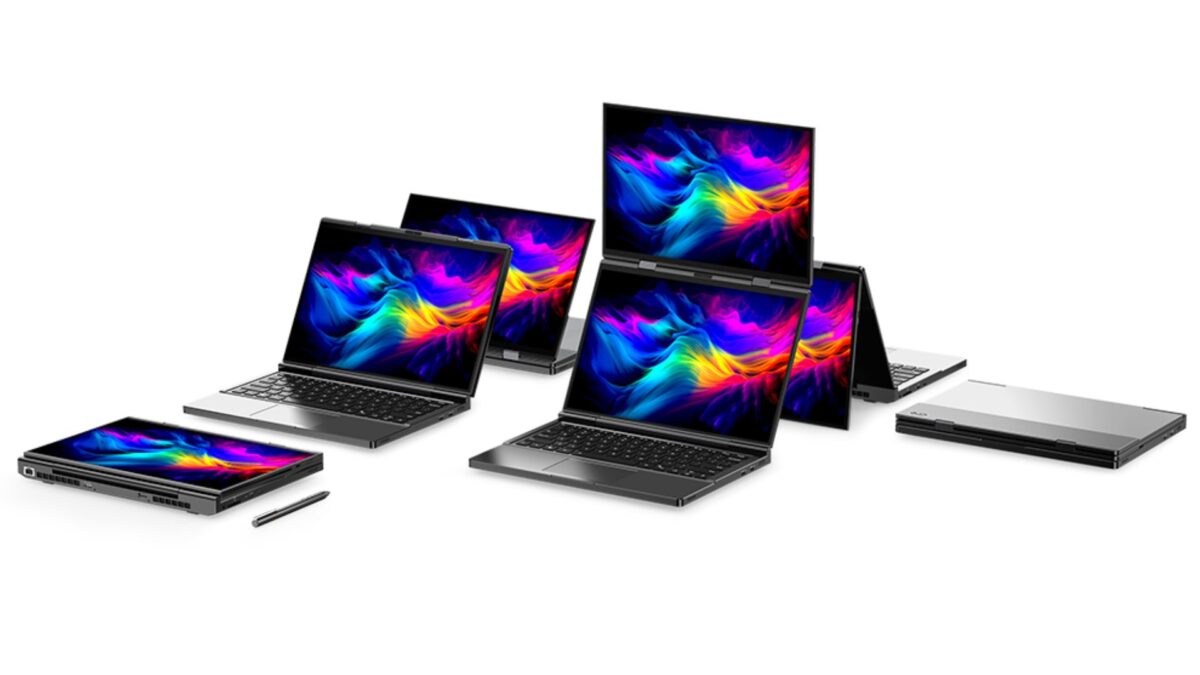
Notebook Duo je určený pre profesionálov a technologických nadšencov, ktorí potrebujú plne funkčný počítač so systémom Windows v ultraprenosnom balení a je vybavený dvoma 13,3-palcovými dotykovými obrazovkami a plnohodnotnou klávesnicou. Vďaka robustnému hardvéru a prispôsobivým tvarom je GPD Duo určený používateľom, ktorí požadujú vysoký výkon a všestrannosť v skutočne vreckovom počítači.
Our getting started with the GPD Duo guide is here to ensure you hit the ground running with your new GPD Duo, from initial hardware checks and software updates to optimizing your productivity and troubleshooting common issues. This guide will help you make the most of your ultra-mobile PC, whether you’re using it for work, entertainment, or on-the-go computing tasks.
Kontrola zariadenia GPD Duo
Po prijatí zariadenia GPD Duo odporúčame vykonať dôkladnú kontrolu, aby ste si overili, či všetko funguje podľa očakávania:
- Preskúmajte kryt zariadenia: Skontrolujte, či na vonkajšej strane nie sú praskliny, preliačiny alebo poškodenia, ktoré mohli vzniknúť počas prepravy. Venujte zvýšenú pozornosť konštrukcii škrupiny a mechanizmu závesu.
- Otestujte všetky klávesy klávesnice: Pomocou stránky https://keyboard-test.space/ overte, či jednotlivé klávesy na klávesnici reagujú správne.
- Citlivosť dotykovej obrazovky: Otestujte celú dotykovú obrazovku, aby ste sa uistili, že reaguje presne. Uistite sa, že môžete komunikovať so všetkými oblasťami obrazovky bez nereagujúcich miest.
- Overte mechanizmus skladania obrazovky: Otvorte a zatvorte obrazovky, aby ste sa uistili, že fungujú hladko a že obrazovka zostáva na mieste pri rôznych uhloch.
- Otestujte porty USB: Pripojte štandardné zariadenia USB a overte, či všetky porty fungujú správne.
- Overte zvukový výstup: Otestujte reproduktory aj 3,5 mm zvukový port, aby ste sa uistili o čistej kvalite zvuku.
- Otestujte Wi-Fi a Bluetooth: Skontrolujte, či pripojenie Wi-Fi 6E a Bluetooth funguje podľa očakávania.
By thoroughly inspecting your GPD Duo, you can ensure all components are working correctly and quickly address any potential issues. If you encounter any problems, the GPD Store offers full support. Simply visit our Contact Us page and reach out for assistance.
Aktualizácia systému GPD Duo Windows a ovládačov
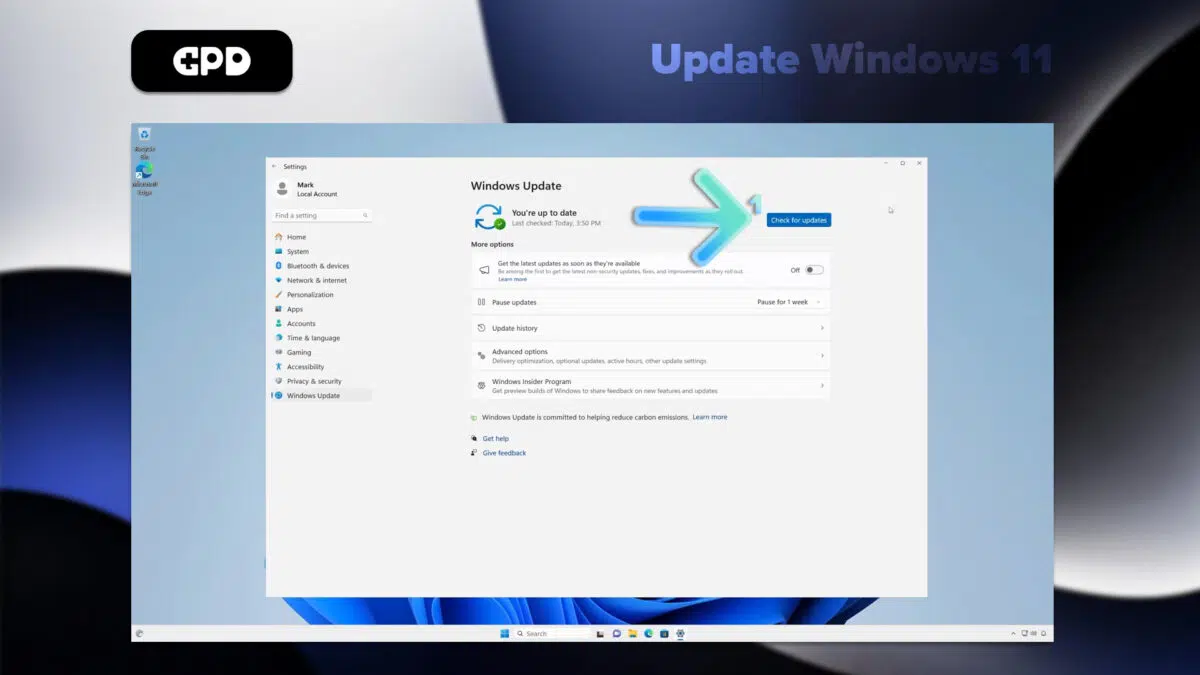
Aktualizácia systému Windows 11
Keeping your GPD Duo updated is essential for ensuring peak performance and security. Here’s how to check for and install Windows 11 updates:
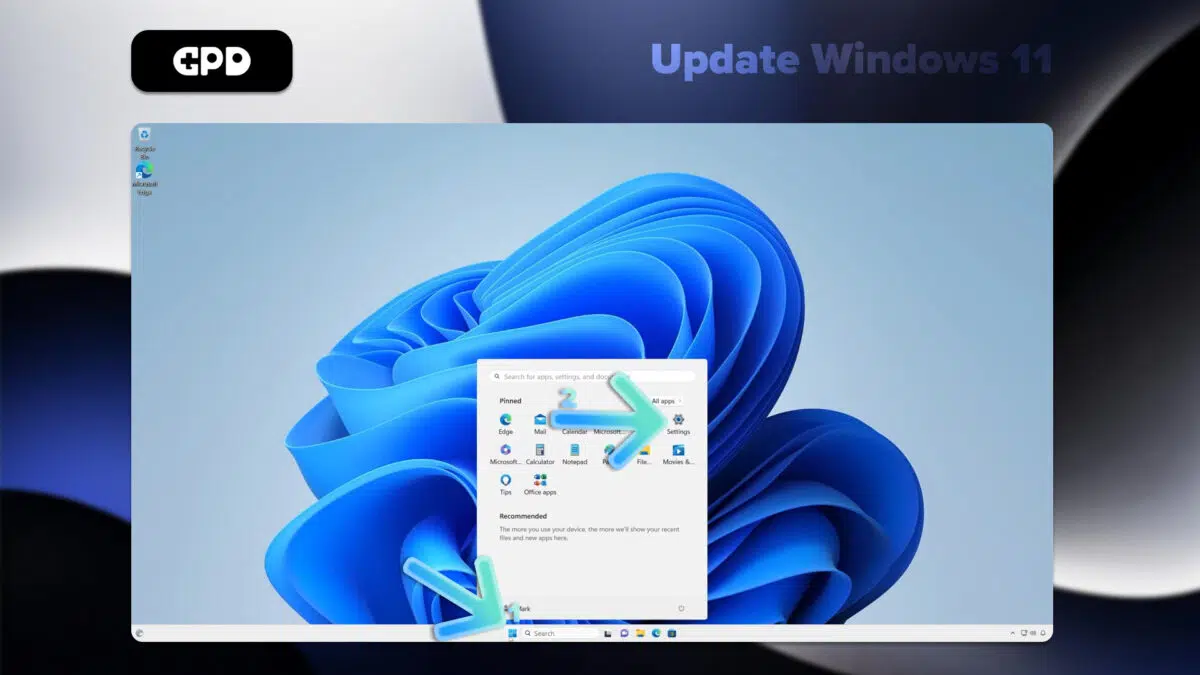
Otvorte ponuku Štart kliknutím na ikonu Windows alebo stlačením klávesu Windows.
Vyberte ikonu Nastavenia (symbol ozubeného kolesa) alebo zadajte do vyhľadávacieho riadka “Nastavenia” a stlačte kláves Enter.
V okne Nastavenia kliknite na položku “Windows Update” v ľavom bočnom paneli.
Kliknite na tlačidlo “Skontrolovať aktualizácie” a zistite, či sú k dispozícii nejaké aktualizácie.
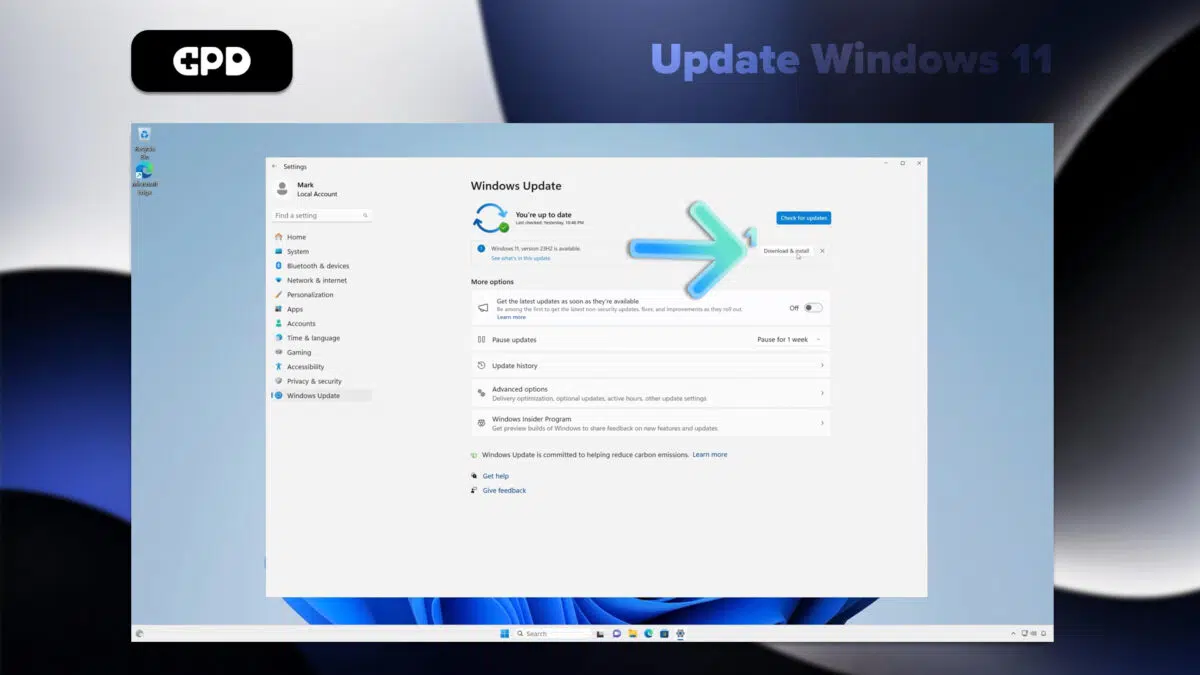
If updates are found, Windows will automatically begin downloading them.
Once downloaded, you may need to restart your GPD Duo to complete the installation.
Note: Your GPD Duo is set to automatically check for updates, but it’s a good habit to manually check periodically. You can also customize update settings by clicking “Advanced options” in the Windows Update menu.
Aktualizácia ovládačov v zariadení GPD Duo
Prostredníctvom služby Windows Update
Pomocou služby Windows Update môžete najjednoduchšie zabezpečiť aktualizáciu väčšiny ovládačov:
Otvorte ponuku Štart a vyberte položku Nastavenia (ikona ozubeného kolesa).
V ľavom bočnom paneli vyberte položku “Windows Update”.
Kliknite na položku “Kontrolovať aktualizácie”.
Systém Windows automaticky stiahne a nainštaluje všetky dostupné aktualizácie ovládačov spolu s aktualizáciami systému.
Prostredníctvom Správcu zariadení
Konkrétnejšie aktualizácie ovládačov:
Kliknite pravým tlačidlom myši na tlačidlo Štart a vyberte položku “Správca zariadení”.
Rozbaľte kategóriu zariadenia, ktoré chcete aktualizovať.
Kliknite pravým tlačidlom myši na zariadenie a vyberte položku “Aktualizovať ovládač”.
Vyberte položku “Automaticky vyhľadať ovládače”.
Aktualizácia ovládačov AMD
Keďže GPD Duo využíva procesory AMD, ovládače GPU a čipovej sady môžete aktualizovať pomocou nástroja Auto-Detect spoločnosti AMD: Podrobnejšieho sprievodcu grafickými ovládačmi AMD nájdete tu.
Stiahnite si a nainštalujte program AMD Auto-Detect and Install Driver Updates z oficiálnej webovej stránky spoločnosti AMD.
Spustite softvér a podľa pokynov vyberte, ktoré ovládače chcete aktualizovať.
Poznámka: Ovládače vždy preberajte z oficiálnych zdrojov, aby ste zaistili stabilitu a bezpečnosť systému. Zatiaľ čo služba Windows Update pokrýva väčšinu základných ovládačov, použitie nástroja spoločnosti AMD zabezpečí, že komponenty špecifické pre AMD budú optimalizované pre vaše zariadenie GPD Duo.
GPD Duo Video vstup
Vrchný displej zariadenia GPD Duo môže fungovať ako prenosný monitor a prijímať video cez USB-C. Viac informácií nájdete v príručke o vstupe videa na GPD Duo tu.
Povinný softvér pre GPD Duo
To get the most out of your GPD Duo, consider installing the following applications:
Optimalizácia výkonu
GPD MotionAssist: Konfigurácia nastavení TDP, ovládania gyroskopu a ďalších funkcií špecifických pre zariadenie.
Hry
Steam:
RetroArch: Kľúčová platforma pre PC hry s rozsiahlou knižnicou titulov kompatibilných s Duo: Emulátor klasických hier z rôznych konzol.
Produktivita
Microsoft Office alebo LibreOffice:
OneNote: Ideálny na písanie poznámok, najmä s dotykovou obrazovkou.
Zábava
VLCMedia Player: Všestranný prehrávač médií podporujúci rôzne formáty videa a zvuku.
Nástroje
7-Zip: Na kompresiu a extrakciu súborov.
ShareX: Nahrávanie obrazovky: Výkonný nástroj na vytváranie snímok obrazovky a nahrávanie obrazovky.
Vývoj
Visual Studio Code: Ľahký a všestranný editor kódu vhodný na vývoj na cestách.
Zabezpečenie
Malwarebytes: Ponúka dodatočnú ochranu pred škodlivým softvérom a vírusmi.
Prispôsobenie
AutoHotkey: Užitočné na vytváranie vlastných klávesových skratiek a makier, najmä na kompaktnej klávesnici modelu Duo.
Reminder: Úprava nastavení v hre pre optimálny výkon, vyváženie vizuálnych efektov s počtom snímok za sekundu, aby ste dosiahli čo najlepší zážitok na GPD Duo.
Príslušenstvo, ktoré musíte mať pre svoj GPD Duo
Dokovacia stanica GPD G1 eGPU
GPD G1 je výkonné príslušenstvo určené na zvýšenie výkonu zariadenia GPD Duo. Vďaka externému grafickému procesoru a rozšíreným možnostiam pripojenia premieňa Duo na systém stolovej triedy, ktorý je ideálny na hranie hier a produktivitu.
GPD G1 je vybavený grafickým procesorom AMD Radeon RX 7600M XT, ktorý poskytuje grafický výkon na úrovni stolového počítača a umožňuje zariadeniu ľahko zvládať náročné hry a aplikácie.
Dokovacia stanica ponúka viacero možností výstupu na displej vrátane HDMI 2.1 a DisplayPort 1.4a, čo umožňuje nastavenie viacerých monitorov a poskytuje plynulé hranie hier s vysokou obnovovacou frekvenciou.
Okrem vylepšenej grafiky pridáva GPD G1 ďalšie porty USB a vysokorýchlostnú čítačku kariet SD, čím rozširuje možnosti pripojenia a ukladania.
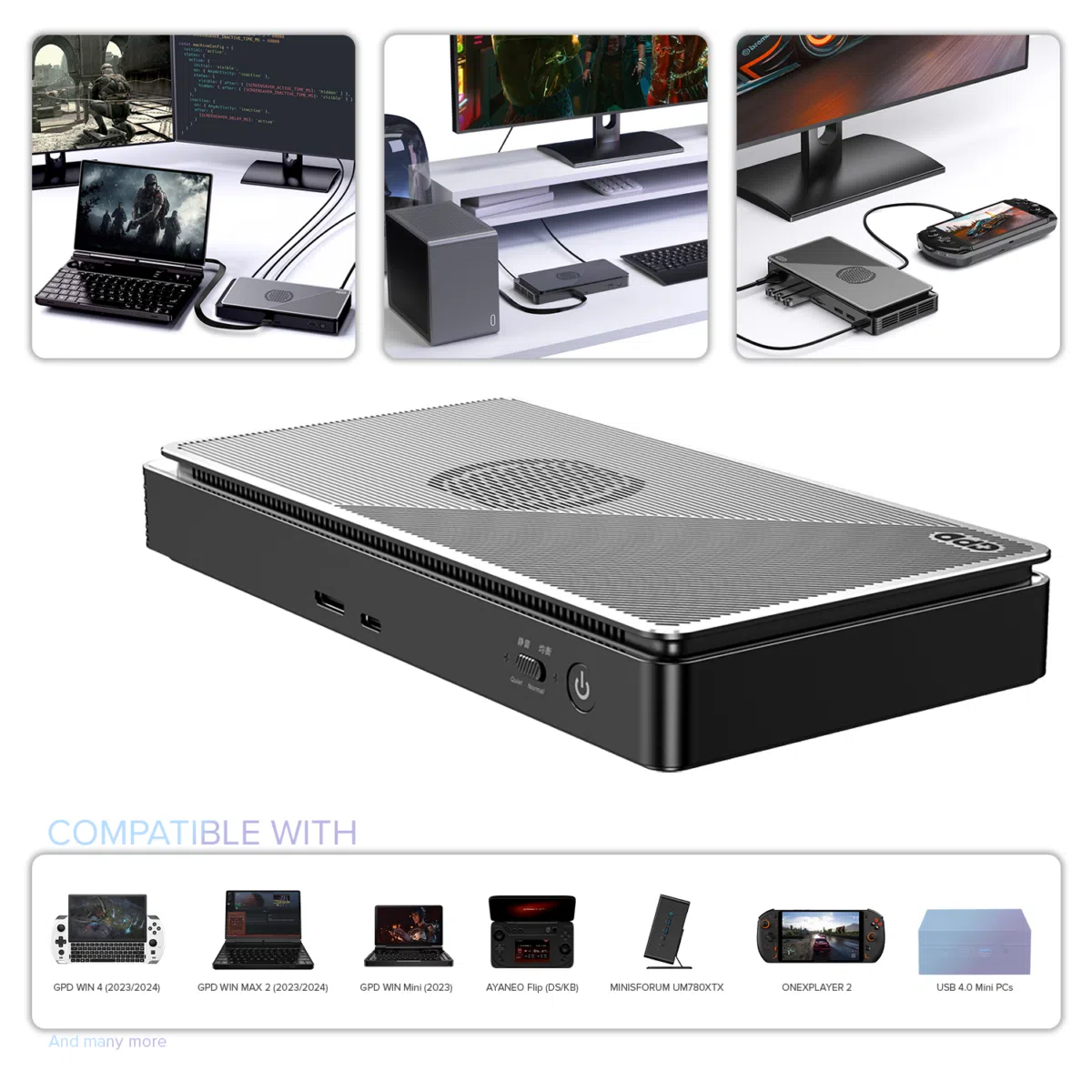
GPD G1 (2024) eGPU Docking Station
- GPU: AMD Radeon™ RX 7600M XT eGPU
- COMPATIBILITY: OCuLink, USB 4, Thunderbolt 3 & 4
- OCULINK: PCI Express Connectivity
- USB 4: up to 40 Gbps
- Designed for: GPD WIN MAX 2, WIN 4, WIN Mini, ROG Ally X
Flexibilné a bezpečné platobné možnosti
We use the latest technology in Payment Processing, which allows you to checkout via your Debit/Credit Card, or PayPal for a fast and secure experience.
2-ročná záruka na všetky produkty GPD
2 Years Warranty from DROIX Global for your peace of mind
QUALITY ASSURANCE & PRE-DISPATCH TESTING
Ensuring Customer Satisfaction at the Highest Standard: Every device undergoes rigorous testing and a multi-point quality assurance check before it is shipped. Our dedicated team verifies performance, functionality, and component integrity to guarantee your GPD device is in perfect working order upon arrival, providing you with confidence and peace of mind.
Ceny, dane a doprava
Note:
- United States Customers: The displayed price does NOT include TAX nor duties. Liability to clear customs and pay any associated tax/duties lies on the customer.
- EU Customers: The displayed price includes applicable TAX, which may be up to 25% depending on your country.
- Canada Customers: The displayed price includes applicable taxes, which may include 5% GST and additional Provincial Sales Taxes (PST), Harmonized Sales Tax (HST), or Quebec Sales Tax (QST), depending on your province.
For EU Customers ONLY: Express DDP (Delivered Duty Paid). This means:
- All customs duties and taxes are included in the price displayed on the product page.
- You will not need to pay any additional charges upon delivery.
- In the rare event of customs-related issues, our team will handle the customs clearance process on your behalf to ensure a smooth delivery experience.
- If you decide to return your order or request a refund, please be aware that taxes and duties paid on your behalf under DDP terms cannot be refunded.
Important Information About Returns:
Please refer to our Terms & Conditions for detailed information.
Zákaznícka podpora
Got a question? We’re a short text away from having your issue sorted!
Please refer to our Terms & Conditions for detailed information.
Čo je súčasťou balenia
- 1x GPD G1 2024
- 1x Power Adapter
- 1x USB Type-C Cable
- 1x User Manual
GPD Stylus
Stylus GPD je všestranné a kvalitne spracované príslušenstvo, ktoré je navrhnuté ako doplnok k modelom GPD, ako sú GPD Duro, Pocket 3 a Win Max 2, a je kompatibilné s inými notebookmi a tabletmi. Je vyrobený z odolnej hliníkovej zliatiny a ponúka ergonomický, ľahký dizajn, ktorý poskytuje pohodlný úchop, takže je ideálny na dlhodobé používanie.
Vďaka vysokocitlivému hrotu citlivému na tlak 4096 úrovní z mäkkej gumy umožňuje stylus presné ovládanie, či už píšete poznámky, vytvárate ilustrácie alebo upravujete fotografie. Táto pokročilá citlivosť na tlak prináša plynulú, prirodzenú interakciu, ktorá je rovnako intuitívna ako písanie na papier, s detailným ovládaním jemných aj tučných čiar. Gumový hrot navyše chráni obrazovku pred poškriabaním, udržiava ju čistú a vo výbornom stave.
Prenosný a praktický stylus GPD je vybavený hornou prackou na jednoduché pripevnenie k vreckám alebo puzdrám, takže sa dá pohodlne prenášať. Či už sa pohybujete v aplikáciách, alebo nechávate priechod svojej kreativite, tento stylus dodáva bezproblémovú kombináciu funkčnosti a pohodlia, čím zlepšuje vaše skúsenosti s akýmkoľvek zariadením GPD.

GPD Stylus for GPD Pocket 3 & WIN MAX 2
- Works with GPD Pocket 3 & GPD WIN MAX 2
- 4096-level Pressure Sensitivity
- Sleek & Ergonomic
- Metal Buckle
- Memo writing and character input
Flexibilné a bezpečné platobné možnosti
We use the latest technology in Payment Processing, which allows you to checkout via your Debit/Credit Card, or PayPal for a fast and secure experience.
2-ročná záruka na všetky produkty GPD
2 Years Warranty from DROIX Global for your peace of mind
QUALITY ASSURANCE & PRE-DISPATCH TESTING
Ensuring Customer Satisfaction at the Highest Standard: Every device undergoes rigorous testing and a multi-point quality assurance check before it is shipped. Our dedicated team verifies performance, functionality, and component integrity to guarantee your GPD device is in perfect working order upon arrival, providing you with confidence and peace of mind.
Ceny, dane a doprava
Note:
- United States Customers: The displayed price does NOT include TAX nor duties. Liability to clear customs and pay any associated tax/duties lies on the customer.
- EU Customers: The displayed price includes applicable TAX, which may be up to 25% depending on your country.
- Canada Customers: The displayed price includes applicable taxes, which may include 5% GST and additional Provincial Sales Taxes (PST), Harmonized Sales Tax (HST), or Quebec Sales Tax (QST), depending on your province.
For EU Customers ONLY: Express DDP (Delivered Duty Paid). This means:
- All customs duties and taxes are included in the price displayed on the product page.
- You will not need to pay any additional charges upon delivery.
- In the rare event of customs-related issues, our team will handle the customs clearance process on your behalf to ensure a smooth delivery experience.
- If you decide to return your order or request a refund, please be aware that taxes and duties paid on your behalf under DDP terms cannot be refunded.
Important Information About Returns:
Please refer to our Terms & Conditions for detailed information.
Zákaznícka podpora
Got a question? We’re a short text away from having your issue sorted!
Please refer to our Terms & Conditions for detailed information.
Čo je súčasťou balenia
- 1x GPD Stylus
Questions on this guide
5 answeredIs there an Owner’s manual I can download?

The Duo comes with a quick start guide in the box. We do also have a Getting Started guide on our Knowledge Base at https://gpdstore.net/kb/gpd-duo-support-hub/kb-article/getting-started-with-the-gpd-duo/.
how do i turn off the back screen while using the laptop like normal
Press the F3 key to enable/disable the top display.
What are the default settings on the motion assist software
We took a screenshot of Motion Assist on first use and have uploaded it to https://droidbox.sharepoint.com/:i:/s/Purchasing/EcF-_BIvHldOla_X3dIW2oMBbpGY-ue1eJkWjy-zdcpO7A?e=GugBJN . I hope that helps.
My Duo keep restarting just got it this past Friday. Not sure what to do exactly. Do I need to reset it again? It’s extremely slow, glitch, stutters (flickers and flashes with a ton of lag just on desktop alone) a lot if it doesn’t restart then it will restartbefore getting to really change anything.
Have you installed any software recently that may be the cause of the slowdowns. Open Task Manager and view the Processes tab. Select the CPU column for programs that may be using a lot of CPU time in the background. It may also be worth checking the Disk column as well but this is less likely.
If you are still having an issue and you purchased it from GPD Store, please get in contact with our customer service at [email protected] with some details and they can look into the issue further and advise. Thanks.
When an external display is connected, all three screens, including the added screen, are cloned and no other settings can be selected. Is there a solution?
If you go to Display Settings by right clicking on the desktop. You should see the three monitors, just below are “Identify” and to the right “Duplicate this desktop on 2 or 3” or similar. Change this option to “Extend Desktop to this display”. You may need to click on the different monitors above and change them.

No. I just see two monitors when I connect external display. The OS seems to recognize the internal monitor as one monitor and displays a clone of it.
If you purchased it from us GPDSTORE, please email [email protected] with your order number and explain the issue that it is only cloning the desktops and not showing individual. Our customer service will be able to look into it further and advise. Thanks.
Unfortunately, no. I (exactly a staff of the department I belong to) purchased it from Amazon business. Do you believe that a hardware error is likely? Is there a possibility that initializing the OS will fix the problem?
I have not seen this issue before and if its displaying on the external monitor then you should be able to change it to show across all desktops. Are there any options if you go to Display settings, does it show all of the monitros, have you tried with another monitor in case that is the issue? and below the monitor graphics there will be identify and then to the right of that options such as Duplicate desktop, Extend desktop and Disconnect this display? You could try reinstalling Windows in case it fixes the issue, but you may need to conact the seller on Amazon for further support.